Git integration
Git is a distributed version control system designed to handle everything from small to very large projects with speed and efficiency.
Windmill has a dedicated resource Type used for Git sync, to sync Windmill workspace to a remote repository that will automatically be committed and pushed scripts, flows and apps on each deploy.
More:
This video shows how to set up a Git repository for a workspace.
GitHub App
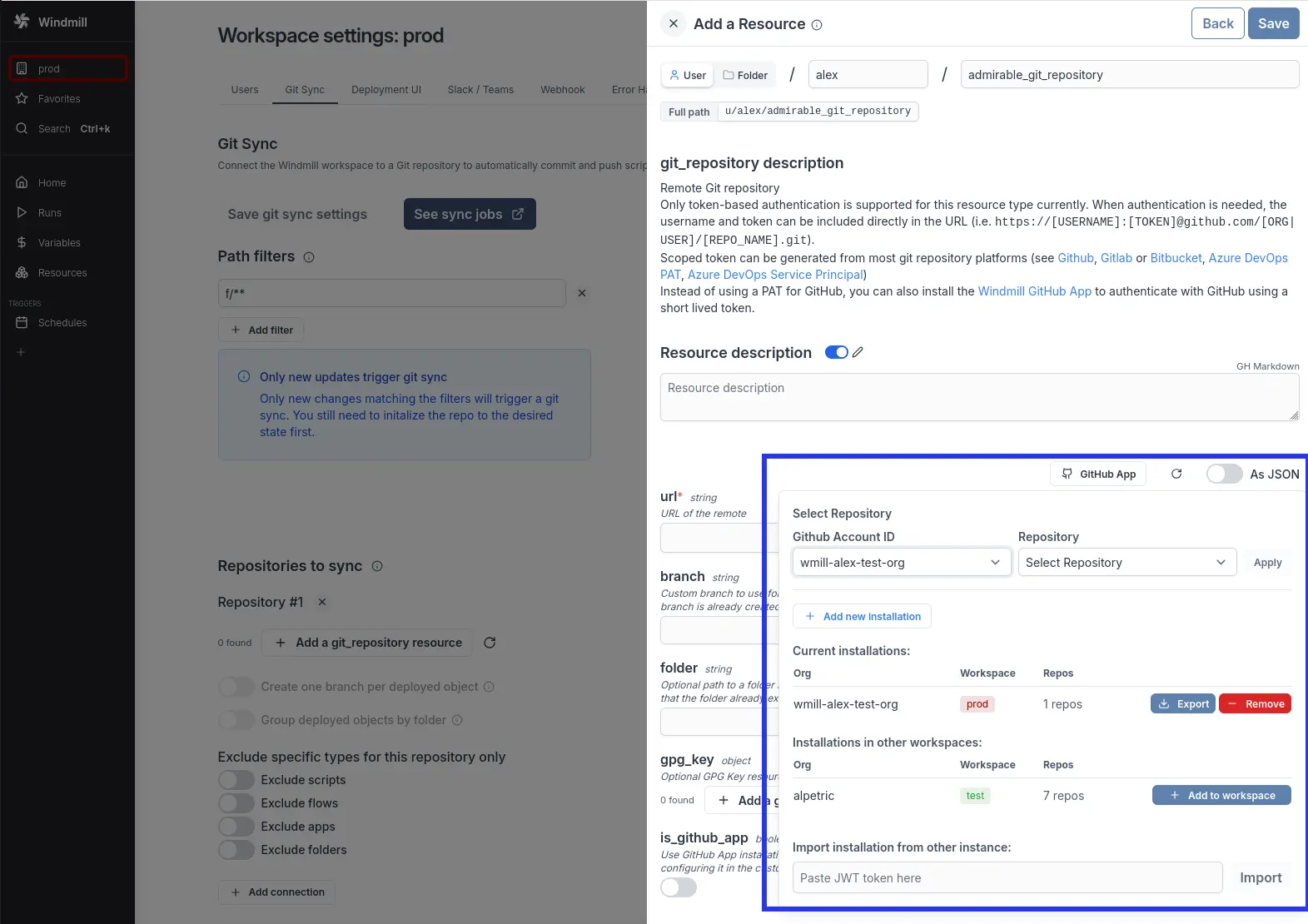
Instead of using a long lived personal access token to authenticate with GitHub for Git sync, you can use the GitHub App to authenticate with GitHub. This allows you to control which repositories can be accessed by your Windmill deployment using a short-live GitHub app installation token.
GitHub App is available under Windmill Enterprise.
Network requirements
The GitHub App feature requires your Windmill instance to communicate with https://stats.windmill.dev to obtain GitHub installation tokens. This is the same endpoint used for telemetry.
If your GitHub organization uses IP allow lists, you will need to whitelist the IP address of stats.windmill.dev to allow it to request installation tokens from GitHub on behalf of your Windmill instance. Contact [email protected] to get the current IP address.
This network requirement only applies to the Windmill-managed GitHub App. If you use a self-managed GitHub App, your Windmill instance communicates directly with your GitHub instance. In that case, if your GitHub organization uses IP allow lists, whitelist your Windmill instance's IP address instead.
As a Windmill workspace admin, you can install the GitHub app to multiple organizations and link them to your Windmill workspaces. Once an app has been installed to a workspace, you can install it to other workspace where you have the admin role.
You will only be able to use the installation token for Git sync.
GitHub App permissions
Beyond repository contents (read and write), which powers the push direction of Git sync, the GitHub App requests the following permissions to handle the Git to Windmill direction in-app:
| Permission (read and write) | What it enables |
|---|---|
| Repository webhooks | Register a webhook per synced repository so commits deploy to your Windmill workspace instantly (automatic sync from Git) |
| Pull requests | Open pull requests for branches Windmill pushes (promotion wm_deploy/** and fork wm-fork/** branches, see in-app pull request creation) and maintain a deploy-preview comment on your pull requests |
| Checks | Post a "Windmill diff" check on pull requests showing what merging would deploy, a "Windmill CI tests" check reporting the CI test results of fork pull requests, and a deploy status check on synced commits |
All of these features are opt-in from the workspace Git sync settings. If your organization has not approved the permissions yet, every feature degrades gracefully: automatic sync falls back to polling and upgrades to webhooks automatically once the webhooks permission is granted, and a failed pull request creation is surfaced on the repository card.
For self-managed GitHub Apps, grant the same permissions in your app settings (Settings → Developer settings → GitHub Apps → Permissions & events) and accept the permission update on the installation. Windmill creates the webhooks per repository itself, so the app-level "Subscribe to events" list needs no changes.
Importing / Exporting to/from other windmill instance
This applies to the Windmill-managed GitHub App only. A GitHub app can only be installed to a GitHub organization once. Hence to associate an installation to multiple windmill instances you need to export the associated JWT token on the source instance using the "Export" button and paste the JWT in the destination instance to import the installation.
The JWT token associated to your GitHub app installation is sensitive and has the rights to request a short lived installation token. To revoke the JWT, you need to uninstall the GitHub app from your organization and re-install it to re-associate it with a windmill instance.
Self-managed GitHub App
Instead of using the Windmill-managed GitHub App, you can register your own GitHub App on any GitHub instance: GitHub.com, GitHub Enterprise Cloud (including data residency hosts on *.ghe.com) or a GitHub Enterprise Server (GHES) instance. This gives you full control over the app configuration and removes the dependency on stats.windmill.dev, as tokens are exchanged directly between your Windmill instance and your GitHub instance.
This feature is Enterprise Edition only and is configured at the instance level by a superadmin.
To set up a self-managed GitHub App:
- Register a new GitHub App on your GitHub instance, under Settings → Developer settings → GitHub Apps → New GitHub App, with the following configuration:
- GitHub App name: e.g.
windmill-sync(this becomes the app slug) - Homepage URL: your Windmill instance URL
- Setup URL (under "Post installation"):
<your-windmill-instance-url>/gh_success, and check Redirect on update - Callback URL:
<your-windmill-instance-url>/gh_success - Webhook: uncheck Active. Windmill registers the webhooks it needs per repository, so the app-level webhook stays unused.
- Repository permissions: Contents: Read & write and Metadata: Read-only are the minimum, for the push direction of Git sync. Add Repository webhooks, Pull requests and Checks (read and write) for the Git to Windmill direction, see GitHub App permissions
- Where can this GitHub App be installed?: Any account (or restrict to your organization)
- GitHub App name: e.g.
- On the app page after creation, note the App ID, the Client ID and the app slug (the last segment of the app settings URL,
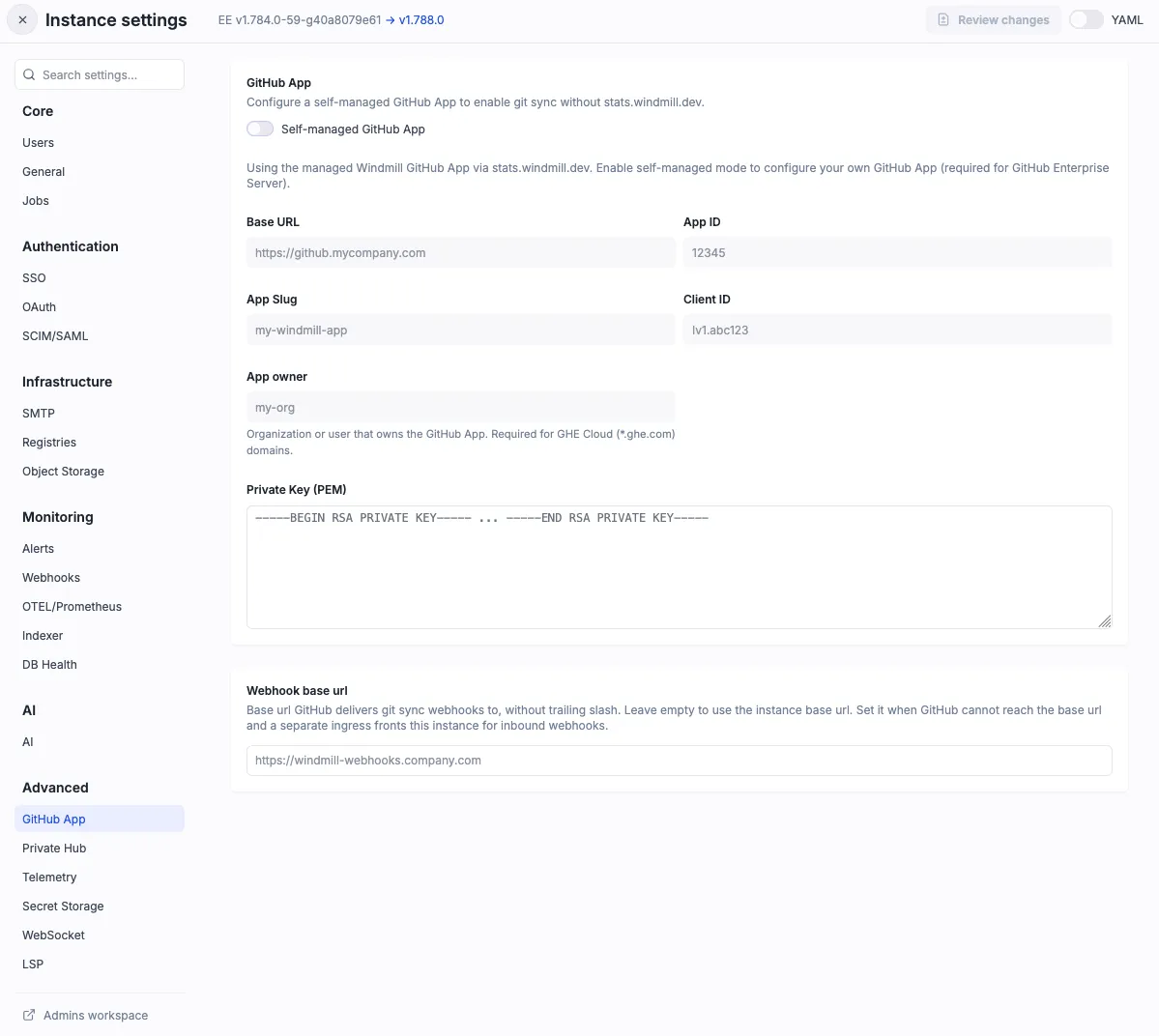
<your-github-host>/settings/apps/<app-slug>, or<your-github-host>/organizations/<org>/settings/apps/<app-slug>for an organization-owned app; GitHub normalizes the app name to lowercase with hyphens), and click Generate a private key to download the.pemfile - In Windmill Instance Settings, go to Advanced > GitHub App and enable the "Self-managed GitHub App" toggle
- Fill in the app details: Base URL (e.g.
https://github.com,https://<subdomain>.ghe.comor your GHES URL), App ID, App Slug, Client ID, and Private Key (PEM). App owner (the organization or user that owns the app) is only needed on GitHub Enterprise Cloud data residency hosts (*.ghe.com), whose installation URLs carry the owner - Install the GitHub App to your organization on your GitHub instance, either from the workspace Git sync settings in Windmill or directly on GitHub
The Setup URL is what makes GitHub redirect back to your Windmill instance after the app is installed, carrying the installation details that link it to the workspace. If it is not set, installing the app from the workspace Git sync settings silently does nothing on the Windmill side.
If the app was installed without a Setup URL (or directly on GitHub), a superadmin can still link the installation to workspaces manually: in instance settings under Advanced → GitHub App → Workspace assignments, click Refresh to discover the app's installations and assign them to workspaces.
Once configured, the self-managed GitHub App can be used for Git sync authentication in the same way as the managed GitHub App: the same "GitHub App" button in the connection form, now pointing at your app for every workspace on the instance. Installations created earlier against the managed app keep working, since each installation records the GitHub host it belongs to and its tokens are always requested from that host. Host-based installation filtering ensures tokens are scoped to the correct GitHub instance, preventing token leakage across instances.
Importing and exporting installations only applies to the managed app. To use a self-managed app on several Windmill instances, install it on each of them, or have a superadmin assign the installation to workspaces from the Workspace assignments table.
Network requirements for a self-managed app
Windmill talks to your GitHub host directly: https://api.github.com for GitHub.com, https://api.<subdomain>.ghe.com for GitHub Enterprise Cloud data residency, and <base-url>/api/v3 for GHES. Pushing, pulling, opening pull requests and posting checks only need outbound access from your instance and workers.
Webhook delivery is the one inbound path. Your GitHub host must be able to reach the Windmill URL the webhook is registered on, over a certificate it trusts (Windmill registers webhooks with SSL verification enabled). It does not need to be reachable from the public internet, so this works on private networks. If GitHub has to reach Windmill on a different url than your users' browsers do, set a webhook base url. Without a reachable receiver, automatic sync stays on polling and nothing else is affected.
GitLab
GitLab has no equivalent of a GitHub App: instead of installing something, you create one token in GitLab and hand it to Windmill. A GitLab repository whose token Windmill holds gets the same managed Git sync features an app-backed GitHub repository has: instant pull over a webhook, merge requests opened on deploy, a diff preview on the merge request, and renewal of the token before it expires.
Handing the token to Windmill is available under Windmill Enterprise.
A GitLab repository whose token is written into its URL, or into the secret variable the URL points at ($var:), keeps syncing on every plan as a plain git remote: no webhook, no merge requests, no renewal.
The project access token
Create a project access token on the project you are syncing, under Settings → Access tokens.
| Setting | Value |
|---|---|
| Scope | api. It covers Git over HTTPS too, so no separate write_repository is needed, and it is what lets Windmill renew the token |
| Role | Maintainer. Developer covers pushing deploy branches and opening merge requests, but creating the webhook needs Maintainer (see what each managed feature needs) |
| Expiry | Required. Only a group service account personal access token on self-managed can go without one |
Use a separate token per repository. A group access token reaches every project in the group, but Windmill stores the credential per repository and a renewal rewrites only the repository it renewed for, stranding the others until you paste a new token there.
The token's name becomes the name of the GitLab bot user it is issued to, which is the author of every commit, merge request and preview note Windmill writes.
Name it windmill-sync or similar.
Connecting a repository
In the resource form of a git_repository resource, use the GitLab button: paste the instance URL and the token, list the projects the token can reach, and pick one.
Windmill stores the token and fills the resource with the plain remote URL, which carries no credential of its own.
The token is stored encrypted on the workspace, keyed by the repository it was issued for rather than by the resource that names it, and served only to the sync job that needs it.
Two consequences: repointing a resource's url does not carry the token along, so a repository that genuinely moved needs its token entered again, and workspace forks read this one copy rather than each holding their own.
Treat workspace admin as equivalent to holding the token: an admin of the workspace, or of any fork below it, can have a job request the credential, exactly as they can for a GitHub App installation token.
To swap a token, use "Replace token" on the resource. Only the workspace that holds the token has that control; a fork borrowing its parent's is pointed at the parent.
Expiry and renewal
Windmill shows the token's expiry on the repository in the Git sync settings and renews it within three weeks of expiring.
A token without the api scope (or self_rotate) cannot rotate itself, so Windmill cannot renew it and says so on the repository instead.
A failed renewal is never retried, because GitLab revokes the whole token family if an already-rotated token is presented again. Replace the token to restore sync.
Non-expiring tokens are possible only for a group service account personal access token on self-managed, with require_personal_access_token_expiry turned off in the instance's application settings.
A group access token is always rejected without an expiry.
What each managed feature needs
| Feature | Needs |
|---|---|
| Instant pull | Maintainer, so Windmill can create the project hook, and a Windmill base URL GitLab can reach. Falls back to polling about every minute |
| Merge requests on deploy | Developer, plus the api scope |
| Diff preview on a merge request | The project hook, plus permission to post merge request notes |
Self-managed GitLab
Windmill talks to <your-gitlab>/api/v4 and needs no inbound access of its own beyond the hook deliveries.
Two limits:
- Webhooks to a private network are blocked until an administrator enables "Allow requests to the local network from webhooks and integrations" (Admin → Settings → Network → Outbound requests). A Windmill instance on the same private network as GitLab needs this, otherwise hook creation fails and the repository keeps polling.
- GitLab served under a path prefix (a relative-URL install) is not supported, so the managed features stay unavailable. The repository still syncs through a token in its URL.