ETL and data processing
The recommended way to build a data pipeline in Windmill is now Pipelines: DuckDB transformations that materialize into managed DuckLake tables, wired automatically by asset lineage. That path unlocks idempotent writes, time-travel, column-level lineage, data tests and one-click backfill. This page covers the underlying data-processing recipes those steps run on - efficient S3 streaming, DuckDB connection settings, and the benchmarks behind Windmill's single-node approach - which apply whether you orchestrate with pipelines or flows.
In essence, an ETL (Extract, Transform, Load) process is a Directed Acyclic Graph (DAG) of jobs where each job reads data, performs computations, and outputs new or updated datasets. This page focuses on the data-processing side: reading, transforming and writing datasets efficiently, independent of how the steps are orchestrated.
Windmill makes data processing fast, reliable and straightforward to build:
- Efficient processing: stream large datasets to and from object storage and process them with DuckDB without loading everything into memory (see the recipes and benchmarks below).
- Developer experience: each step is an ordinary script you can write, test and run in isolation, in the language best suited to the transformation.
- Built-in monitoring: error and recovery handling and run history apply to every step regardless of how it is orchestrated.
Orchestrating the steps
The processing recipes here are orchestration-agnostic. Windmill offers two ways to connect the steps, and you can pick per use case:
- Pipelines (alpha): a declarative, asset-based model where independent scripts in a folder are wired automatically by asset lineage, with comment annotations for materialization, schedules, partitions, joins and debounce. This is the recommended model for data pipelines: DuckDB steps that materialize into managed DuckLake tables get idempotent writes, time-travel, column lineage, data tests and backfill.
- Flows: a general-purpose visual DAG editor. Best when you want explicit control over parallelism, concurrency limits, branching, suspend/approval, and restarting from any step.
Neither replaces the other; the processing code below is identical regardless of which you choose.
An existing dbt project runs on Windmill as-is: one project is one script, dbt still owns its models, refs and tests, and those models land on the same asset graph as the steps above.
The particularity of data pipeline flows vs. any other kind of automation flows is that they run computation on large datasets and the result of such computation is itself a (potentially large) dataset that needs to be stored.
For the compute, as data practitioner for the most demanding ETLs, we have observed that in almost all cases, the system they run on is ill-designed for their task. Much faster alternatives now exist leveraging the modern OLAP processing engines. Windmill integrates with DuckDB, one of the best-in-class in-memory data processing engines, and it fits Windmill particularly well since you can assign variously sized workers depending on the step.
To give you a quick idea:
- Running a
SELECT COUNT(*), SUM(column_1), AVG(column_2) FROM my_table GROUP_BY keywith 600M entries inmy_tablerequires less than 24Gb of memory using DuckDB - Running a
SELECT * FROM table_a JOIN table_b ORDER BY key, withtable_ahaving 300M rows andtable_b75M rows with DuckDB requires 24Gb of memory
These figures are backed by our TPC-H-derived benchmark (refreshed 2026): DuckDB, querying Parquet directly, ran a 9-query workload over a 100 GB dataset (600M-row fact table) in ~20 seconds at a ~20 GB memory peak on a single node — beating a single-node Spark baseline at every scale.
Add to those numbers that on AWS for example, you can get up to 24Tb of memory on a single server. Nowadays, you don't need a complex distributed computing architecture to process a large amount of data.
And for storage, you can now link a Windmill workspace to an S3 bucket and use it as source and/or target of your processing steps seamlessly, without any boilerplate.
The very large majority of ETLs can be processed step-wise on single nodes and Windmill provides (one of) the best models for orchestrating non-sharded compute. Using this model, your ETLs will see a massive performance improvement, your infrastructure will be easier to manage and your pipeline will be easier to write, maintain, and monitor.
Windmill integration with an external object storage
Each step of a data pipeline is a script that reads a dataset, transforms it, and produces a new one. Windmill can pass a step result to its dependent steps, but because those results are serialized to the Windmill database and kept as long as the job is stored, this obviously won't work when the result is a dataset of millions of rows. The solution is to save the datasets to an external storage at the end of each script - which is exactly why pipelines wire steps by the S3 objects and tables they exchange rather than by in-database results.
In most cases, S3 is a well-suited storage and Windmill provides an integration with external S3 storage at the workspace level.
The first step is to define an S3 resource in Windmill and assign it to be the workspace storage in the workspace settings, under Object storage (S3):
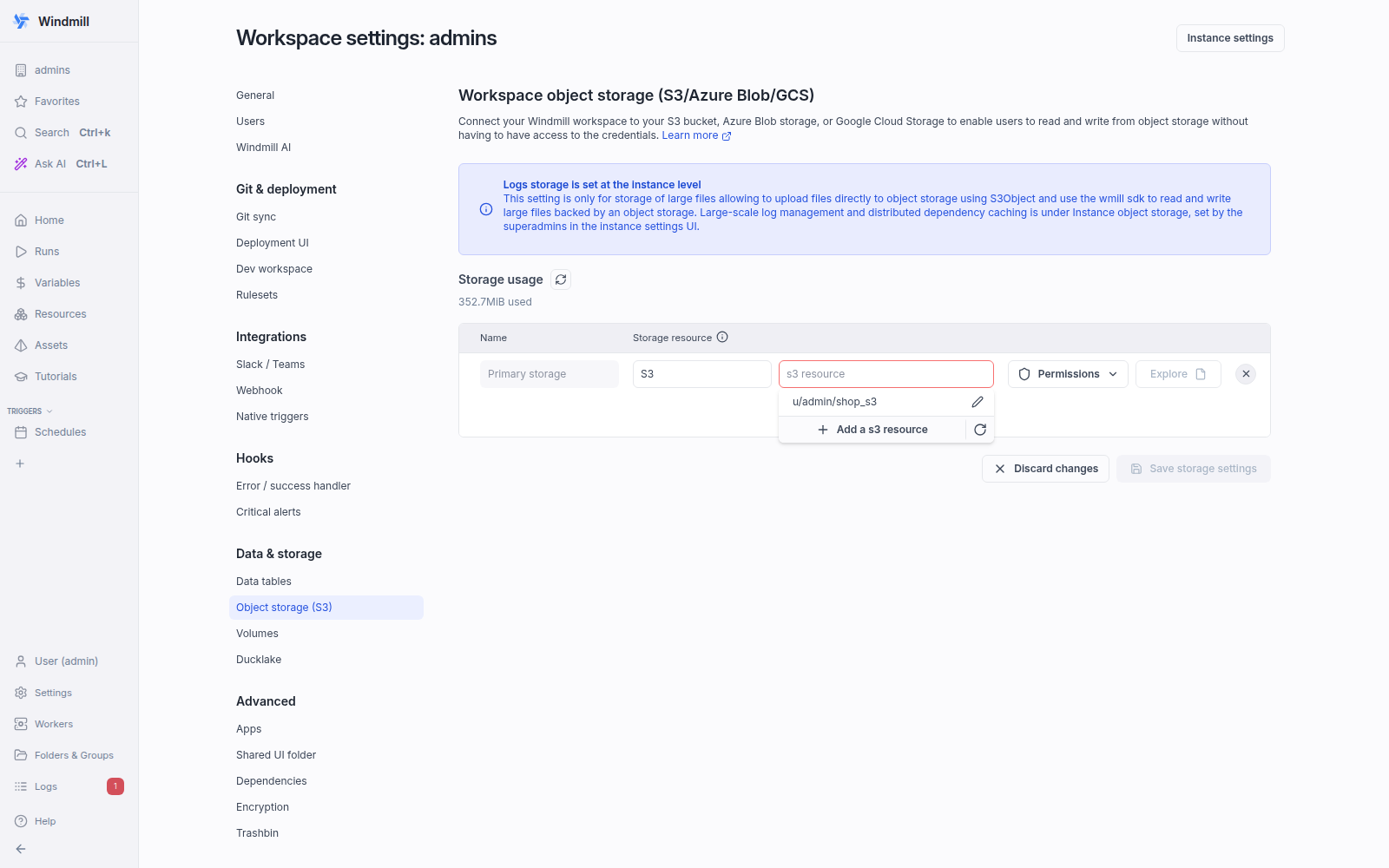
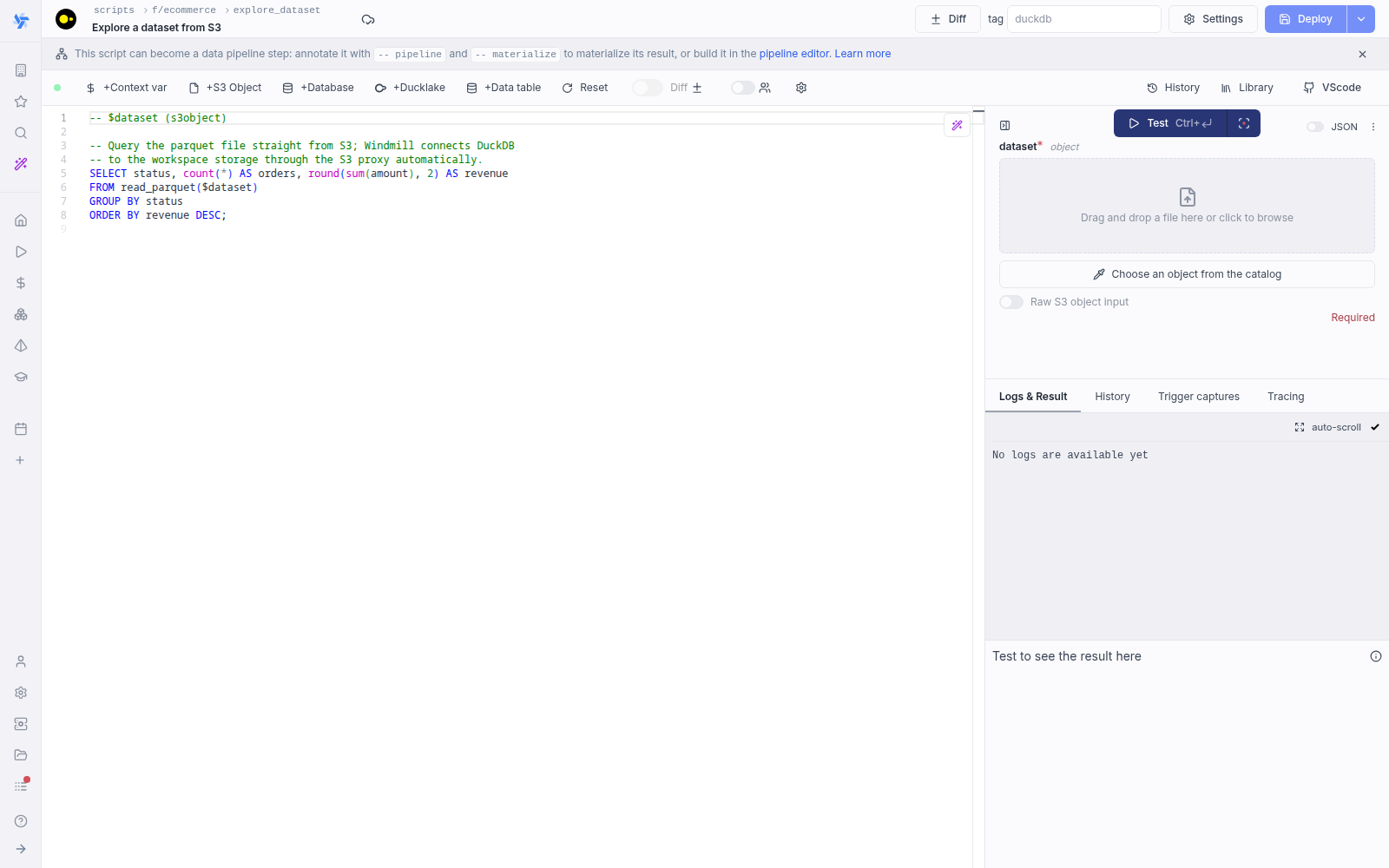
From now on, Windmill will be connected to this bucket and you'll have easy access to it from the code editor and the job run details. If a script takes as input a s3object, the input form on the right shows a file picker and a catalog browser to choose the file directly from the bucket.
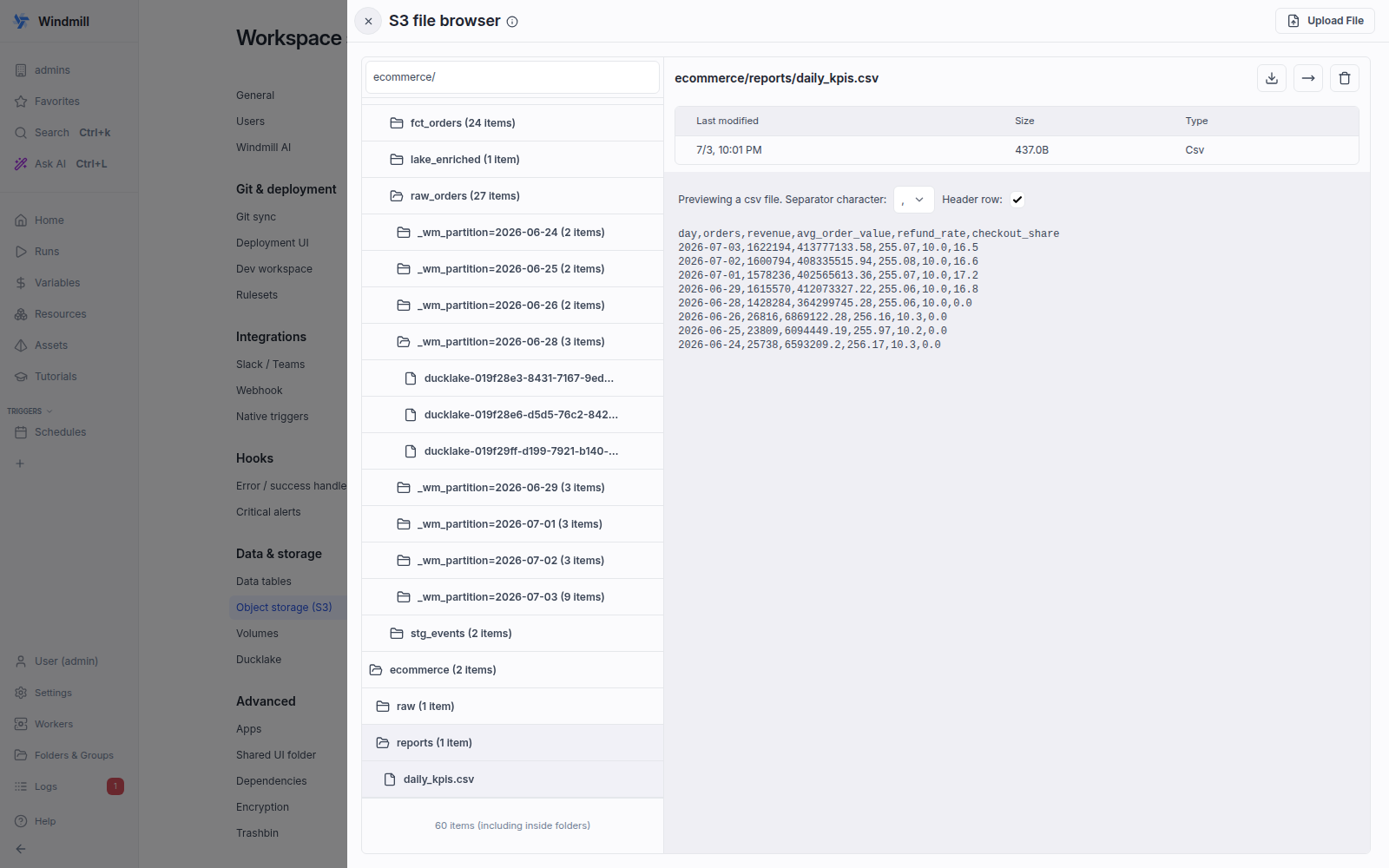
Same for the result of the script. If you return an s3object containing a key s3 pointing to a file inside your bucket, in the result panel there will be a button to open the bucket explorer to visualize the file.
S3 files in Windmill are just pointers to the S3 object using its key. As such, they are represented by a simple JSON:
{
	"s3": "path/to/file"
}
The bucket explorer lets you browse the bucket content and visualize file content without leaving Windmill: select any file to get its metadata and, for common formats, a preview. Below it is showing the CSV a pipeline step exported, next to the Hive-partitioned parquet files of the DuckLake tables the same pipeline materializes.
From there you always have the possibility to use the S3 client library of your choice to read and write to S3. That being said, DuckDB can read/write directly from/to files stored in S3, and Windmill ships with helpers to make the entire data processing mechanics very cohesive.
Find all details at:
Windmill integration with DuckDB for data pipelines
The canonical way to process data in Windmill is a native DuckDB script (a script whose language is DuckDB). It connects to your workspace object storage automatically through the Windmill S3 proxy, so you read and write S3 files straight from SQL with no credentials, connection strings or boilerplate. You can also drive DuckDB from Python (or any language) with the duckdb library when you need surrounding code, but the native SQL script is the shortest path.
- DuckDB (native SQL)
- DuckDB (Python)
-- $file1 (s3object)

-- Run queries directly on an S3 parquet file passed as an argument
SELECT * FROM read_parquet($file1);

-- Or using an explicit path in a workspace storage
SELECT * FROM read_json('s3:///demo/data.json');

-- You can also specify a secondary workspace storage
SELECT * FROM read_csv('s3://secondary_storage/demo/data.csv');

-- Write the result of a query to a different parquet file on S3
COPY (
  SELECT COUNT(*) FROM read_parquet($file1)
) TO 's3:///demo/output.pq' (FORMAT 'parquet');
import wmill
from wmill import S3Object
import duckdb


def main(input_file: S3Object):
    bucket = wmill.get_resource("u/admin/windmill-cloud-demo")["bucket"]

    # create a DuckDB database in memory
    # see https://duckdb.org/docs/api/python/dbapi
    conn = duckdb.connect()

    # this will default to the workspace S3 resource
    args = wmill.duckdb_connection_settings().connection_settings_str
    # this will use the designated resource
    # args = wmill.duckdb_connection_settings("<PATH_TO_S3_RESOURCE>").connection_settings_str

    # connect duck db to the S3 bucket - this will default to the workspace S3 resource
    conn.execute(args)

    input_uri = "s3://{}/{}".format(bucket, input_file["s3"])
    output_file = "output/result.parquet"
    output_uri = "s3://{}/{}".format(bucket, output_file)

    # Run queries directly on the parquet file
    query_result = conn.sql(
        """
        SELECT * FROM read_parquet('{}')
    """.format(
            input_uri
        )
    )
    query_result.show()

    # Write the result of a query to a different parquet file on S3
    conn.execute(
        """
        COPY (
            SELECT COUNT(*) FROM read_parquet('{input_uri}')
        ) TO '{output_uri}' (FORMAT 'parquet');
    """.format(
            input_uri=input_uri, output_uri=output_uri
        )
    )

    conn.close()
    return S3Object(s3=output_file)
A native DuckDB script needs no configuration to reach S3: the S3 proxy handles the connection. When you drive DuckDB from Python instead, the S3 resource must be accessible to the user running the job, or set as public in the workspace settings.
Canonical data pipeline in Windmill with DuckDB
With S3 as the external store, a transformation step typically performs:
- Pulling data from S3.
- Running some computation on the data.
- Storing the result back to S3 for the next scripts to be run.
When running a native DuckDB script, Windmill resolves the connection to your workspace storage under the hood, so you query S3 straight from SQL:
-- Windmill figures out the correct connection string automatically
SELECT * FROM read_parquet('s3:///path/to/file.parquet');
SELECT * FROM read_csv('s3://secondary_storage/path/to/file.csv');
If you drive DuckDB from Python instead, wmill.duckdb_connection_settings() returns the same connection so you never hand-write S3 credentials or SET s3_... blocks. See Object storage in Windmill for the full connection-settings reference.
In the end, a canonical pipeline step in Windmill is a native DuckDB script that reads from S3, transforms, and writes the result back for the next step to pick up:
-- $input_dataset (s3object)

-- Windmill connects DuckDB to your workspace storage automatically,
-- so the input parquet is read straight from S3.
COPY (
  SELECT SUM(l_extendedprice * l_discount) AS revenue
  FROM read_parquet($input_dataset)
  WHERE l_shipdate >= DATE '1994-01-01'
    AND l_shipdate < DATE '1995-01-01'
    AND l_discount BETWEEN 0.05 AND 0.07
    AND l_quantity < 24
) TO 's3:///output/revenue.parquet' (FORMAT 'parquet');
The output parquet on S3 becomes the input of the next step, which declares it with a -- on s3:///... annotation in a pipeline or reads it as a step input in a flow. The structure is always the same: read from S3, transform, write back to S3.
A full pipeline, end to end
The recipes above compose into complete pipelines. The smallest realistic one is three steps - extract in Python, transform and materialize in DuckDB, export back to S3 - wired only by the datasets they exchange:
- Extract: a scheduled Python script dumps the source API into the workspace storage.
# pipeline
# on schedule
import json
import wmill
from wmill import S3Object


def main():
    events = fetch_from_tracker_api()
    body = "\n".join(json.dumps(e) for e in events)
    wmill.write_s3_file(S3Object(s3="lake/raw/events.json"), body.encode())
    return {"events": len(events)}
- Transform: a DuckDB script fires whenever the dump is written and materializes it into a managed DuckLake table, deduplicating on the merge key and testing the slice.
-- pipeline
-- on s3:///lake/raw/events.json
-- materialize ducklake://main/events key=event_id
-- data_test not_null event_id
-- data_test unique event_id

SELECT event_id, event_type, ts::TIMESTAMP AS ts
FROM read_json('s3:///lake/raw/events.json');
- Load: another DuckDB script fires when the table is materialized and exports an aggregate for downstream consumers.
-- pipeline
-- on ducklake://main/events

ATTACH 'ducklake://main' AS dl;

CREATE TEMP TABLE report AS
SELECT event_type, count(*) AS n FROM dl.events GROUP BY event_type;

COPY (SELECT * FROM report) TO 's3:///lake/reports/events_by_type.csv' (FORMAT csv, HEADER true);
Deploy the three scripts in one folder and the pipeline view shows extract → events.json → transform → events table → export → events_by_type.csv, runs the chain automatically on every schedule fire, and records a DuckLake snapshot, row count and test results for the materialized step. The pipelines page grows this exact shape into a ten-script e-commerce warehouse - partitioned facts, an SCD2 customer dimension, macro libraries, backfill - without adding any orchestration code.
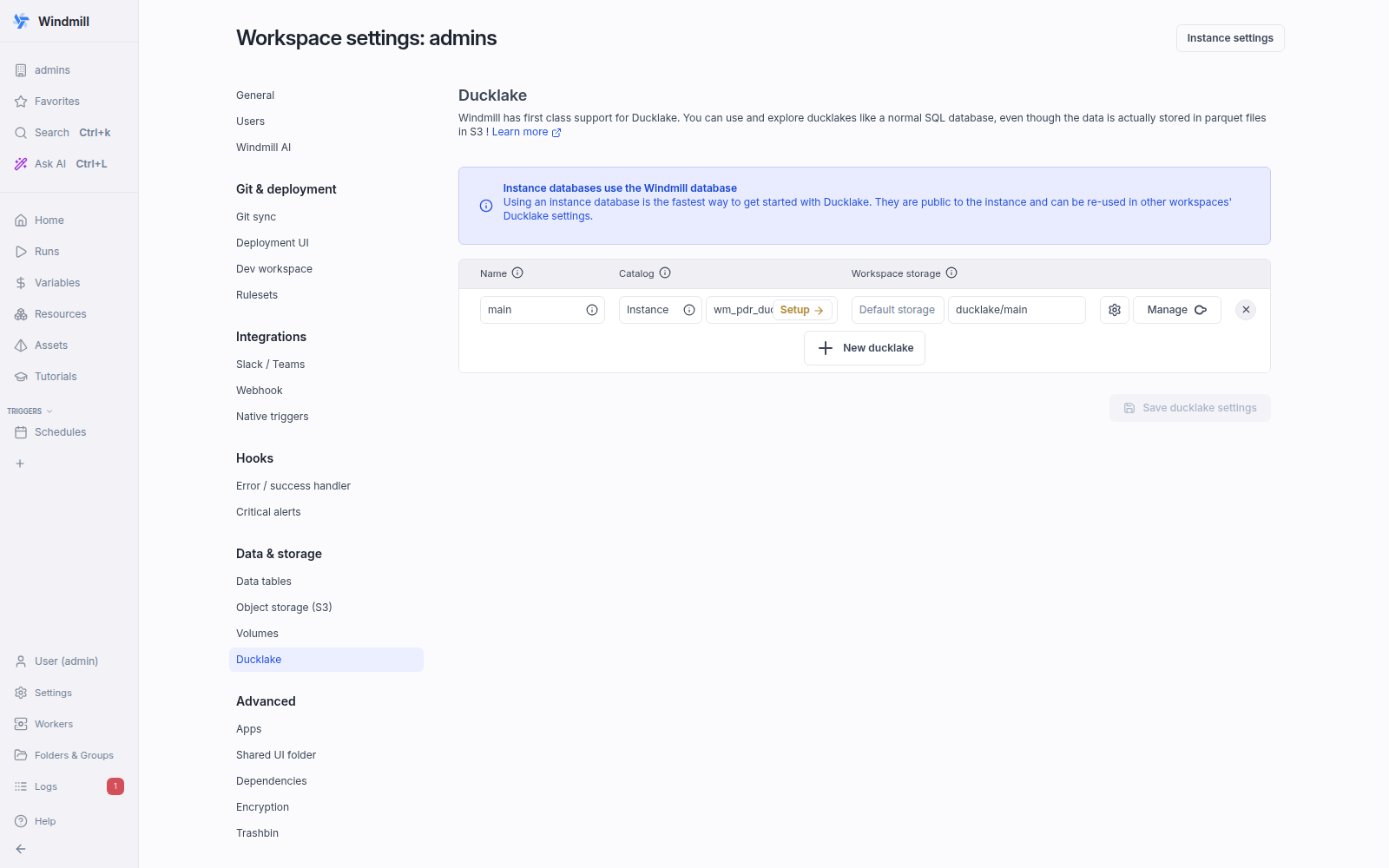
The managed table step requires a DuckLake, which is one setting next to the workspace storage (a catalog database plus a data path inside the storage):
In-memory data processing performance
By using DuckDB (or any other in-memory processing engine) inside Windmill, the computation happens on a single node. Even though you might have multiple Windmill workers, a script is run by a single worker and the computation is not distributed. In practice this covers the large majority of data pipelines: DuckDB reads parquet straight from S3 and processes tens of millions of rows on one machine, and you can assign a larger worker to the steps that need more memory. On AWS you can go up to 24Tb of memory on a single server, so a distributed cluster is rarely required.
When a dataset does not fit in memory, DuckDB spills to disk. Backing its database with a file on a shared directory between steps, we ran the 8 TPC-H queries on a 100Gb dataset in 40 minutes at a 29Gb peak.
Our earlier head-to-head numbers against Spark were measured on older hardware (an m4.xlarge) and an older DuckDB release, and no longer reflect current performance. We are re-running them on current instances with DuckDB 1.x and DuckLake materialization and will republish the charts here.
Limit of the number of executions per second
Windmill's core is its queue of jobs which is implemented in Postgres using the UPDATE SKIP LOCKED pattern. It can scale comfortably to 5k requests per second (RPS) on a normal Postgres database during benchmarks.