Data tables
This page is part of our section on Persistent storage & databases which covers where to effectively store and manage the data manipulated by Windmill. Check that page for more options on data storage.
Windmill Data Tables let you store and query relational data with near-zero setup using databases managed automatically by Windmill. They provide a simple, safe, workspace-scoped way to leverage SQL inside your workflows without exposing credentials. Data tables can also be used from full-code apps via SQL backend runnables and from the Database Studio app component for browsing and editing data visually.
Data tables are queryable as a typed schema from TypeScript, Python and DuckDB clients, and can be browsed, edited and used as a Postgres trigger source without ever exposing the underlying connection string to users.
Getting started
Go to workspace settings -> Data Tables and configure a Data Table :
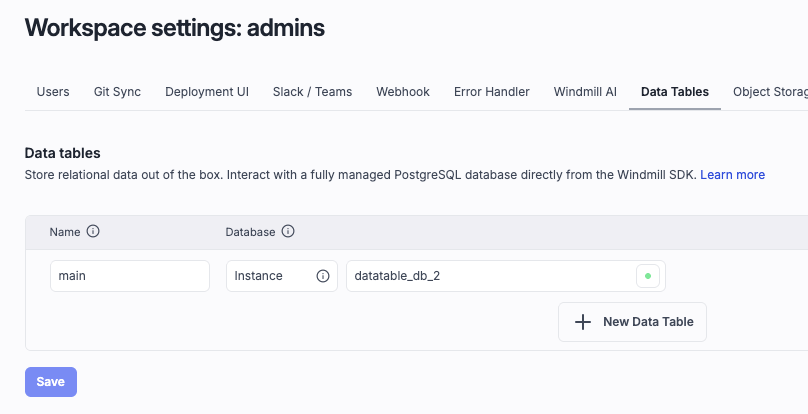
Superadmins can use a Custom instance database and get started with no setup.
Usage
- Typescript
- Python
- DuckDB
import * as wmill from 'windmill-client';

export async function main(user_id: string) {
	// let sql = wmill.datatable('named_datatable');
	let sql = wmill.datatable();

	// This string interpolation syntax is safe
	// and is transformed into a parameterized query
	let friend = await sql`SELECT * FROM friend WHERE id = ${user_id}`.fetchOne();
	// let allFriends = await sql`INSERT INTO friend VALUES ('John', 21)`.fetch();

	return friend;
}
import wmill

def main(user_id: str):
    # db = wmill.datatable('named_datatable')
    db = wmill.datatable()

    # Postgres scripts use positional arguments
    friend = db.query('SELECT * FROM friend WHERE id = $1', user_id).fetch_one()
    # all_friends = db.query('SELECT * FROM friend').fetch()

    return friend
-- $user_id (bigint)

-- ATTACH 'datatable://named_datatable' AS dt;
ATTACH 'datatable' AS dt;
USE dt;

SELECT * FROM friend WHERE id = $user_id;
In workspace settings, we recommend configuring a single primary data table (and at most a few secondary ones), and using schemas to organize your data. This is not about the number of SQL tables inside a data table, which is unlimited. There is no hard limit either way.
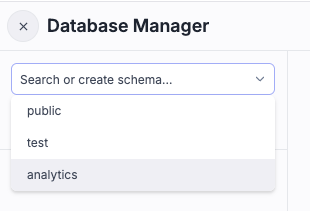
You can reference schemas normally with the schema.table syntax, or set the default search path with this syntax (Python / Typescript) :
sql = wmill.datatable(':myschema'); // or 'named_datatable:myschema'
sql`SELECT * FROM mytable`; // refers to myschema.mytable
Query methods
Every sql`...`, sql.query(...) or db.query(...) call returns a statement object with four execution methods:
fetch()— all rows from the last statement (default)fetchOne()/fetch_one()— first row only, ornull/Noneif emptyfetchOneScalar()/fetch_one_scalar()— first column of the first rowexecute()— run the query and return nothing
For multi-statement queries or scalar-only results, pass a result collection mode to fetch:
- Typescript
- Python
await sql`...`.fetch({ resultCollection: 'all_statements_all_rows' });
db.query('...').fetch(result_collection='all_statements_all_rows')
Available modes: last_statement_all_rows (default), last_statement_first_row, last_statement_all_rows_scalar, last_statement_first_row_scalar, all_statements_all_rows, all_statements_first_row, all_statements_all_rows_scalar, all_statements_first_row_scalar.
TypeScript also supports sql.query(sql, ...params) as an alternative to tagged-template syntax, matching the Python API:
await sql.query('SELECT * FROM friend WHERE id = $1', user_id).fetchOne();
Schemas
Data tables support Postgres schemas to organize tables into logical groupings within a single data table. You can:
- Create, rename and drop schemas from the workspace settings Data Tables UI.
- Reference tables with the explicit
schema.tablesyntax, or switch the default search path from the client by appending:myschemaafter the data table name (wmill.datatable('named_datatable:myschema')orwmill.datatable(':myschema')for the default data table). - Use schemas as an organizational boundary without needing multiple configured data tables: we recommend one primary data table (and at most a few secondary ones) per workspace, with schemas for separation.
Type-checked queries
The Windmill editor understands your data table's schema and type-checks queries at edit time for TypeScript, Python and DuckDB scripts. The introspected schema (tables, columns, types) is surfaced in the editor's SQL IntelliSense, and invalid columns or type mismatches are flagged before the script ever runs.
String-interpolated parameters (e.g. sql`SELECT * FROM friend WHERE id = ${user_id}`) are always transformed into safe parameterized queries, so type checking covers both the SQL itself and the bindings.
sql.raw for dynamic SQL fragments
Use sql.raw(value) to inline a string directly into the SQL query without parameterization. This is useful for dynamic table or column names that cannot be bound as parameters:
const sql = wmill.datatable();
await sql`SELECT * FROM ${sql.raw(table)} WHERE age > ${age}`.fetch();
// Produces: SELECT * FROM users WHERE age > $1::BIGINT
sql.raw is available on both wmill.datatable() and wmill.ducklake(). Since the value is inlined verbatim, ensure it comes from trusted input to avoid SQL injection.
When a data table schema changes, the editor re-introspects it so downstream scripts immediately see the new columns and types without a manual refresh.
Assets integration
Data tables are assets in Windmill. When you reference a data table in a script, Windmill automatically parses the code and detects them. You can then click on it and explore the data table in the Database Explorer.
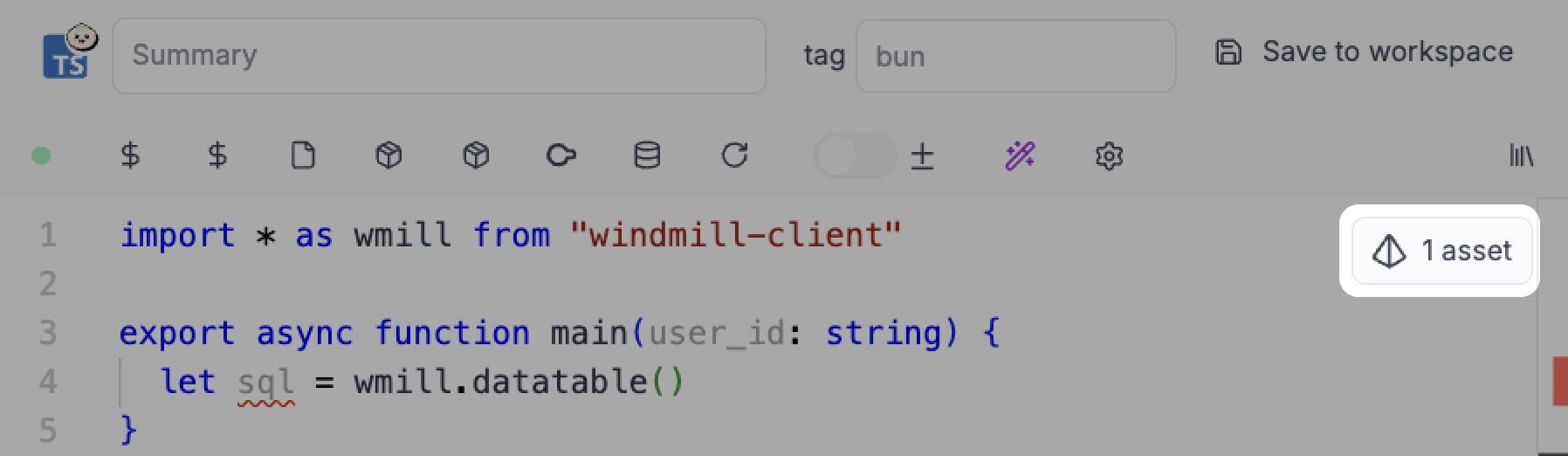
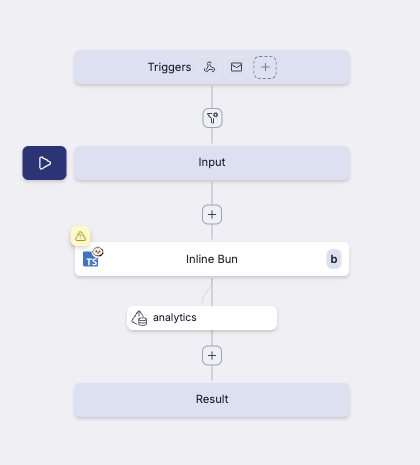
Windmill auto detects if the data table was used in Read (SELECT ... FROM) or Write mode (UPDATE, DELETE ...). Assets are displayed as asset nodes in flows, making it easy to visualize data dependencies between scripts.
Database Studio integration
Data tables are a first-class source in the Database Studio component of the low-code app editor (legacy). Select Data Table as the component's Type, then use the built-in table picker to choose from the workspace's configured data tables — no resource wiring required.
From there you get the full Database Studio experience (browse rows, inline edit, create/alter tables, schema explorer) on top of your data tables, without exposing the underlying credentials to the app builder or end users.
Use as a Postgres resource and trigger source
A data table that is backed by a Postgres resource (either the custom instance database or a workspace-managed Postgres resource) can be used anywhere a Postgres resource is expected — most notably as the source of a Postgres trigger. This lets you react to inserts, updates and deletes on tables managed by a data table without handing out the Postgres credentials.
Workspace-scoped
Data tables are scoped to a workspace. All members of the workspace can access its data tables. Credentials are managed internally by Windmill and are never exposed to users.
Special data table: main
The data table named main is the default data table. Scripts can access it without specifying its name.
Example:
# Uses the 'main' data table implicitly
wmill.datatable()
Migrations
You can version a data table's schema with SQL migrations. A migration is a pair of SQL statements - an up migration that applies a change (for example CREATE TABLE) and an optional down migration that reverts it. Applied migrations are tracked in a _wm_migrations table inside each data table, so a migration is never applied twice, and migrations run in timestamp order.
Each migration runs as a normal user-permissioned Windmill postgresql job (labelled datatable_migration), so applications and rollbacks show up in the runs history and failures surface the underlying Postgres error.
From the UI
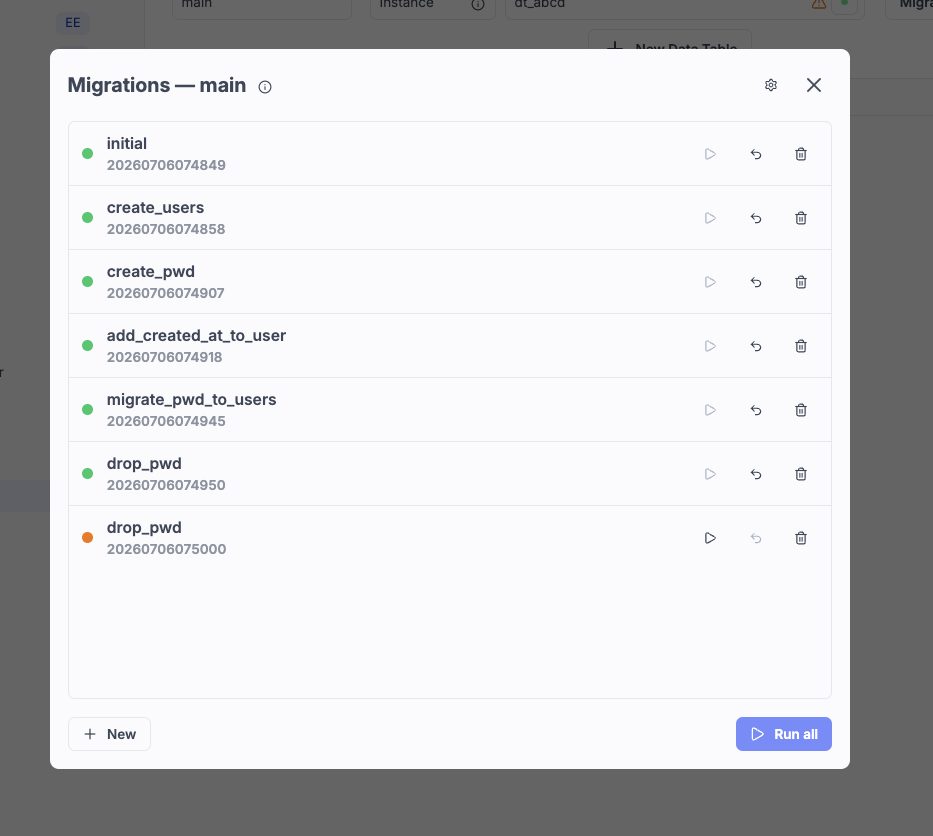
Go to workspace settings -> Data Tables and click Migrations next to a data table to open the migrations modal. From there you can:
- Create a New migration with
Up/DownSQL editors, and optionally Create and run it in one step (the insert is reverted if the run fails). - Run or Revert an individual migration, or Run all pending migrations. A status dot shows whether each migration has been applied (green), is not yet applied (orange), or has an unknown state (grey).
- Generate initial migration, which snapshots the data table's current schema into a first migration and marks it as already applied (with no
down), so it is never re-run. This is useful to bring an existing data table under migration control.
Running or reverting a migration out of order (one that has earlier un-run migrations, or later applied ones) asks for confirmation first, and deletions always confirm.
From the CLI
Migrations are stored as workspace files under migrations/datatable/<datatable>/ and can be scaffolded, applied and rolled back with the wmill datatable migrate commands:
wmill datatable migrate new add_users_table   # scaffold .up.sql / .down.sql files
wmill datatable migrate status                 # list migrations and whether they have run
wmill datatable migrate up                     # apply all pending migrations
wmill datatable migrate down                   # roll back the most recent migration
See the CLI datatable reference for the full command reference and sync behavior. If the workspace has git sync enabled, migrations are committed to the linked repository as they are created, edited or deleted.
Database types
Windmill supports three backend database types for Data Tables:
1. Internal managed Postgres
- Uses the Windmill instance database.
- Zero-setup, one-click provisioning.
- Requires superadmin to configure.
- Although the database exists at the instance level, it is only accessible to workspaces that define a data table pointing to it.
- Supports roles and permissions.
- See Custom instance database for more details.
2. External managed Postgres
- Connect an external Postgres instance managed by Windmill at the instance level.
- Configure from Instance Settings > Managed Postgres.
- Supports roles and permissions, just like the custom instance database.
- Use this when you want to keep data on your own infrastructure while still benefiting from Windmill's role-based access control.
- Ideal for organizations that require data to stay in a specific region, need a dedicated database cluster, or want to use managed Postgres services (AWS RDS, Google Cloud SQL, etc.).
3. Postgres resource
- Attach a workspace Postgres resource to the data table.
- Does not support roles and permissions - all workspace members have full access.
Permissions
Data table roles let you control who can access which schemas and tables within a data table. Roles are Postgres login roles created at the instance level and assigned to users, groups or folders at the data table level. When a script or app connects as a specific role, Postgres enforces access according to the privileges you grant.
This feature is available in Enterprise Edition only. It applies to data tables backed by managed Postgres (instance database or external managed instance), not to data tables backed by Postgres resources.
Example: setting up schema-level access control
Say you have a data table with three schemas:
public- accessible to everyone in the workspaceanalytics- accessible only to members of theanalytics_ffolder (a folder acting as a project boundary)company_data- accessible only to workspace admins
Here's how to set this up.
Step 1: enable roles
Go to Workspace settings > Data Tables, click Manage on your data table to open the Database Manager, then click the menu on the data table in the left pane and select Roles.
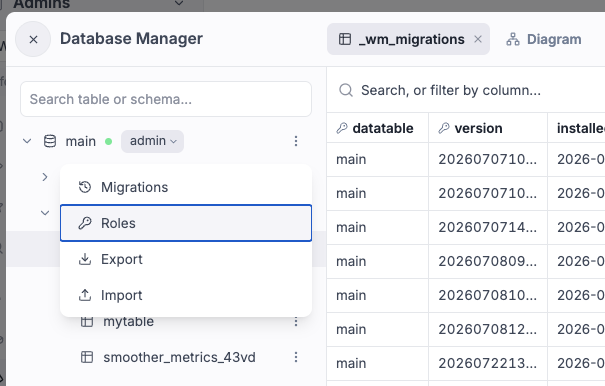
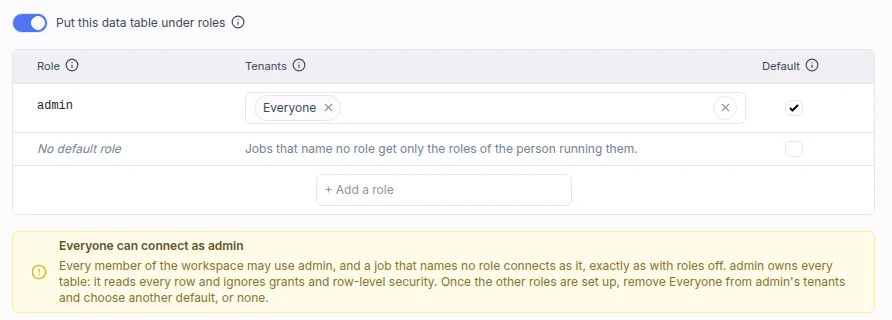
Check 'Put this data table under roles'.
The admin role is the connection the data table used before roles: it owns every existing table, reads every row and ignores grants and row-level security.
It starts as the default role with everyone in the workspace as tenant, so turning roles on changes nothing until you edit them.
Step 2: create a role for the analytics team
Click Add role and create a role called analytics.
Assign the folder f/analytics_f to it.
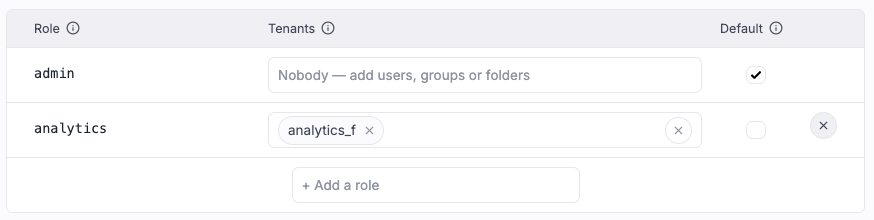
Now anyone with permissions on analytics_f can use the analytics role, but it has no privileges yet.
Step 3: grant privileges on the analytics schema
Exit the Roles drawer.
Click the menu on the analytics schema and select Access.
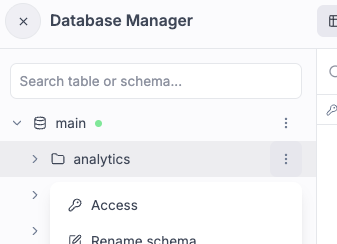
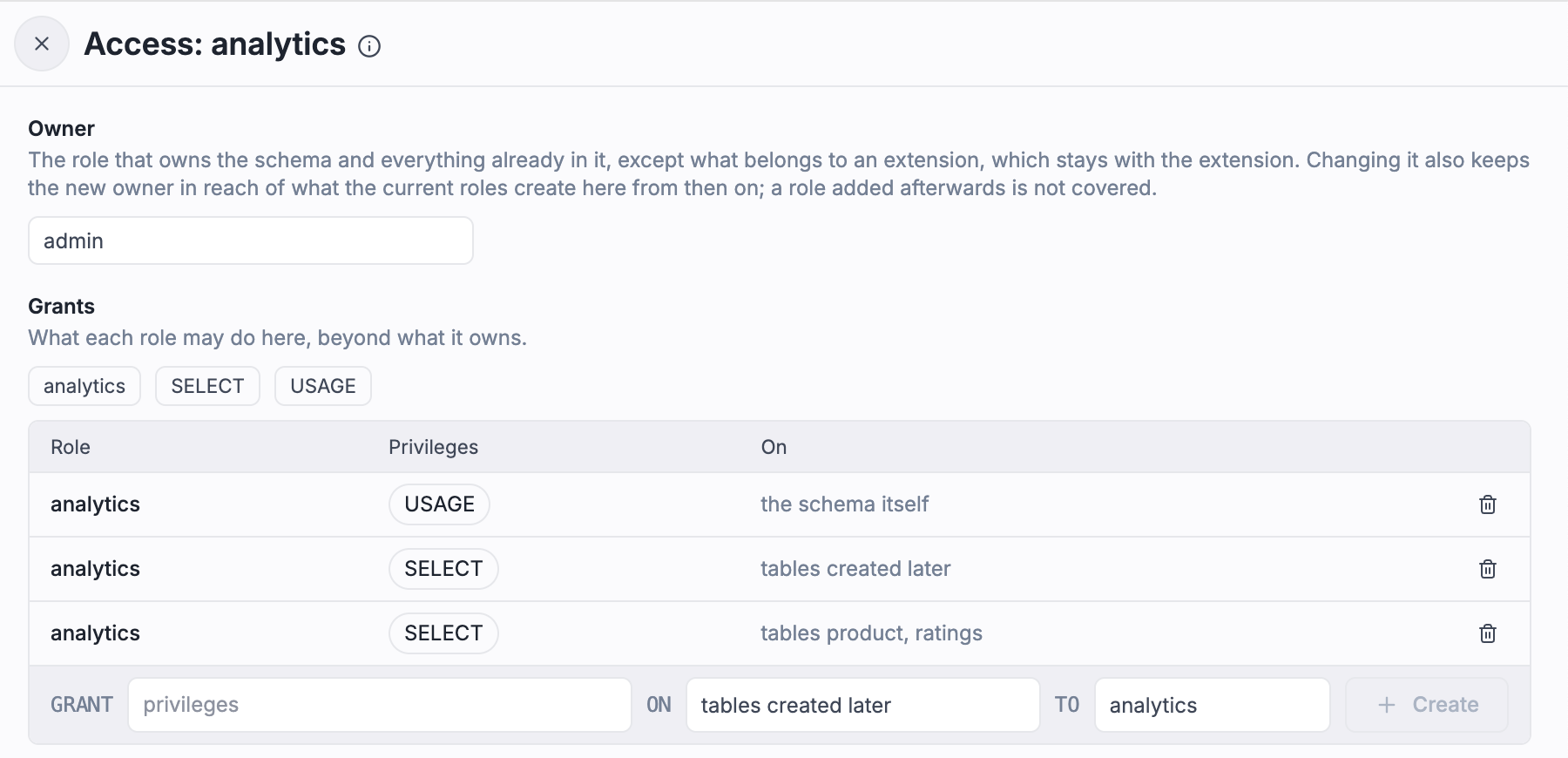
Grant SELECT on all tables in the schema, and enable the same grant for tables created in the future (default privileges).
USAGE on the schema is granted automatically since it's required to access tables.
Step 4: test access from scripts
The admin role is still the default and still open to everyone, so a call to wmill.datatable('your_datatable') that names no role keeps connecting as admin.
To connect as the analytics role alone, name it:
- Typescript
- Python
- DuckDB
import * as wmill from 'windmill-client';

export async function main() {
	let sql = wmill.datatable('main', { role: 'analytics' });

	// WORKS - analytics role has SELECT on analytics schema
	let data = await sql`SELECT * FROM analytics.reports`.fetch();

	// FAILS - analytics role has no access to company_data schema
	let secret = await sql`SELECT * FROM company_data.salaries`.fetch();

	return data;
}
import wmill

def main():
    db = wmill.datatable("main", role="analytics")

    # WORKS - analytics role has SELECT on analytics schema
    data = db.query("SELECT * FROM analytics.reports").fetch()

    # FAILS - analytics role has no access to company_data schema
    secret = db.query("SELECT * FROM company_data.salaries").fetch()

    return data
ATTACH 'datatable://main?role=analytics' AS dt;
USE dt;

-- WORKS - analytics role has SELECT on analytics schema
SELECT * FROM analytics.reports;

-- FAILS - analytics role has no access to company_data schema
SELECT * FROM company_data.salaries;
Step 5: create a role for everyone else
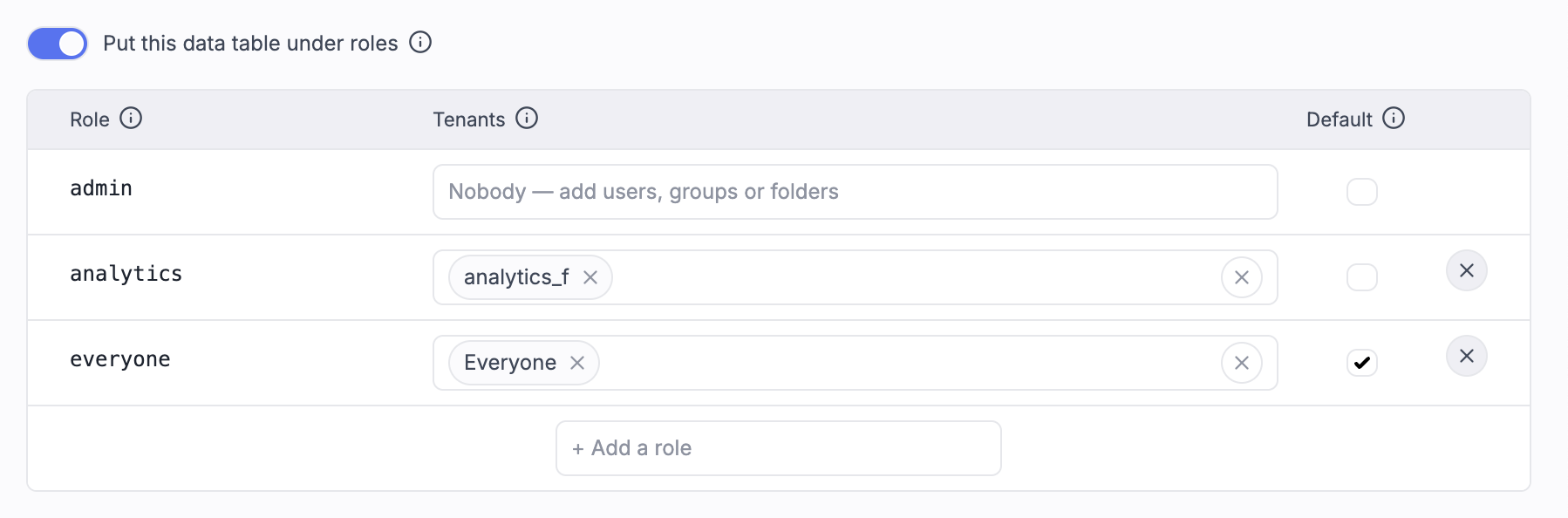
What remains is to remove Everyone from the tenants of admin, so that only workspace admins and superadmins can use it.
Doing only that would leave a user who is neither a workspace admin nor in analytics_f with no role, unable to open the Database Manager at all.
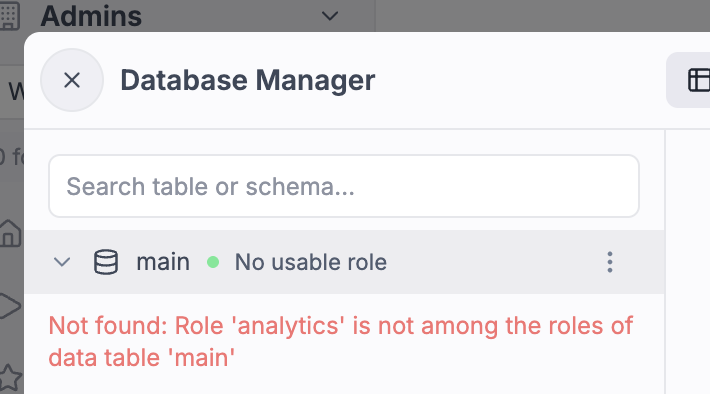
So first create a role called everyone, assign * (everyone in the workspace) as tenant, and make it the default role.
Then remove Everyone from the tenants of admin.
Grant SELECT on the public schema.
Now all users can access the public schema in the Database Manager.
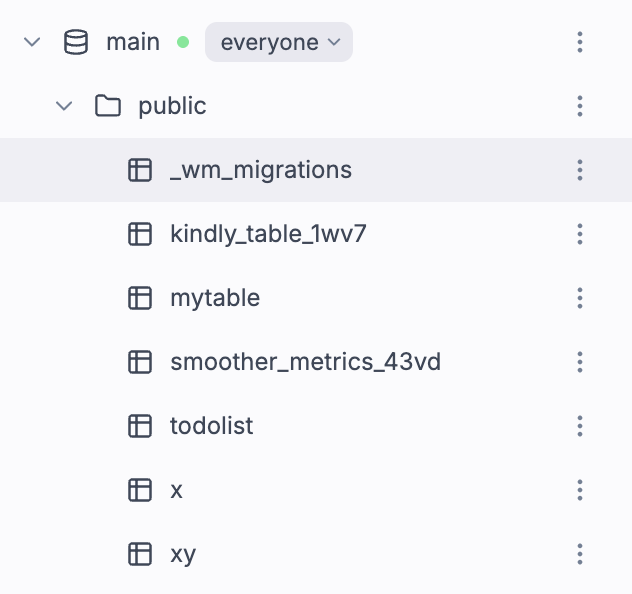
Because everyone is now the default role, a call to wmill.datatable('your_datatable') that names no role connects as everyone, plus analytics when the identity the job runs as is in analytics_f.
See connections that name no role.
Step 6: let users create their own schemas
Users may want to create schemas for their apps.
Grant CREATE on the database to the everyone role so they can create new schemas.

Connections that name no role
A connection names a role with { role: '...' } in TypeScript, role= in Python, or ?role= in a datatable:// reference.
It then holds that role alone, whoever runs the job.
A connection that names none is resolved from the default role of the data table, chosen in the Default column of the Roles drawer, and the roles of one identity:
| Default role | A connection that names no role holds |
|---|---|
admin (until you change it) | admin, when the identity is a workspace admin or a tenant of admin. No other role is added |
| Another role | That role, when the identity may use it, plus every role the identity is a tenant of |
| No default role | Only the roles the identity is a tenant of |
A connection left with no role at all is refused with an error instead of returning no rows.
The identity is the one the job runs as, the same one its resources and variables are read with:
- For a script or flow run directly or tested in the editor, whoever started it.
- For an app in publisher mode, the publisher, so every viewer of the app reads through the publisher's roles.
- For a run started by a schedule or a trigger, its owner.
- For a job started by another job, such as a flow step, the identity of that job.
An inline runnable of a full-code app can instead read data as the viewer, the logged-in person using the app. Its connections that name no role then hold the viewer's roles, by the same rules. A viewer of a public app who is not logged in has no roles, and such a runnable is refused for them. Such a runnable runs the publisher's code with the viewer's reach into the data table, the same trust as an app in viewer execution mode.
Only tenant lists count toward the identity's roles.
A workspace admin can name any role, but being an admin adds no role to a connection that names none, and admin is never added.
With a default role other than admin, an admin who runs a script therefore sees the rows of the roles they were assigned, not every row.
Cached results are kept per identity and per viewer, so a result read through one person's roles is never served to another.
Row-level security per viewer
With a default role other than admin, Postgres row-level security can return different rows to each viewer of an app whose runnable reads data as the viewer, with nothing written in the runnable's code.
Say app_user is the default role with everyone as tenant, and sales_emea and sales_amer are assigned to the people covering each region.
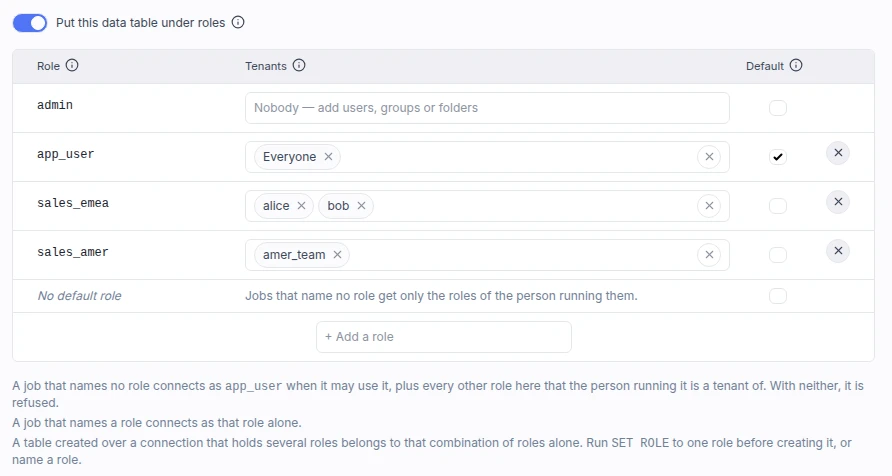
Grant SELECT on the table to the three roles, then write the policies as a test of role membership:
ALTER TABLE orders ENABLE ROW LEVEL SECURITY;

CREATE POLICY emea ON orders FOR SELECT
  USING (region = 'emea' AND pg_has_role(current_user, 'sales_emea', 'member'));

CREATE POLICY amer ON orders FOR SELECT
  USING (region = 'amer' AND pg_has_role(current_user, 'sales_amer', 'member'));
The runnable names no role, and reads data as the viewer:
import * as wmill from 'windmill-client';

export async function main() {
	const sql = wmill.datatable('main');
	// Returns the rows of the regions the viewer was assigned to
	return await sql`SELECT * FROM orders`.fetch();
}
A viewer in sales_emea gets the EMEA rows, a viewer in both roles gets both regions, and a viewer in neither connects as app_user and gets no rows.
Write policies with pg_has_role rather than current_user = 'sales_emea'.
A connection that holds several roles logs in as a user Windmill manages for that combination of roles, which is a member of each of them but named after none.
pg_has_role is also true for the role's own login, so the same policy serves a connection that names the role.
A policy names its role as text, so renaming the role in the instance catalog breaks the policy.
A table created over a connection that holds several roles belongs to that combination of roles alone, and no other role or identity can reach it.
Before creating an object, name a role or run SET ROLE <role>.
Tenant patterns
When assigning tenants to roles, use these patterns:
u/<username>- a specific userg/<group>- all members of a groupf/<folder>- anyone with permissions on the folder*- everyone in the workspace
Workspace admins and superadmins can always use any role regardless of tenant assignments, by naming it.
Available privileges
Privileges depend on the target object:
- Database:
CONNECT,CREATE - Schema:
USAGE,CREATE - Table:
SELECT,INSERT,UPDATE,DELETE,TRUNCATE,REFERENCES,TRIGGER
The ACL editor also supports:
- Granting privileges on all tables, sequences or functions in a schema
- Setting default privileges for objects created in the future
- Transferring ownership of schemas or tables
Instance role catalog
Superadmins manage the instance-wide role catalog from Instance Settings > Data Table settings > Role Catalog. Each role is a real Postgres login with an auto-generated password stored encrypted at the instance level.
Role names must be 1-63 characters, alphanumeric plus _ and - only.
Reserved names are not allowed: admin, postgres, public, or names starting with pg_, windmill_, custom_instance_, or wm_set_.
Migrations with roles
The migration editor includes a role picker.
The selected role is stored as a -- role <name> annotation in the migration SQL file.
Down migrations inherit the same role.
Migrations without a role annotation run as admin.
Raw apps with roles
When creating a full-code app backed by a data table, the template picker includes a role selector.
The selected role applies to all data table queries, including those generated by the copilot.
It is recorded under data.roles in raw_app.yaml, and it pins the app to that one role for every viewer.
For rows that differ per viewer, remove that entry, call wmill.datatable() with no role and let the runnable read data as the viewer, see row-level security per viewer.
Limitations
Postgres triggers are not compatible with permissioned data tables. Replication streams read every row regardless of role privileges. If you need both triggers and row-level security, use separate data tables: one with roles for apps and scripts, one without for triggers.
Workspace forks
When a forked workspace references a permissioned data table from its parent, the role assignments are governed by the parent workspace. The child workspace cannot change role assignments. Fork admins can access data through the roles assigned in the parent.
Clone forks replay the parent's grants onto the copied data, preserving the permission structure.
Use on agent workers
wmill.datatable() and wmill.ducklake() work on agent workers out of the box, from both TypeScript and Python. Because agent workers do not run the embedded internal Windmill server, the clients automatically detect the execution environment and fall back from the inline preview path to a run-and-wait flow against the main Windmill API, so scripts that use data tables remain portable between regular and agent workers with no code changes.