Native Windows automation, without Docker or WSL
Run PowerShell, MSSQL and C# on domain-joined servers with full access to Active Directory and Kerberos. A code-first replacement for Task Scheduler and Power Automate. Native Windows workers are a Self-Hosted Enterprise feature.
Why Windows automation breaks inside containers
PowerShell scripts that touch Active Directory need the worker to be domain-joined. SQL Server with Kerberos needs a real Windows token, not a forwarded one. Modules published to private Azure Artifacts feeds expect the user's certificate store. As soon as you put the worker inside Docker or WSL, all of that breaks, and you end up rebuilding auth shims that fight Microsoft's stack instead of using it.
Windmill runs the worker as a native Windows service, executing PowerShell, C# and SQL directly on the host. Active Directory, Kerberos, NTLM, certificate-bound credentials, GPO-managed services and private feeds all keep working, because nothing intercepts them. Server-side, Windmill stays exactly the same: one orchestrator, one queue, one observability surface, with mixed Windows and Linux workers picking up jobs by tag.
Built for the Microsoft stack
PowerShell, C#, SQL Server, Teams and Entra ID as first-class primitives. Learn more about Windows workers.
Native Windows workers
EnterpriseInstall the Windmill worker via sc.exe or NSSM. Jobs run as native Windows processes with full access to domain credentials, Kerberos tickets, private module feeds and the local certificate store. No Docker, no WSL, no auth shims. Requires a Self-Hosted Enterprise license.
> sc.exe create windmill-worker binPath= "C:\windmill\windmill-ee.exe" `
    DisplayName= "Windmill Worker" `
    start= auto `
    obj= "CORP\svc-windmill" password= ********
[SC] CreateService SUCCESS

> sc.exe start windmill-worker
SERVICE_NAME: windmill-worker
        STATE              : 4  RUNNING
        WIN32_EXIT_CODE    : 0  (0x0)
PowerShell as a first-class language
Write scripts with [CmdletBinding()], typed parameters and common parameters (Verbose, Debug, ErrorAction). Windmill auto-generates the input form, runs the script and captures the output object stream. Import modules from PSGallery or private Azure Artifacts feeds the way PowerShell expects.
MSSQL with Kerberos
Resources hold a host, database and Kerberos config. No service-account passwords are stored in Windmill. Query SQL Server, run stored procedures and stream results into the rest of your flow with parameterized queries.
Learn more about MSSQL integration# Resource: mssql/prod-finance # host: sql-prod.corp.local # database: Finance # auth: kerberos # uses the worker's domain identity Invoke-Sqlcmd -ServerInstance $r.host ` -Database $r.database ` -Query "SELECT TOP 10 invoice_id, amount FROM dbo.invoices WHERE status = @status" ` -Variable @{ status = "PENDING" }
C# / .NET 9 scripts
Author scripts in C# with full async/await, NuGet dependency management and typed inputs. Use the same Azure SDKs your team already runs in production for Blob Storage, Service Bus or Graph API calls. Compiled and cached on the worker, with per-script lockfiles to keep runs reproducible.
// nuget: [email protected]
using Azure.Storage.Blobs;
using Azure.Identity;

public async Task<string> main(string container, string blob) {
    var cred = new DefaultAzureCredential();
    var client = new BlobClient(
        "https://storage.corp.local/",
        cred);
    await client.UploadAsync(blob);
    return $"uploaded {blob}";
}
AI agents on Windows infrastructure
A Windmill AI agent running on the same domain-joined host can query Active Directory, restart a Windows service, pull a row from SQL Server and post the result to Teams in a single run, with every action audited.
Learn more about AI agentsTeams approvals and alerts
Approval cards carry input fields and Resume/Cancel buttons. Route success and failure alerts to channels with the same resource your scripts already use. Pairs with Entra ID SSO so approvers are real domain users, not service accounts.
Learn more about Teams integration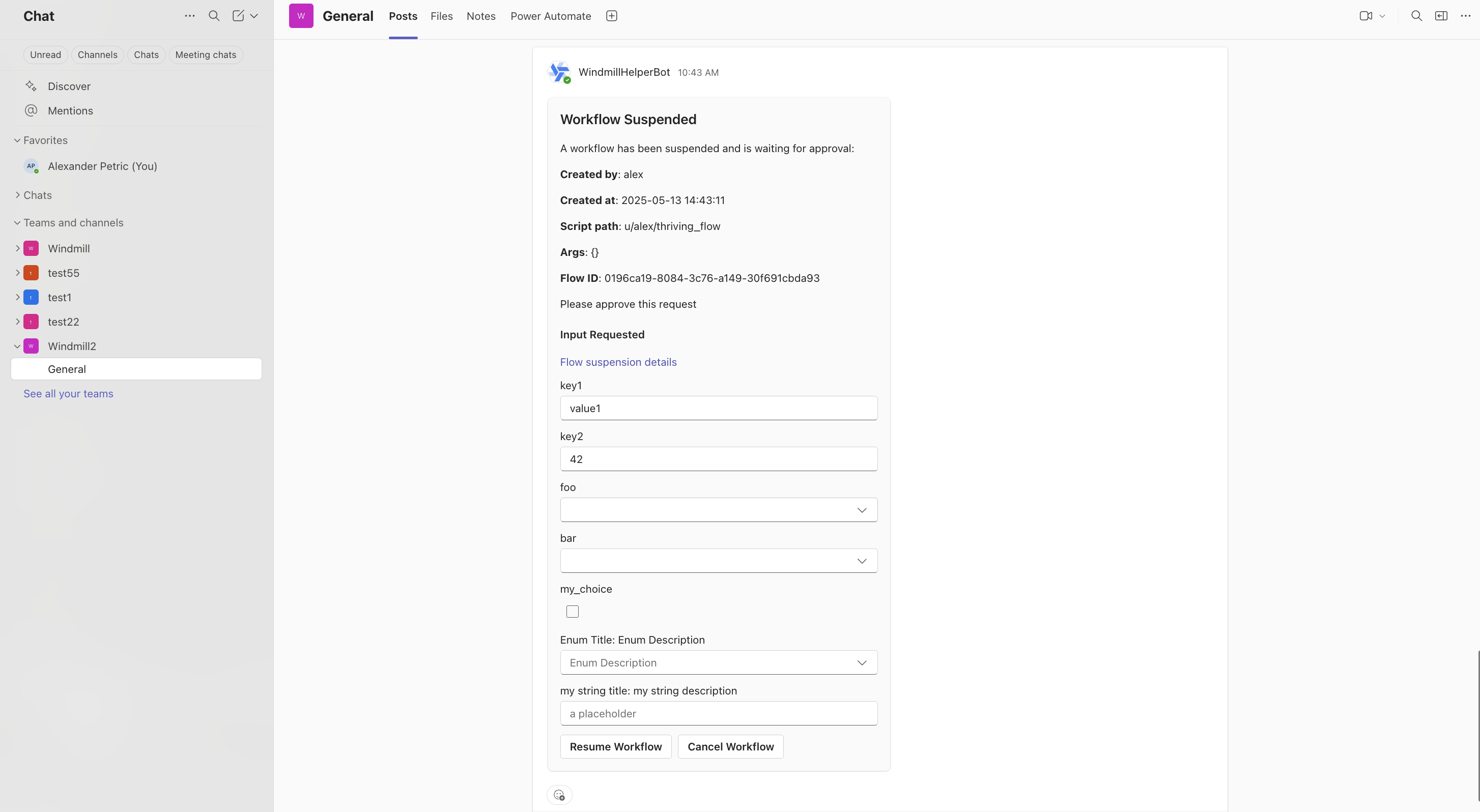
Plugs into the rest of your Microsoft estate
Resources, triggers and integrations cover the rest of the stack so a single flow can span identity, messaging, storage and queueing without leaving Windmill.
Sign in with corporate identity, sync groups, scope RBAC by AD group.
Approval cards, channel alerts, slash commands tied to flows.
Windows Integrated Auth, no stored passwords, parameterized queries.
Read and write blobs from PowerShell or C# with managed identity.
Private NuGet and PowerShell module feeds resolved on the worker.
Consume from Kerberized Kafka clusters with keytab auth.
Windows and Linux workers in the same Windmill instance
Tag a script windows and it runs on a domain-joined Windows host. Tag it linux and it runs in your existing container fleet. The same flow can step from a PowerShell AD lookup, into a Python data transform on Linux, into a Teams approval, with one queue, one set of resources and one audit trail.
- · PowerShell + AD
- · MSSQL Kerberos
- · C#/.NET 9
- · Windows services (sc.exe)
- · Python data jobs
- · TypeScript / Deno
- · Bash + cron
- · Containerized tooling
How Windmill compares on Windows
Most Windows automation tools come from one of three eras: built-in (Task Scheduler), low-code RPA (Power Automate Desktop), or legacy enterprise schedulers (JAMS, ActiveBatch, Stonebranch). Windmill is the developer-first option that covers what each of them does, while staying open source and code-first.
| Capability |  Windmill Windmill | Power Automate | Task Scheduler | JAMS / ActiveBatch | Ansible (Win) |
|---|---|---|---|---|---|
| Runs natively on Windows (no Docker / WSL) | Partial | ||||
| Domain auth (Kerberos, AD groups) | Partial | ||||
| PowerShell as a first-class language | Partial | Partial | |||
| C# / .NET scripts | Partial | Partial | |||
| MSSQL with Windows Integrated Auth | Partial | Partial | Partial | ||
| Visual flow editor with approvals | Partial | ||||
| Code-first authoring + Git sync | Partial | ||||
| Self-hosted | |||||
| Open source | |||||
| Centralized observability across hosts | Partial | Partial | |||
| Mix Windows and Linux workers in one fleet | |||||
| AI agents calling Windows scripts as tools | Partial |
"Partial" means the capability exists with significant constraints (extra licensing, third-party module, or limited surface).
More you can build on Windmill
Windows automation is one piece. The same platform powers data pipelines, internal apps, AI agents and scheduled workflows on Linux and Windows alike.
Write scripts in TypeScript, Python, Go, Bash, SQL and trigger them from webhooks, schedules, queues or the auto-generated UI.
Build production-grade internal apps with backend scripts, data tables and React, Vue or Svelte frontends.
Orchestrate ETL jobs with parallel branches, DuckDB queries and connections to any database or S3 bucket.
Build AI agents with tool-calling, DAG orchestration, sandboxes and direct access to your scripts and resources.
Chain scripts into flows with approval steps, parallel branches, loops and conditional logic.
Run cron jobs with a visual builder, execution history, error handlers, recovery handlers and alerting.
Frequently asked questions
Bring Windows servers under one orchestrator
Install the worker as a Windows service, point it at your Windmill instance, run the first PowerShell script in minutes.