10 posts tagged with "Security"
View All TagsHTTP routes can restrict which origins may call them from a browser. The allowlist is enforced on both the OPTIONS preflight and the response, so a disallowed origin cannot read the result, and a request that needs a preflight never reaches the runnable. Superadmins can set an instance-wide default on Enterprise Edition.
New features
- New "Allowed origins" option in the route editor, under Advanced > Request Options.
- A matching Origin is echoed in Access-Control-Allow-Origin; other origins get no header, on the preflight and the response.
- New "HTTP route default allowed origins" instance setting governs routes that set no list of their own (Enterprise Edition); a route opts out with *.
- When an allowlist applies, it overrides Access-Control-Allow-Origin set through wm_headers. Static websites are exempt.
A fourth app access mode sits between members-only and public. Opening an app set to Guests requires signing in through your identity provider, but not a Windmill account and not workspace membership. Runnables execute on behalf of the publisher exactly as they do for a member, and the visitor is confined to that one app. Because a guest leaves no user row behind they take no seat. The first 100 distinct guest emails over a trailing 30 days are free on any instance, and past that an instance holding an Enterprise Edition license meters them at four guests to one seat while an instance without one admits no new guest email until the count drops back under 100. Off by default, behind three independent switches.
New features
- The app editor's Public URL toggle becomes an Access control with three options: Members, Guests and Public. Guests reach the app through the same secret URL or custom URL as a public app, but are asked to sign in first.
- Signing in as a guest provisions nothing: no user row, no invite, no workspace membership. It goes through the instance SSO or SAML providers, and someone who already has an account anywhere on the instance is never admitted as a guest.
- The session is pinned to one workspace, scoped to the one app, and expires after 8 hours by default (GUEST_SESSION_VALIDITY_SECONDS). Listing jobs, scripts, flows, apps or variables, reading resource values, another workspace and another guest app are all refused.
- Three gates, all off by default: the app mode, a workspace switch under workspace settings > Advanced > Apps, and a superadmin switch under instance settings > Users > Guests. The two switches are re-read on every guest request, so turning either off stops guests already signed in on their next request; flipping an app back to Members closes it to its existing guests just as immediately.
- A superadmin Guests tab lists the distinct guest emails of the trailing 30 days with the workspaces they opened and when they were first and last seen, next to the instance standing against the allowance.
- Opening an app to guests can be reserved to workspace admins and bypass users with the "Restrict guest app access" protection ruleset rule (Enterprise Edition).
- Tracked app files carry the access mode as a tri-state - public: true, guests: true, or neither - so a CLI pull followed by a push, and git sync, keep the mode an app was deployed with.
Secret masking in job logs
SecurityWindmill now masks secret values in job logs automatically, replacing all but the first 3 characters with stars and emitting a one-time notice. Masking happens in-memory so plaintext never lands in job_logs.
New features
- Plaintext values of secret variables and $encrypted: arguments are tracked per-job and masked in stdout/stderr before logs are persisted.
- First 3 characters are kept for debuggability; the rest is replaced by *****.
- Only values of 8 characters or more are masked, to avoid false positives like "true" or "1234".
- Masking happens in-memory before logs are written to the database, so plaintext never lands in job_logs.
Persistent volumes for scripts via code annotations, per-script sandbox annotation for Python and TypeScript, and AI sandbox for running coding agents with isolation and persistent state.
New features
- Volumes: persistent file storage attached to scripts via comment annotations, synced to workspace object storage.
- Dynamic volume names with $workspace and $args[...] interpolation.
- Per-worker LRU volume cache (10 GB) with exclusive leasing for concurrency safety.
- Per-script sandbox annotation (#sandbox / //sandbox) now supported for Python and TypeScript in addition to Bash.
- AI sandbox: sandboxing + volumes pattern for running AI coding agents (Claude Code, Codex, OpenCode) with persistent state.
- Built-in Claude Code template using the Claude Agent SDK with volume-backed session persistence.
- Volumes UI in the Assets page for browsing, exploring, and deleting volumes.
- Community Edition volume limits: max 20 volumes per workspace, 50 MB per file.
Instance-level setting to enforce nsjail sandboxing across all jobs, and per-script #sandbox annotation for bash scripts.
New features
- job_isolation instance setting with nsjail_sandboxing value to enforce sandboxing for all jobs.
- Sandboxing enabled when either job_isolation is set or DISABLE_NSJAIL=false.
- #sandbox bash annotation to enable sandboxing for individual bash scripts.
- Nsjail always probed at startup regardless of DISABLE_NSJAIL setting.
Implemented true Hashicorp Vault integration for secure secrets management.
New features
- Native Hashicorp Vault integration
- Secure secrets management with Vault
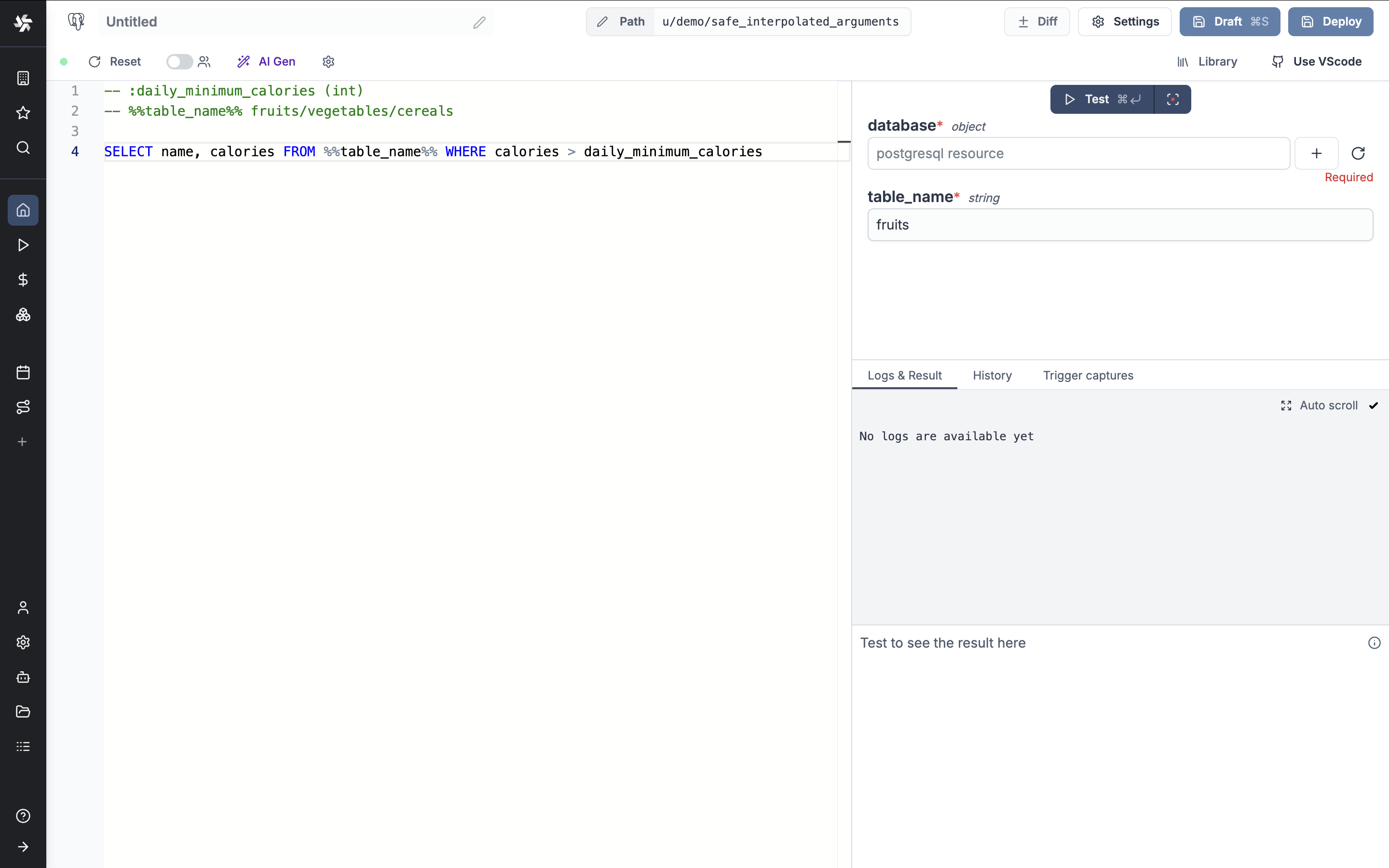
Backend schema validation and safe interpolated arguments for SQL queries.
New features
- Backend schema validation for scripts using the schema_validation annotation.
- Safe interpolated arguments for SQL queries using %%parameter%% syntax.
- Protection against SQL injections with strict validation rules for interpolated parameters.
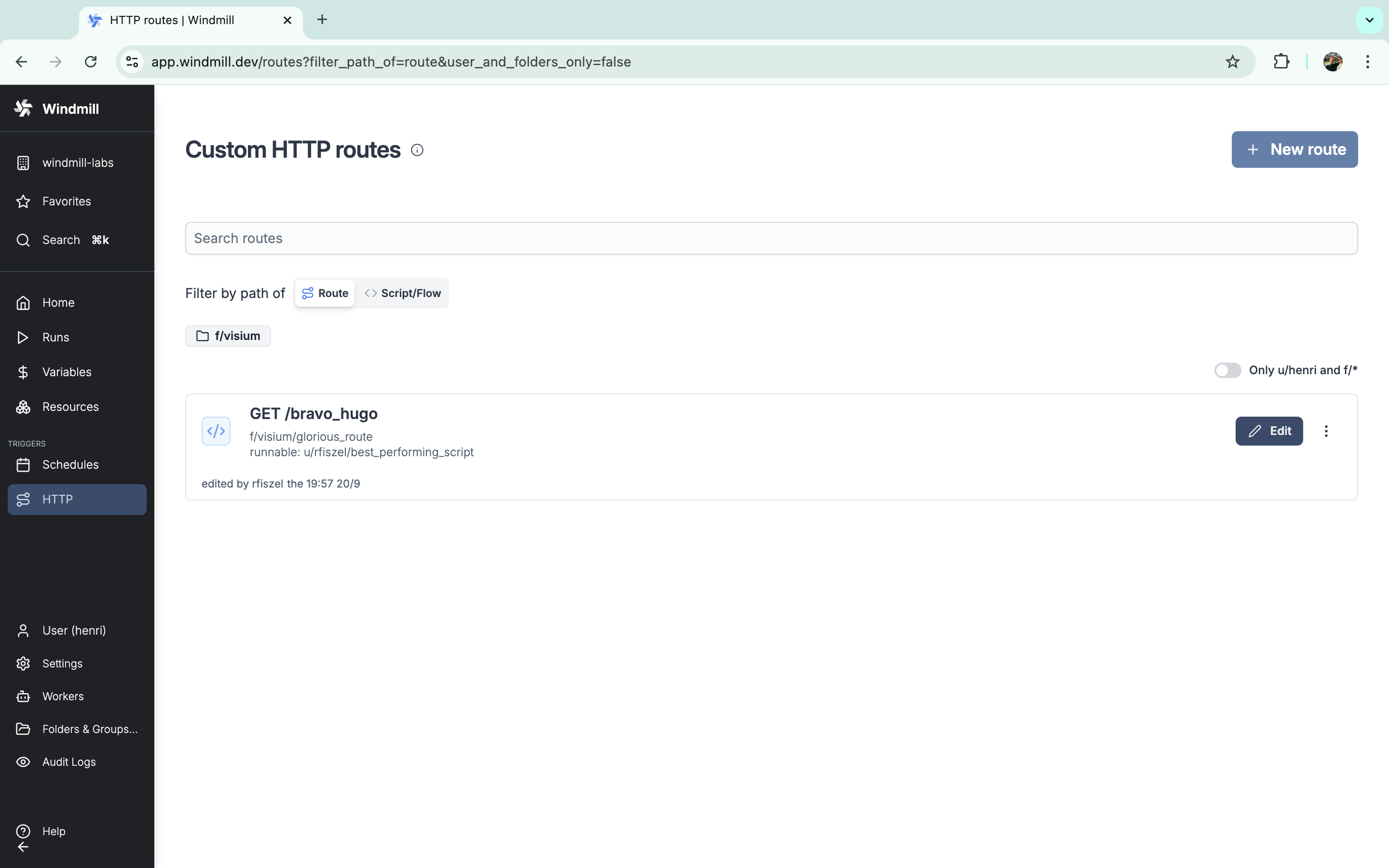
Windmill supports custom HTTP routes to trigger a script or flow.
New features
- Trigger a script or flow via a custom HTTP route.
- Use a preprocessor to transform the request before it is passed to the runnable.
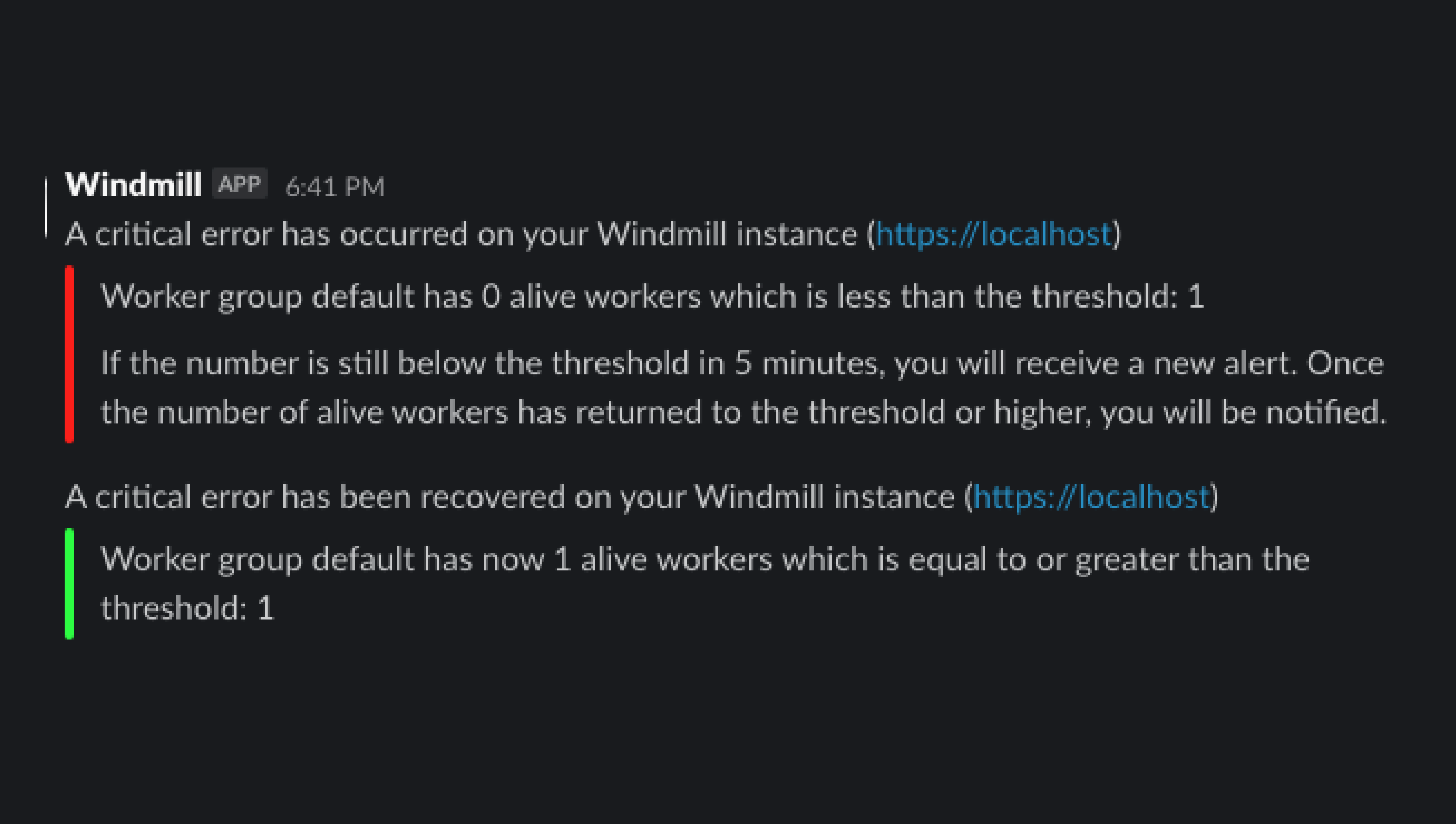
Get a notification everytime on critical events such as when a job is re-run after a crash.
New features
- Get email or Slack notifications for critical events such as everytime a job is re-run after a crash.
- You can set an alert to receive notification via Email or Slack when the number of running workers in a group falls below a given number.
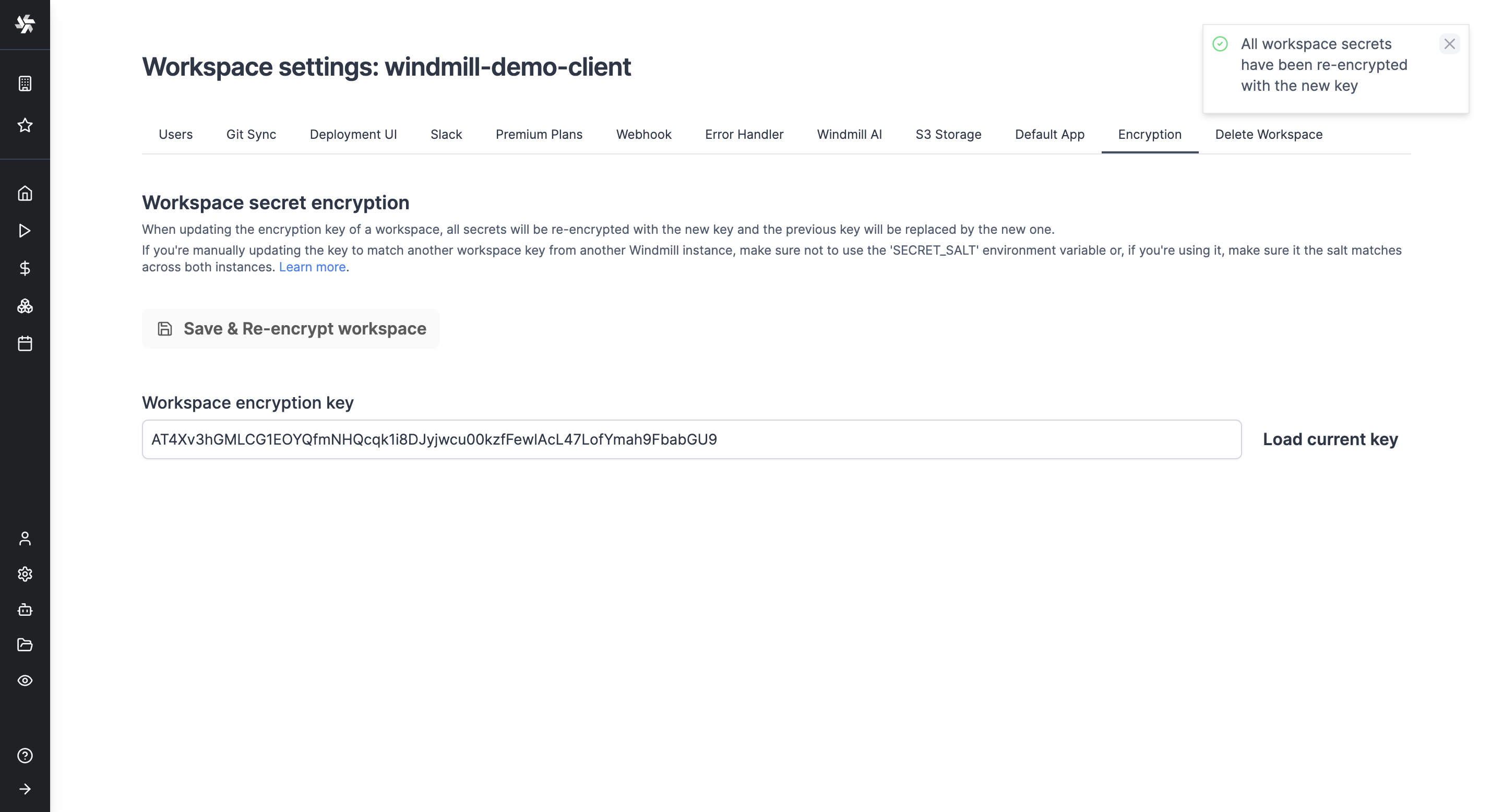
All secrets of a workspace are encrypted with a symmetric key unique to that workspace. This key is generated when the workspace is created and is stored in the database in the workspace_settings. You can now manually update the encryption key of a workspace, it will be re-encrypted with the new key and the previous key will be replaced by the new one.
New features
- Manually update the encryption key of a workspace.