Kafka triggers
Windmill can connect to Kafka brokers servers and trigger runnables (scripts, flows) when a message is received. Listening is done from the servers, so it doesn't take up any workers. Kafka triggers is a self-hosted Enterprise feature.
Kafka resource configuration
Before creating a Kafka trigger, you need to set up a Kafka resource. Head to the Resources page, click "Add resource" and select kafka.
The resource requires:
- Brokers: List of broker hostnames in the format
hostname:port - Security: Authentication and encryption settings
Security options
| Security mode | Description |
|---|---|
| PLAINTEXT | No authentication or encryption. Use only for development. |
| SASL_PLAINTEXT | Username/password authentication without encryption. Supports PLAIN, SCRAM-SHA-256, SCRAM-SHA-512 mechanisms. |
| SSL | TLS encryption with optional client certificate authentication. |
| SASL_SSL | Username/password authentication with TLS encryption. |
| SASL_GSSAPI | Kerberos (GSSAPI) authentication without encryption. |
| SASL_SSL_GSSAPI | Kerberos (GSSAPI) authentication with TLS encryption. |
| SASL_SSL_OAUTHBEARER | OAuth 2.0 / OIDC client_credentials authentication with TLS encryption. |
Kerberos (GSSAPI) authentication
For enterprise environments using Kerberos, select SASL_GSSAPI or SASL_SSL_GSSAPI security mode.
| Property | Description | Required |
|---|---|---|
| kerberos_service_name | Kerberos principal name of the Kafka broker service (default: kafka) | No |
| kerberos_principal | Client's Kerberos principal (e.g., [email protected]) | Yes |
| keytab_path | Path to keytab file mounted on the server | No* |
| keytab_base64 | Base64-encoded keytab content | No* |
*Either keytab_path or keytab_base64 must be provided.
Using keytab_base64: Encode your keytab file with base64 -w0 /path/to/keytab and paste the result. This is stored securely and written to a temporary file at runtime.
Using keytab_path: Mount the keytab file on the server container and provide the path. This is useful when deploying with Kubernetes secrets or Docker volumes.
When running the Windmill server as a non-root user (e.g., uid 1000 or 1001), the keytab file must be readable by that user. Keytab files are typically created with restrictive permissions (600, owner-only). If you see kinit: Permission denied errors, either:
- Use
keytab_base64instead ofkeytab_path- Windmill writes the keytab with the server's ownership - In Kubernetes, set
defaultMode: 0644on your Secret volume mount:volumes:- name: keytabsecret:secretName: kafka-keytabdefaultMode: 0644 - In Docker Compose, ensure the keytab file on the host has readable permissions before mounting
Kafka triggers run on the server (windmill-app pod), not on workers. When using keytab_path, the keytab file and /etc/krb5.conf must be mounted on the server pod, not worker pods. When using SASL_SSL_GSSAPI, you can also provide CA certificates for TLS verification.
Example krb5.conf
[libdefaults]
    default_realm = EXAMPLE.COM
    dns_lookup_realm = false
    dns_lookup_kdc = false
    # Recommended for containerized environments - see troubleshooting below
    dns_canonicalize_hostname = false

[realms]
    EXAMPLE.COM = {
        kdc = kdc.example.com
        admin_server = kdc.example.com
    }

[domain_realm]
    .example.com = EXAMPLE.COM
    example.com = EXAMPLE.COM
Docker Compose example
services:
  windmill_server:
    image: ghcr.io/windmill-labs/windmill-ee:latest
    volumes:
      - ./krb5.conf:/etc/krb5.conf:ro
Helm/Kubernetes example
Create a ConfigMap for krb5.conf:
apiVersion: v1
kind: ConfigMap
metadata:
  name: krb5-config
data:
  krb5.conf: |
    [libdefaults]
        default_realm = EXAMPLE.COM
        dns_canonicalize_hostname = false
    [realms]
        EXAMPLE.COM = {
            kdc = kdc.example.com
        }
Then in your Helm values:
windmill:
  app:
    volumes:
      - name: krb5-config
        configMap:
          name: krb5-config
    volumeMounts:
      - name: krb5-config
        mountPath: /etc/krb5.conf
        subPath: krb5.conf
If you encounter this error, GSSAPI may be constructing the wrong service principal due to DNS canonicalization. GSSAPI performs reverse DNS lookups on the broker IP to determine the hostname for the service principal.
Verify that reverse DNS for your broker IP returns the expected hostname matching your Kerberos SPN. For example, if your SPN is kafka/kafka.example.com@REALM, then host <broker-ip> should return kafka.example.com.
In containerized environments (Docker, Kubernetes) where reverse DNS may return internal container/pod names instead of the expected hostname, add to your krb5.conf:
[libdefaults]
    dns_canonicalize_hostname = false
This tells GSSAPI to use the hostname as configured in your broker list without reverse DNS canonicalization.
OAUTHBEARER (OIDC) authentication
For brokers that delegate authentication to an external identity provider (IdP), select SASL_SSL_OAUTHBEARER. Windmill performs the OAuth 2.0 client_credentials grant against the IdP's token endpoint and forwards the resulting bearer token to the broker.
| Property | Description | Required |
|---|---|---|
| client_id | OAuth client ID registered with the IdP | Yes |
| client_secret | OAuth client secret registered with the IdP | Yes |
| token_endpoint_url | Full URL of the IdP token endpoint (e.g., https://login.example.com/realms/kafka/protocol/openid-connect/token) | Yes |
| scope | Space-separated list of OAuth scopes to request from the IdP | No |
| extensions | Comma-separated key=value pairs sent as SASL/OAUTHBEARER extensions | No |
| ca | PEM-encoded CA certificate for verifying the broker | No |
| certificate | PEM-encoded client certificate for mutual TLS | No |
| key | PEM-encoded client private key | No |
| key_password | Password for the client private key, if encrypted | No |
Token acquisition happens on the server (windmill-app pod), not on workers. Tokens are cached and refreshed automatically by librdkafka before they expire, so the trigger maintains a long-lived consumer connection without re-issuing credentials on every message.
Example
client_id          = my-kafka-client
client_secret      = <secret>
token_endpoint_url = https://login.example.com/realms/kafka/protocol/openid-connect/token
scope              = kafka
OAUTHBEARER must be paired with TLS (SASL_SSL_OAUTHBEARER). Sending bearer tokens over a plaintext connection would expose them on the wire, so the unencrypted variant is intentionally not offered.
How to use
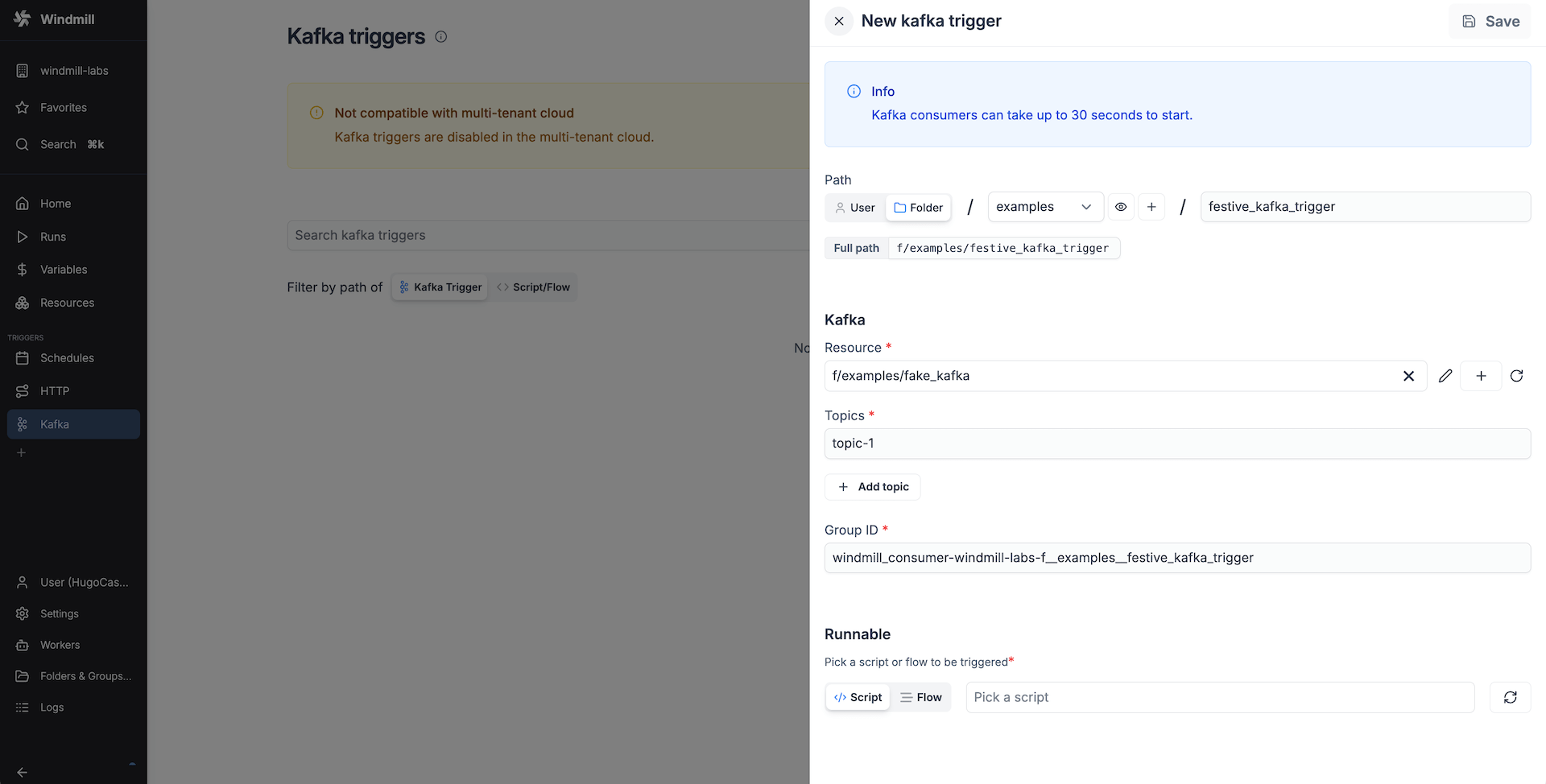
Create a new trigger on the Kafka triggers page. Add a Kafka resource with the broker hostnames (hostname:port) and the security settings. Specify the topics the trigger should listen to. The group id is automatically filled in from the current workspace and the trigger path. You can change it if necessary. It indicates the consumer group to which the trigger belongs. This guarantees that even if the trigger stops listening for a while, it will receive the messages it missed when it starts listening again.
The following settings are available under the Advanced section of the Kafka trigger editor.
Initial offset
The 'Initial offset' setting controls where the consumer starts reading when the consumer group has no committed offset (i.e. the first time the trigger is created or when using a new group ID):
- Latest (default): Only new messages produced after the trigger starts will be consumed.
- Earliest: All existing messages in the topic will be consumed from the beginning.
This corresponds to Kafka's auto.offset.reset configuration. It has no effect once the consumer group has a committed offset.
Auto-commit offsets
By default, Windmill commits offsets once the job has been successfully pushed to the queue. You can disable auto-commit to get manual control over when offsets are committed.
When auto-commit is disabled:
- Messages are delivered to your script but offsets are not committed automatically.
- If the trigger restarts before you commit, unacknowledged messages will be re-delivered.
- You must call the SDK helper from your script to commit offsets.
The preprocessor event payload includes trigger_path, partition and offset fields that you pass to the commit function. The SDK call stores the offset in the database and returns immediately. Every 5 seconds, the trigger's consumer picks up stored offsets and commits the highest one for each topic/partition pair to Kafka.
- TypeScript (Bun)
- Python
import * as wmill from "windmill-client";

export async function preprocessor(
  event: {
    kind: "kafka";
    trigger_path: string;
    payload: string;
    brokers: string[];
    topic: string;
    group_id: string;
    partition: number;
    offset: number;
  }
) {
  const msg = JSON.parse(atob(event.payload));

  return {
    data: msg,
    topic: event.topic,
    partition: event.partition,
    offset: event.offset,
    trigger_path: event.trigger_path
  };
}

export async function main(
  data: any,
  topic: string,
  partition: number,
  offset: number,
  trigger_path: string
) {
  // process the message
  // ...

  // commit the offset after successful processing
  await wmill.commitKafkaOffsets(trigger_path, topic, partition, offset);
}
import wmill
import base64
import json

def preprocessor(event: dict):
    msg = json.loads(base64.b64decode(event["payload"]))

    return {
        "data": msg,
        "topic": event["topic"],
        "partition": event["partition"],
        "offset": event["offset"],
        "trigger_path": event["trigger_path"],
    }

def main(
    data: dict,
    topic: str,
    partition: int,
    offset: int,
    trigger_path: str,
):
    # process the message
    # ...

    # commit the offset after successful processing
    wmill.commit_kafka_offsets(trigger_path, topic, partition, offset)
Reset offset to earliest
For existing triggers, clicking the 'Reset offset to earliest' button restarts the consumer with the offset reset to the beginning of the topic, causing all messages to be re-processed.
Runnable configuration
Once the Kafka resource and settings are set, select the runnable that should be triggered by this trigger.
The received webhook base64 encoded payload will be passed to the runnable as a string argument called payload.
Here's an example script:
export async function main(payload: string) {
  // do something with the message
}
And if you use a preprocessor, the script could look like this:
export async function preprocessor(
  event: {
    kind: "kafka",
    trigger_path: string;
    payload: string, // base64 encoded payload
    brokers: string[];
    topic: string; // the specific topic the message was received from
    group_id: string;
    partition: number;
    offset: number;
  }
) {
  if (event.kind !== "kafka") {
    throw new Error(`Expected a kafka event`);
  }

  // assuming the message is a JSON object
  const msg = JSON.parse(atob(event.payload));

  // define args for the main function
  return {
    message_content: msg.content,
    topic: event.topic,
    partition: event.partition,
    offset: event.offset
  };
}

export async function main(message_content: string, topic: string, partition: number, offset: number) {
  // do something with the message content and topic
}
Filters
Kafka triggers support message filtering so that only messages matching specified criteria trigger the runnable. Filters match against the message parsed as JSON. The base64 encoding only applies to the payload the script or flow receives - filters run on the message before it is encoded.
Each entry is either a criterion, addressing a top-level field by Key or a nested one by a dotted Path (e.g. account.id) and comparing it to a value, or a group (AND, OR or NONE) nesting further entries, which lets you express a condition like "A and B and (C or D)". The filter logic selector combines the top-level entries. A human-readable preview is shown for each criterion (e.g. payload.type == "order_created").
Filters are configured in the Kafka trigger editor and evaluated server-side before dispatching the job. They use the same engine as WebSocket trigger filters, where the syntax, the matching rules and the group semantics are documented in full.
Error handling
Kafka triggers support local error handlers that override workspace error handlers for specific triggers. See the error handling documentation for configuration details and examples.