Email triggers
Scripts and flows can be triggered by email messages sent to a specific email address, leveraging SMTP.
Email triggers on Windmill Community Edition are limited to 100 emails per day.
Configuration
Email triggers is available on both cloud and self-hosted instances.
Cloud
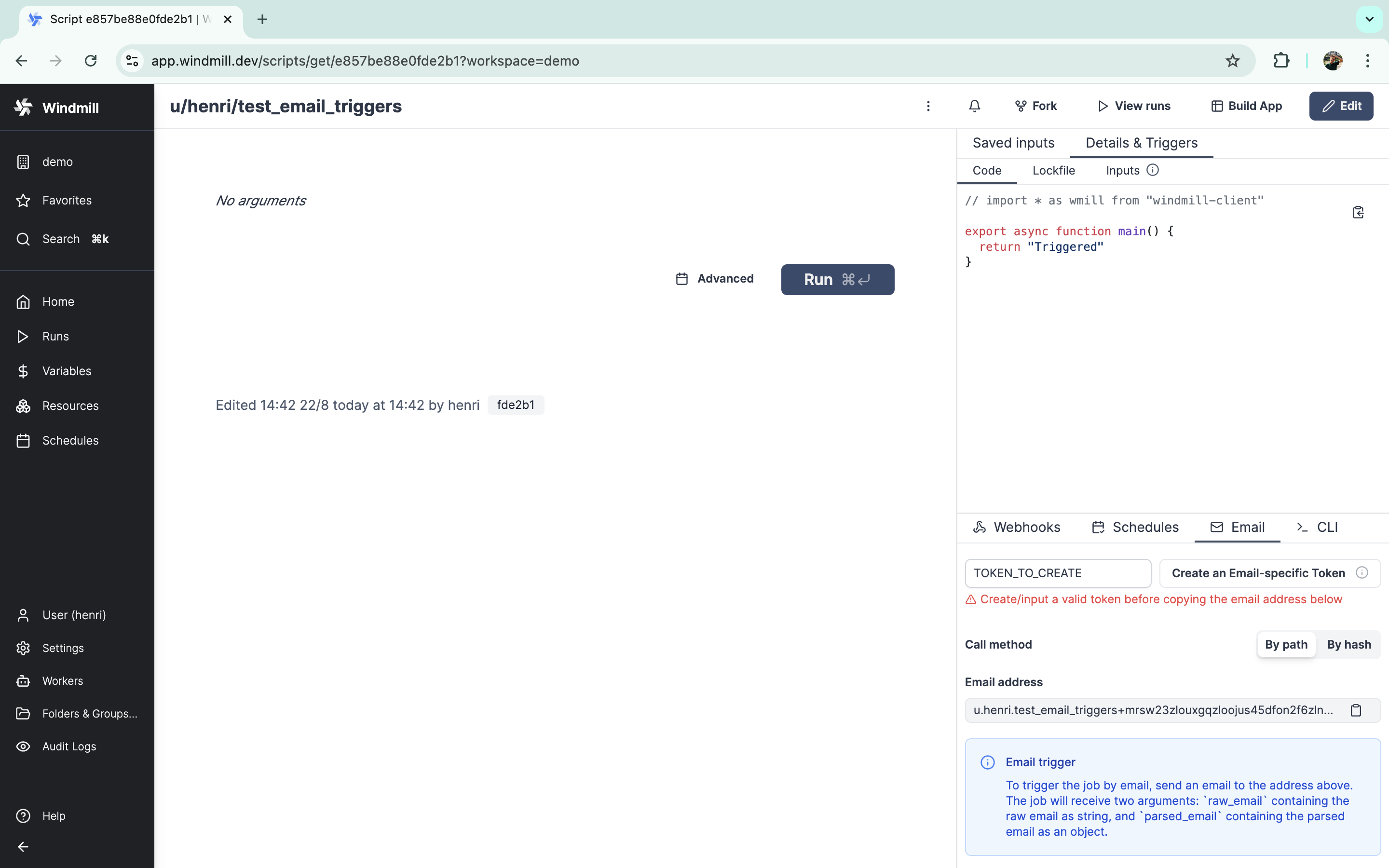
On cloud instances, Email triggers is already configured. You can try it from demo workspace.
Self-hosted
First, make sure that the port 25 is exposed either on your instance public IP or a separate IP and that it redirects to the Windmill app on port 2525. The Caddyfile already contains the necessary configuration for this. For Kubernetes, you will find example configurations for some providers on the Windmill helm charts repository.
In addition, you will need to create one or two records in your DNS provider depending on your setup.
If the port 25 is exposed on the same IP as the Windmill instance (e.g. docker-compose with Caddy):
- An MX record from
mail.<instance domain>to<instance domain>.
If the port 25 is exposed through a different IP (e.g. Kubernetes):
- An A/CNAME record that points to the IP of the Windmill instance with port 25 exposed (for example
mail_server.<instance domain>). - An MX record from
mail.<instance domain>to the record defined above (mail_server.<instance domain>if following the example).
You can choose any email domain, we suggest using mail.<instance domain>.
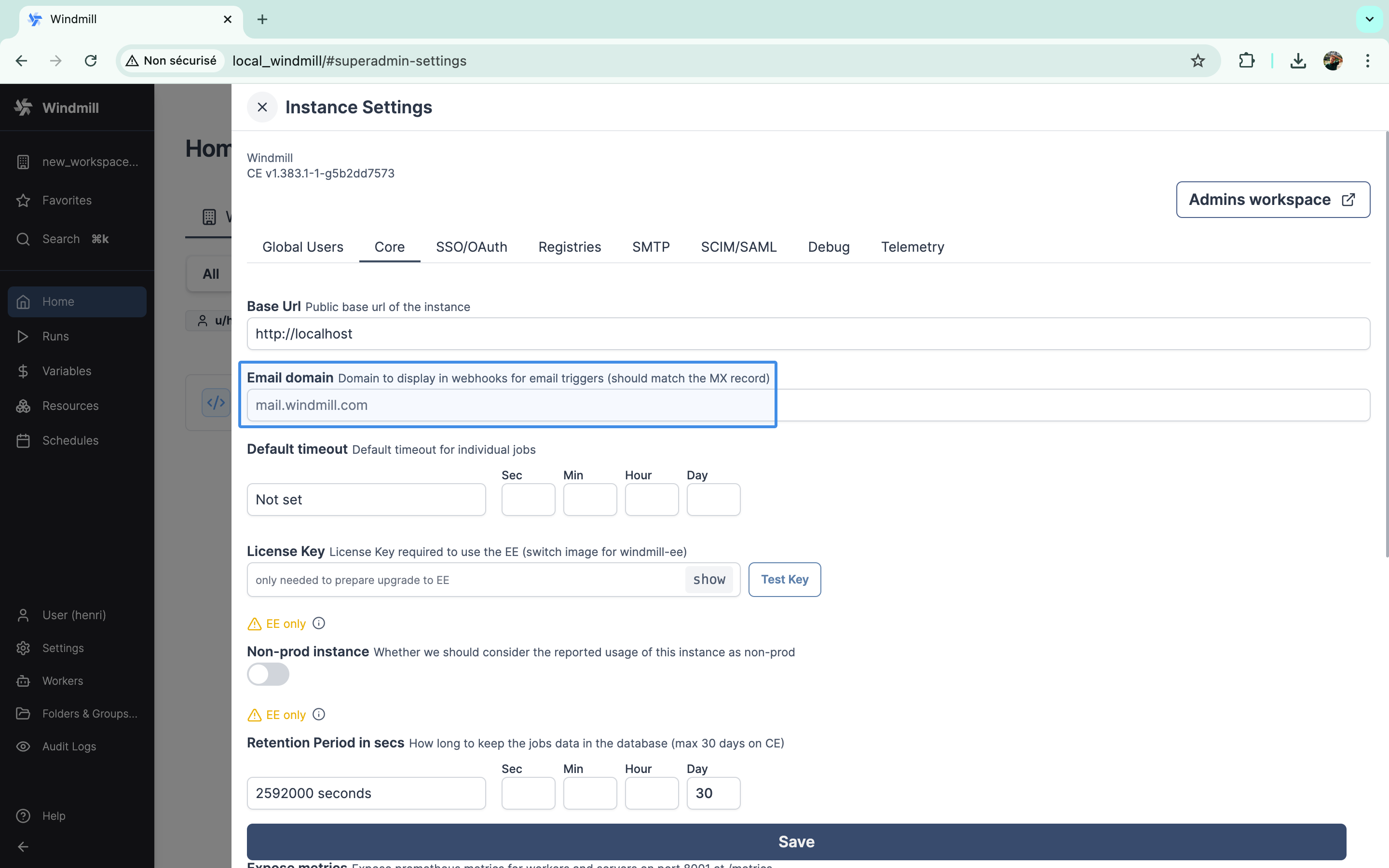
Once you have defined the DNS settings, set the email domain in the instance settings under the "Core" tab.
How to use
There are two kind of email triggers: default runnable emails and custom email triggers.
Default runnable emails
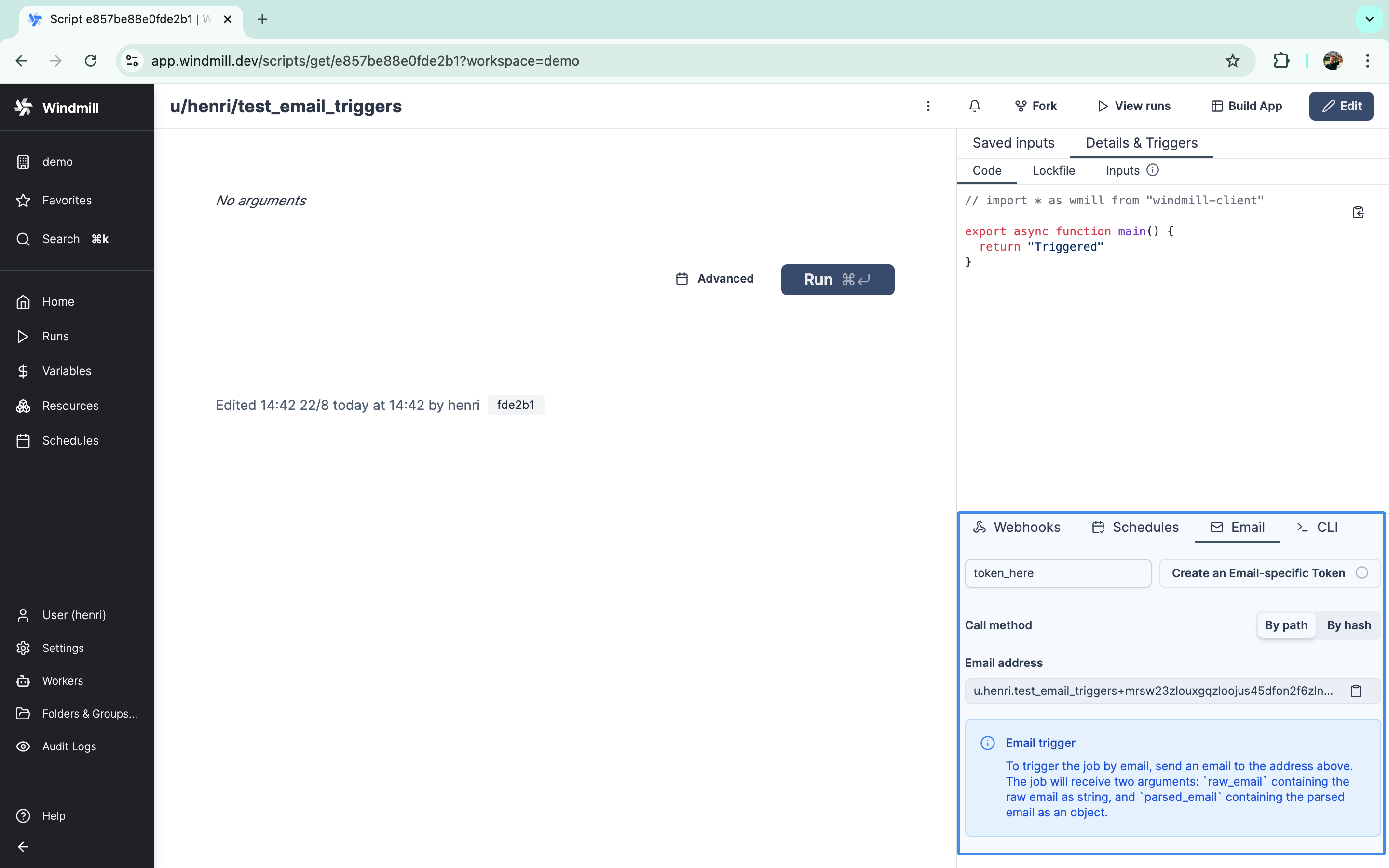
Each script and flow has a default trigger email address. You will find the specific email address to use in the triggers panels.
The email address takes the form <path/hash>+<workspace+path/hash+token base32 encoded>@<email domain>.
Custom email triggers
In addition to default runnable emails, you can also create email triggers with a custom address to trigger a script or flow. The local part can only contain lowercase letters, numbers, underscores, and dots (no dashes allowed). Only workspace admins can create custom email triggers or edit the local part of existing ones.
You have the option to prefix the email address with the workspace id.
This is useful for avoiding conflicts when you have a staging and production workspace and you are deploying between the two (see Deploy to prod).
The format is {workspace_id}-{local_part}@yourdomain.com.
On Cloud, the option is always enabled.
Email extra arguments
You can pass additional arguments to your script by adding them to the email address, formatted as query parameters.
For default runnable emails, add them after the base32 encoded part, separated by a +:
<path/hash>+<workspace+path/hash+token base32 encoded>+env=prod&debug=true®ion=us-west@<email_domain>
For custom email triggers, add them before the @ symbol, separated by a +:
alerts+env=prod&debug=true&[email protected]
These extra arguments are available in your script as email_extra_args:
{
  "env": "prod",
  "debug": "true",
  "region": "us-west"
}
Your script will receive the following arguments:
raw_email: the raw email as a stringparsed_emailthe parsed email with the following attributes:headersa dictionary with the email headers (e.g.From,To,Subject,Date)text_bodythe text body of the email (or textified html body if none)html_bodythe html body of the email (or htmlified text body if none)attachmentslist of attachments with the following attributes:headersa dictionary with the attachment headersbodythe attachment data
email_extra_args: (optional) a dictionary containing extra arguments from the email address
Attchments are uploaded to the workspace object storage (s3) and are replaced in parsed_email by s3 objects ({ s3: "path/to/key" }).
A workspace object storage is required for attachments to be handled.
Here's an example script:
export async function main(
  raw_email: string,
  parsed_email: any,
  email_extra_args?: Record<string, string>
) {
  console.log("Email from:", parsed_email.headers["From"][0].address);

  if (email_extra_args) {
    console.log("Environment:", email_extra_args.env);
    console.log("Debug mode:", email_extra_args.debug === "true");
  }

  // do something with the email
}
And if you use a preprocessor, the script could look like this:
export async function preprocessor(
  event: {
    kind: "email",
    raw_email: string,
    parsed_email: any,
    email_extra_args?: Record<string, string>,
  }
) {
  if (event.kind !== "email") {
    throw new Error("Expected an email event");
  }

  // Access extra args from the email address
  const environment = event.email_extra_args?.env || "production";
  const debugMode = event.email_extra_args?.debug === "true";

  // return what you want to pass to the main function
  return {
    sender_address: event.parsed_email.headers["From"][0].address,
    email_body: event.parsed_email.text_body,
    environment,
    debug_enabled: debugMode
  }
}

export async function main(
  sender_address: string,
  email_body: string,
  environment: string,
  debug_enabled: boolean
) {
  console.log(`Processing email from ${sender_address} in ${environment} environment`);
  if (debug_enabled) {
    console.log("Debug mode enabled, email body:", email_body);
  }
  // do something with the processed data
}
From a script or flow deployed page, you will find on the "Details & Triggers" - "Email" tab the email address to use.
Enable/disable triggers
Custom email triggers can be enabled or disabled from the trigger editor without having to delete and recreate them. Disabled triggers reject incoming emails for their address, making it easy to temporarily pause a trigger (e.g. during maintenance) and re-enable it later. Only workspace admins can toggle the enabled state.
Custom TLS certificate
By default, the self-hosted SMTP server generates a self-signed TLS certificate on startup. For production deployments you can supply your own certificate so that senders can verify the server over STARTTLS.
The certificate is configured via environment variables on the server container. Two modes are supported:
- Direct PEM content: set
SMTP_TLS_CERT_PEMandSMTP_TLS_KEY_PKCS8_PEMto the full PEM contents of the certificate and private key. - File paths: set
SMTP_TLS_CERT_PEM_PATHandSMTP_TLS_KEY_PKCS8_PEM_PATHto paths inside the container (e.g. mounted from Kubernetes secrets or Docker volumes).
The private key must be in PKCS#8 format. Convert an existing key with:
openssl pkcs8 -topk8 -nocrypt -in key.pem -out key_pkcs8.pem
When file paths are used, the certificate is reloaded from disk every 12 hours so that renewed certificates are picked up without restarting the server. If loading or validating the custom certificate fails, Windmill logs an error and falls back to the self-signed certificate.
This feature is only available on Enterprise Edition.
Git sync
Custom email triggers are included in Git sync alongside other event triggers (HTTP routes, WebSocket, Kafka, etc.). When the Triggers resource type is enabled on a git sync repository, email triggers are pushed to the repository as *.email_trigger.yaml files and pulled back into the workspace the same way. This lets you version, review, and promote email trigger definitions across workspaces using the regular Windmill CLI / git workflow.
Error handling
Email triggers support local error handlers that override workspace error handlers for specific triggers. See the error handling documentation for configuration details and examples.