Turn a PowerShell script into a web form
Windmill reads the param() block of a PowerShell script and generates a form from it.
Anyone you share the script with can fill in the form in the browser and run the script, without a PowerShell console or access to the server.
Every run is recorded in the Runs page with its inputs, logs, result and the user who started it.
This guide writes a helpdesk script, shows how each param() declaration becomes a form field, and covers how to share the form with people who do not write scripts.
Where the script runs
PowerShell scripts run on Windmill workers. The Windmill Docker image includes PowerShell 7, so Linux workers run PowerShell scripts out of the box. Scripts that need Windows, such as the Active Directory cmdlets in the example below, run on Windows workers, a Self-Hosted Enterprise feature. Give the script a worker group tag that only your Windows workers listen to, so that it is not picked up by a Linux worker.
Write the script
From the Home page, click New and select Script, then pick PowerShell as the language.
The script below unlocks an Active Directory account and can require a password change at next logon.
It needs a domain-joined Windows worker with the ActiveDirectory module installed, running as an account allowed to unlock users.
<#
.SYNOPSIS
Unlocks an Active Directory account and can require a password change at next logon.
#>
[CmdletBinding()]
param(
    [Parameter(Mandatory)]
    [string]$SamAccountName,

    [ValidateSet('corp.contoso.com', 'emea.contoso.com')]
    [string]$Domain = 'corp.contoso.com',

    [switch]$RequirePasswordChange,

    [int]$TicketNumber
)

Import-Module ActiveDirectory

Write-Verbose "Unlocking $SamAccountName on $Domain (ticket $TicketNumber)"
Unlock-ADAccount -Identity $SamAccountName -Server $Domain

if ($RequirePasswordChange) {
    Set-ADUser -Identity $SamAccountName -Server $Domain -ChangePasswordAtLogon $true
}

$user = Get-ADUser -Identity $SamAccountName -Server $Domain -Properties LockedOut
[PSCustomObject]@{
    account = $user.SamAccountName
    lockedOut = $user.LockedOut
    passwordChangeRequired = [bool]$RequirePasswordChange
    ticket = $TicketNumber
} | ConvertTo-Json | Set-Content -Path ./result.json
The form generated from this param() block has:
SamAccountName: a required text field.Domain: a dropdown with the two domains,corp.contoso.comselected.RequirePasswordChange: a toggle.TicketNumber: an optional integer field.- A collapsed
CmdletBinding parameterssection, because the script declares[CmdletBinding()].
The result is the JSON written to ./result.json.
Without that file, the result is the last line the script writes to the output, as a string.
To try the form on any worker without Active Directory, use this script, which returns the values it receives:
param(
    [Parameter(Mandatory)]
    [string]$Name,
    [int]$Count = 3,
    [double]$Ratio = 0.5,
    [bool]$Enabled,
    [switch]$Force,
    [datetime]$StartAt,
    [ValidateSet('Low', 'Medium', 'High')]
    [string]$Priority = 'Medium',
    [string[]]$Tags,
    [PSCustomObject]$Options
)

[PSCustomObject]@{
    name = $Name
    count = $Count
    ratio = $Ratio
    enabled = $Enabled
    force = [bool]$Force
    startAt = $StartAt
    priority = $Priority
    tags = $Tags
    options = $Options
} | ConvertTo-Json -Depth 5 | Set-Content -Path ./result.json
The form preview on the right of the editor updates as you edit the param() block.
Fill it in and click Test to run the script.
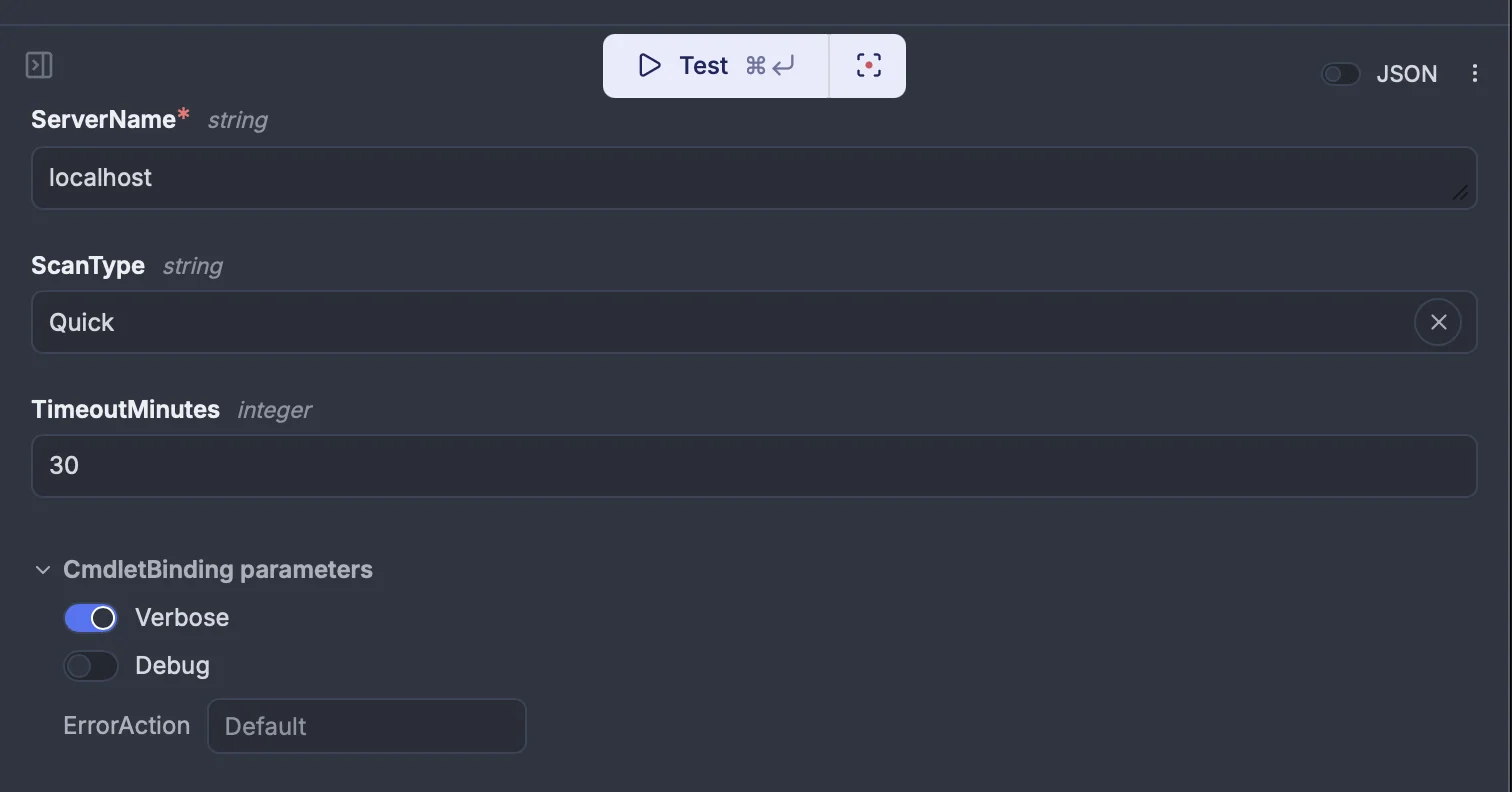
The screenshot below shows the form of another script, which declares [CmdletBinding()] and a required ServerName, a ScanType and a TimeoutMinutes parameter:
How param() becomes form fields
In the param() block | Form field |
|---|---|
[string]$X, or no type | Text field. |
[int]$X, [long]$X | Integer field. |
[double]$X, [decimal]$X, [single]$X | Number field. |
[bool]$X | Toggle. The script receives $true or $false. |
[switch]$X | Toggle. When it is on, the script is called with -X. When it is off, the switch is left out. |
[datetime]$X | Date and time field. |
[PSCustomObject]$X | JSON object field. The value reaches the script as the output of ConvertFrom-Json. |
[string[]]$X and other arrays of the types above | List field of that item type. [int[]] and [long[]] give a list of numbers rather than integers. |
[ValidateSet('A', 'B')] | Dropdown with those values. |
[Parameter(Mandatory)] or [Parameter(Mandatory = $true)] | Required field, unless the parameter also has a default value. Other parameters are optional. PowerShell ignores the default of a mandatory parameter, so a run that leaves that field empty fails: give a mandatory parameter no default. |
$X = 'text', $X = 3, $X = 1.5 | Field prefilled with that default. An untyped parameter with a number default becomes an integer or number field. |
Any other type, for example [hashtable], [securestring] or [pscredential] | Text field. The value is passed to the script as a string, so the run fails when PowerShell cannot convert a string to that type, as with [hashtable] and [securestring], and [pscredential] prompts for a password that nobody can enter. Use [string] or [PSCustomObject] instead. |
[CmdletBinding()] before param() | A CmdletBinding parameters section with Verbose and Debug toggles and an ErrorAction dropdown (Stop, Continue, SilentlyContinue). With Verbose or Debug on, Write-Verbose and Write-Debug output appears in the job logs prefixed with VERBOSE: or DEBUG:. |
You can add a title, a description and a placeholder to each field, and set other options, from the script's Generated UI settings. Those settings are kept when you edit the code later.
What the form does not read
The form is built from a parser that reads the param() block without running it.
Keep these limits in mind:
param()must come first in the script. Only comments, comment-based help and attributes such as[CmdletBinding()]can come before it.- Keep comments out of the
param()block. A comment inside it is read as code: an apostrophe in a comment, as in# the user's login, leaves the form with no fields, and a$in a comment can drop the type of the next parameter. Put help in comment-based help aboveparam(), and field descriptions in the Generated UI settings. - Defaults are read only when they are a quoted string or a number. Defaults such as
$true,$env:COMPUTERNAME,@('a', 'b')or(Get-Date)are not shown in the form. For a toggle that should be on unless someone turns it off, invert it, for example[switch]$SkipNotification. HelpMessage,[ValidateRange()],[ValidatePattern()],[ValidateScript()],[ValidateLength()],[Alias()]and parameter sets do not change the form. They stay in the script, so PowerShell still applies them when the script runs, and a value they reject fails the run.[ValidateSet()]on an array parameter gives a dropdown with a single choice, not a multi-select.- The
CmdletBinding parameterssection has noWhatIforConfirmtoggle, even withSupportsShouldProcess. With[CmdletBinding()], a parameter you declare with the name of a common parameter, such as[switch]$WhatIf, is left out of the form and never receives a value. For a dry run, add your own parameter, for example[switch]$DryRun. - No PowerShell type maps to a Windmill resource. Read credentials inside the script from a secret variable rather than asking for them in the form.
Two runtime behaviors also apply:
- Module autoloading is turned off in Windmill jobs, so import every module you use with
Import-Module. Modules that are not on the worker are installed when the script runs. - Errors stop the script: a script with a
param()block runs with$ErrorActionPreference = 'Stop'andSet-StrictMode -Version Latest, and an error that is not caught fails the run.
Share the form
Deploy the script. Its page shows the form, and anyone who can run the script can use it.
To give helpdesk staff access without letting them edit scripts:
- Give them the Operator role, which runs and views what others built without authoring scripts, flows or apps.
- Put the script in a folder and share the folder with their group.
When the script uses a secret, share the script through an app instead. From the script's page, build an app from its form. The app runs the script on behalf of the app's author, so helpdesk staff do not need read access to the secret, and the user who ran it is still recorded in the Runs page and the audit logs (redacted on the Community plan).