dbt quickstart
Windmill runs dbt projects as a script language of its own. One dbt project is one Windmill script: the project's own files ride with the script as its module bundle, and the worker materializes them into the job directory before invoking dbt. Nothing is cloned at run time, and the project itself is unmodified - the same directory a developer runs dbt build against locally.
What you get on top of dbt build is the rest of Windmill: scheduling and triggers, permissions, run history, live per-model progress, and the project's models as first-class assets, so a Python or DuckDB script reading one of its marts appears on the same lineage graph.
The runtime, the model graph and the UI are all in the Community Edition. Only the mssql and oracle adapters require an Enterprise Edition license, mirroring the boundary the native SQL languages already draw.
dbt is in the browser's new-script language picker, and a dbt script opens in an editor of its own rather than the generic one. Projects can equally be imported and edited with the CLI.
dbt is not offered as an inline language, though: a flow step and an app runnable are a raw body with nowhere to carry a project, so a flow reaches a dbt project the way it reaches any other script - by path, to a deployed one.
Configure a warehouse
A dbt project on Windmill carries no connection of its own. Warehouses are configured once per workspace, under Workspace settings -> dbt: each entry is a name, a resource and an optional dbt target. A project reaches one by name, and takes main when it names none.
The name is also the warehouse's identity in the asset graph - every model becomes dbt://<warehouse>/<schema>/<name> - so two projects pointing at the same warehouse share their nodes instead of drawing two disconnected islands.
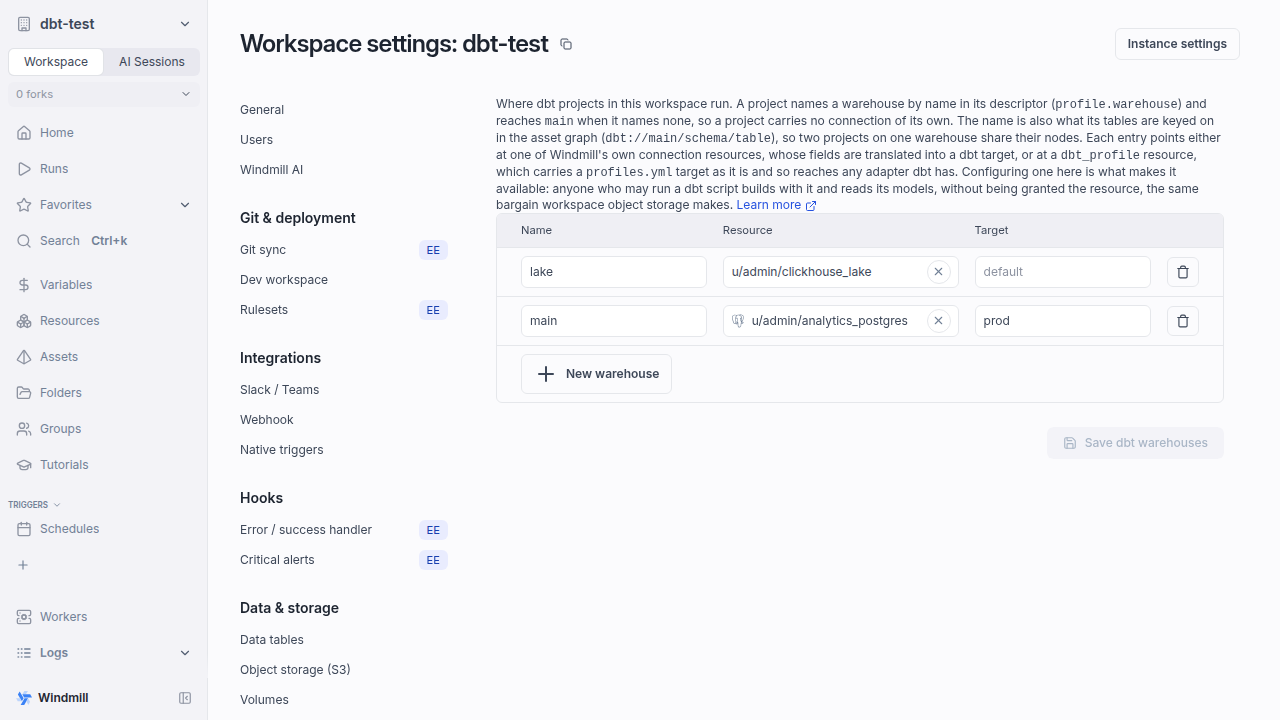
A warehouse points at one of two kinds of resource.
A Windmill connection resource, when one exists for your warehouse: postgresql, redshift, mysql, snowflake, bigquery (or gcp_service_account) and databricks. Windmill translates the fields it carries into the keys dbt reads, so there is nothing dbt-specific to fill in - the resource you already use elsewhere works. The adapter comes from the resource's type.
A dbt_profile resource, for everything else - and for anything the translation above does not cover. It is one entry of a profiles.yml outputs map, as a resource. Given this file on a developer's machine:
# ~/.dbt/profiles.yml
my_project:
  target: prod
  outputs:
    prod:
      type: clickhouse
      host: ch.internal
      port: 8123
      user: analytics
      password: s3cret
      schema: marts
      secure: true
the resource is the prod block - paste it in as it stands, type and all:
{
  "type": "clickhouse",
  "host": "ch.internal",
  "port": 8123,
  "user": "analytics",
  "password": "$var:u/alice/ch_password",
  "schema": "marts",
  "secure": true
}
Nothing is renamed or lifted out, so the block you run locally is the block Windmill runs. The resource type declares no fields, so you get a JSON editor. $var: and $res: references resolve, including inside nested keys, so credentials stay Windmill secrets.
The layers above the block are not in the resource, because Windmill already has them: the profile name comes from the project's own dbt_project.yml, and which output to use is the warehouse's Target (or the descriptor's profile.target). A project with a dev and a prod output becomes two warehouses, one resource each.
Every key is handed to dbt unchanged - so any adapter dbt supports works, including ones Windmill has never heard of (trino, athena, spark, fabric, whatever ships next). Copy the keys from your adapter's own dbt documentation; numbers and booleans keep their type.
With the dbt-core-1x engine the adapter is installed from PyPI as dbt-<type>, and that install is not sandboxed - so it is limited to adapters Windmill ships a list of, plus whatever an instance admin adds to DBT_EXTRA_ADAPTERS. dbt-core-2x and fusion carry their adapters in the binary and install nothing, so they take any type at all.
Two conveniences on top of a literal target: root_certificate_pem is written next to profiles.yml and pointed at by sslrootcert rather than being sent as a value, and the descriptor's profile.schema and threads override their keys in the block.
The mssql and oracle adapters need an enterprise license, whichever kind of resource reaches them - the same boundary the native ms_sql_server and oracledb script languages draw. Every other adapter is CE.
A project that would rather keep its own profiles.yml file still can: see Bring your own profiles.yml.
Configuring a warehouse is what makes it available: the resource is read on the runner without a per-user permission check, exactly as s3:// reaches the workspace bucket. Anyone who may run a dbt script may build with the warehouses it names.
Import a project
The project is copied in as-is, into a <script>__dbt/ folder next to where the script will live. There is no transformation step and no Windmill-specific file to add:
mkdir -p f/analytics/analytics__dbt
cp -r my-dbt-project/. f/analytics/analytics__dbt/
wmill sync push
That deploys the script f/analytics/analytics. A wmill sync pull writes the bundle back verbatim, so the tree stays a canonical dbt project that dbt itself can run with --project-dir analytics__dbt:
f/analytics/
├── analytics.script.yaml           the script's Windmill metadata
└── analytics__dbt/                 the module bundle: the project, unmodified
    ├── wm_dbt.yaml                 the descriptor - OPTIONAL
    ├── dbt_project.yml
    ├── packages.yml
    ├── models/staging/stg_orders.sql
    ├── models/marts/_marts__models.yml
    ├── macros/cents_to_dollars.sql
    ├── seeds/country_codes.csv
    └── snapshots/orders_snapshot.sql
dbt_project.yml is what identifies a project - the worker refuses a bundle without it. A team whose repository must stay canonical keeps it and lets git sync push the project into the workspace; a team with no repository pushes straight from a working copy. Either way the version of the project is the version of the script: a deploy is atomic, a rollback is a redeploy, and the graph the deploy parsed is exactly what a run builds.
Two paths deploying to the same script path is an error rather than a silent overwrite, so f/analytics/analytics.py and f/analytics/analytics__dbt/ cannot coexist.
The dbt editor
A dbt script is a project rather than a body of code, so it opens in an editor shaped like one: a file tree, the descriptor, the run arguments and the model graph. Picking dbt in the new-script language picker seeds a minimal project - wm_dbt.yaml, dbt_project.yml and one model - and an imported project opens the same way.
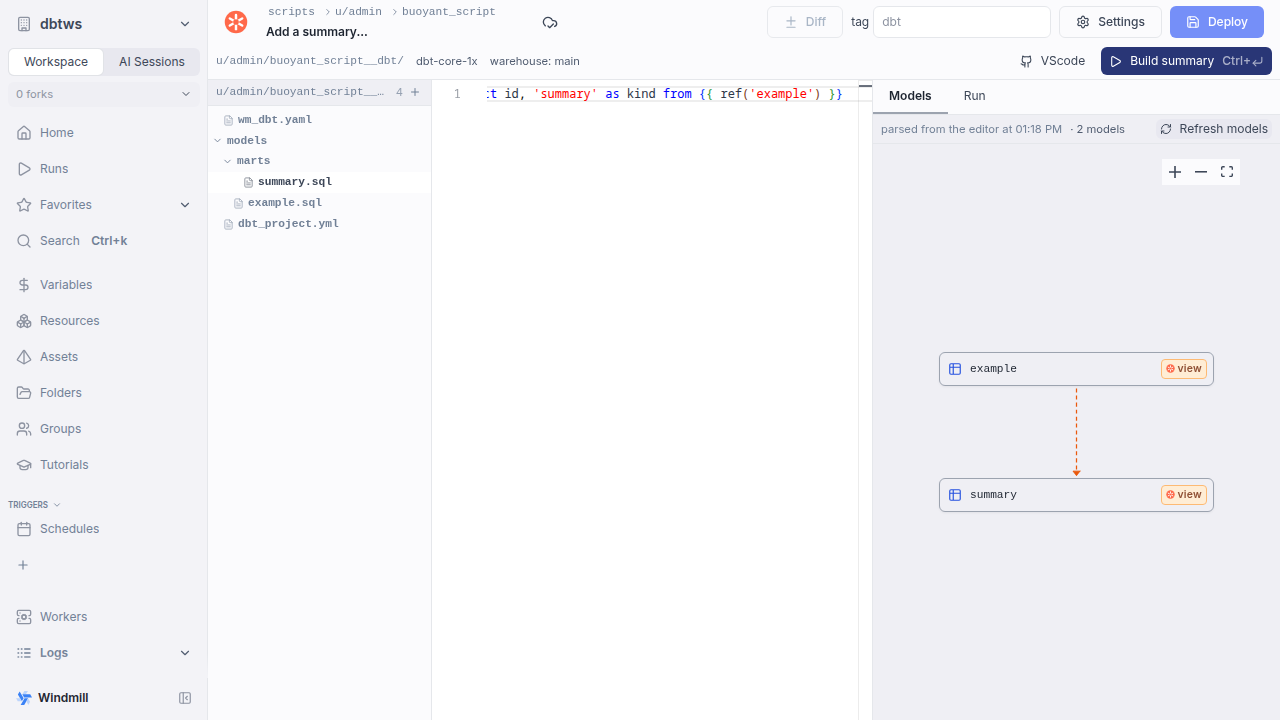
The header names the project folder, its engine and the warehouse its assets are keyed on, and flags a descriptor that does not parse. The tree adds and removes files - .sql, .py, .yml, .yaml, .csv and .md - all but dbt_project.yml, which cannot be deleted since it is what makes the bundle a project. Selecting a file opens it with the grammar its extension implies, and the descriptor sits at the root of the tree.
The run button reads Build <model> when a model file is open and Build project otherwise. The whole bundle travels with the job either way, since dbt resolves ref() project-wide and cannot run a subset of the files; Build <model> only adds dbt's own --select for that model, with its tests along for the ride. A .sql file that is not a model - a macro, an analysis, a singular test - is not selectable by name, so those build the project.
The right pane has two tabs: Models, the graph covered below, and Run, the run form over the job log. That form is derived from the descriptor server-side, which is why a dbt script has no Generated UI settings tab: anything refined there would be overwritten by the next deploy.
Refreshing the model graph
The Models pane draws the project's graph, and it says where the graph came from: as of last deploy for a deployed project, never parsed for one that has never been deployed or refreshed.
Refresh models redraws it from the project as it is in the editor. It runs a real dbt parse job over the files - dbt deps, then dbt parse, no build and no warehouse writes - and the label becomes parsed from the editor at 01:18 PM. The buffer's graph and the deploy's are drawn identically, so the label is how you tell them apart. The graph is always dbt's own: it comes from the manifest dbt produced, not from a scan of the ref() calls, so it agrees with dbt about enabled, macro-built refs, loops and package models.
The parse runs on your workers under the script's worker tag and timeout, so a project reaching a private network parses on a worker that can reach it. It carries whatever run arguments have been filled in, since vars steer enabled, schemas, aliases and relation identity - a parse without them would describe a different project than a build with them.
It renders profiles.yml before dbt runs, so the warehouse the descriptor names has to be one configured on the workspace: a project that names an unknown one fails a refresh the way it would fail a run, and the pane shows dbt's own message with a link to the parse job.
Selecting a node shows that model's SQL and the file it lives in, with Edit to open it in the tree.
A refresh's graph belongs to the editing session rather than to the script: it carries no deployed version, is readable only through the parse job that produced it, and publishes no asset ownership, so refreshing a project you are writing never changes what the workspace asset graph says about the deployed one. Only the last few parses of a script are kept per user, dropped as newer ones land.
Run it
Deploying parses the project (dbt deps + dbt parse, no warehouse touched) and stores its graph. Running it invokes one dbt build per job - dbt's own threading provides the parallelism, Windmill provides the observability.
A run takes a single command argument whose variant is the dbt command, so it carries exactly the overrides that command accepts:
| Command | What it does | Arguments |
|---|---|---|
build | Builds the project (models, seeds, snapshots and tests interleaved) | select, exclude, vars, full_refresh, defer, each defaulting to the descriptor's own value |
retry | Resumes a failed run from its failure point, rebuilding only what it left failed or skipped | dbt_retry_job, the id of the run to resume |
show | Previews a model's rows without writing anything | model, vars, limit (100 by default, 1000 max) |
parse | Parses the project and ingests its model graph, building nothing | vars |
Each {{ placeholder }} the descriptor interpolates in vars becomes one more required run argument, so a date-parameterized project gets a proper run form, webhook payload and schedule argument.
show and parse are not run-form variants - each is a thing you do to the project in front of you, and the graph and the editor are where they live - but both are accepted from a flow, the CLI and the API, which is what makes the editor's refresh scriptable. A parse of a deployed version records that run's own snapshot of the graph and changes nothing about what the script owns.
While a run is in flight, the run page shows each model's state on the project graph: green as nodes finish, spinners on the ones still building, and failures with the nodes dbt skipped behind them. When it ends, every node carries its status, timing, row count and dbt's own message, so a partial failure is legible without reading the log. Live per-model progress is dbt-core-1x only; the other two engines settle every node from run_results.json when the invocation ends (see Engines).
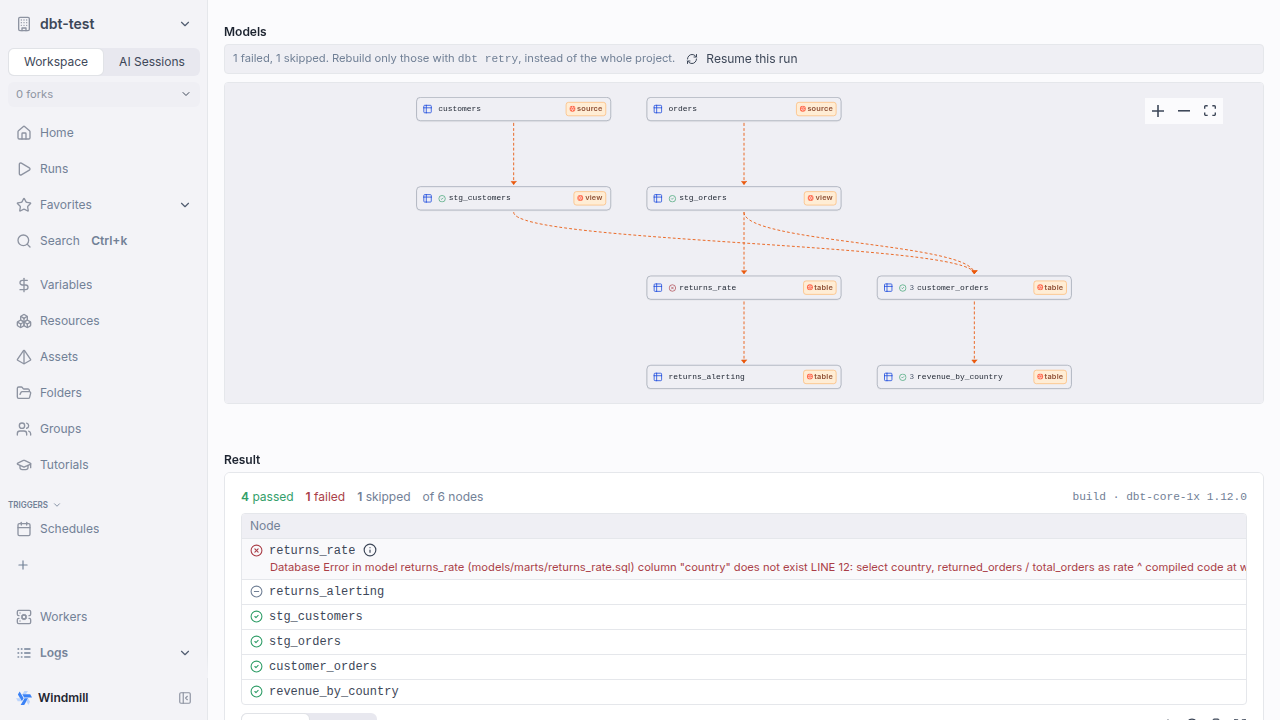
Test failures honor dbt's own severity: an error test fails the job and names the failing node, a warn test surfaces without failing it. Selecting a model on the run page shows its SQL and fully-qualified relation, and Preview rows dispatches a dbt show for exactly that node.
Resume this run on a failed run page fills in the retry command for you. Retry state is kept per worker and in the database, so a retry works from any worker with a database connection, and it is refused rather than misapplied when the project, warehouse or engine has changed since. Retries do not take a lock: a project that must not run twice at once sets the script's concurrency limit, which covers its retries with it.
Deferring to a previous run
defer resolves a ref() a run does not build to the relation the last successful run of the same environment produced, instead of to the schema this run writes into.
Rebuilding one model into a scratch schema then costs that model rather than everything above it.
It is a toggle on the build command, defaulting to the descriptor's own defer:, and a show takes the descriptor's value.
Per run rather than descriptor-only, because the run that publishes an environment's state and the run that defers to it are two invocations of the same script.
A deferring run names the run it read, in the job log and in its result as deferred_to.
The state is manifest.json and run_results.json, published by a successful build that added nothing of its own, kept per script and environment - the warehouse, the target dbt actually runs, and the database and schema they resolve to.
So a run overriding select, exclude or vars publishes nothing, and neither does a dynamic descriptor, a retry, a preview, or a deferring run itself.
It lives in the database rather than on the worker that produced it, so the next run reads it wherever it lands, and it goes with the script rather than expiring.
A manifest past DBT_STATE_INLINE_MAX_BYTES (8 MiB, an environment variable on the worker) goes to the instance's object storage instead, which is an enterprise feature, so on CE that ceiling is the limit.
Deferring is refused rather than run without a state: where the environment has none published, where the profile selects its schema or database with a Jinja template (dbt renders those and Windmill does not, so two renderings would resolve to one environment), and on an agent worker, which reaches the database only through the API. A repointed warehouse or a moved schema is a different environment, so it reads as one nothing has published yet rather than as a manifest whose relation names no longer fit.
dbt's own state selectors compare against the same artifacts, so state:modified+, state:new and result:error+ in select or exclude need defer on and are refused without it: dbt-core-2x and fusion read a missing state as an empty one and exit 0, building nothing or everything while reporting success.
The descriptor may not carry them at all, since its selection also decides which nodes the script owns and the deploy resolves it before any run exists.
source_status: is refused throughout, and so is a result: selector against a state published without run_results.json, which is what a build recovered by retry_failed_nodes stores.
dbt retry reads the run it resumes from --state, the flag a deferral reads its manifest from, and only dbt-core-1x separates the two (--defer-state).
So a run that deferred cannot be resumed on dbt-core-2x or fusion, and its retry_failed_nodes is dropped there too.
The descriptor
wm_dbt.yaml, inside the project folder, holds the run configuration. It is optional - an unmodified dbt project is already a complete Windmill script, running the whole project against the workspace's default warehouse - and appears only when the project wants something Windmill-specific.
# dbt-core-1x (default) | dbt-core-2x | fusion
engine: dbt-core-1x
profile:
  warehouse: main       # a warehouse configured on the workspace, by name
  target: prod          # dbt target within that profile
  # schema: marts       # target schema (BigQuery calls it the dataset)
  # type: postgres      # pin the adapter when inference is wrong
  # profiles_yml: profiles.yml   # or keep the project's own file
# Passed to dbt verbatim - this is dbt's selector grammar, not Windmill's
select: ["tag:nightly+"]
exclude: []
# build (models and tests interleaved) | after_all | none
test_behavior: build
vars:
  run_date: "{{ day }}" # a placeholder becomes a required run argument
  strict: false         # non-string values keep their YAML type
threads: 8
full_refresh: false
# Resolve a ref() this run does not build through the state the last successful
# run of this environment published, instead of through the schema it writes into
defer: false
# Static-analysis pass producing column-level lineage. Needs an engine that does it
column_lineage: false
# Rebuild the nodes a failed build left failed or skipped, in this same job
retry_failed_nodes:
  attempts: 2
  delay_seconds: 30
# Extra env for the project's own {{ env_var() }} lookups
env:
  DBT_PASSWORD: $var:u/alice/warehouse_password
| Field | Default | Purpose |
|---|---|---|
engine | dbt-core-1x | Which dbt to run, see Engines |
profile.warehouse | main | A warehouse configured on the workspace, by name |
profile.target | the warehouse's, else default | dbt target name within the profile |
profile.schema | the resource's | Target schema. Required for BigQuery, whose resource is a service-account JSON with no dataset in it |
profile.type | the resource's, else inferred | dbt adapter, spelled as dbt's own type:. Pins it when the inference is wrong or the resource is a custom type. A dbt_profile resource states its own, and a descriptor disagreeing with it is an error rather than a silent override |
profile.profiles_yml | - | Path (relative to the project) of the project's own profiles.yml, used instead of rendering one |
select / exclude / selector | - | Passed to dbt verbatim. They also scope what the script owns in the graph |
test_behavior | build | build interleaves tests with models (dbt's own default); after_all runs them as a second phase; none skips them |
vars | - | --vars. Values keep their YAML type; string leaves may carry {{ arg }} placeholders substituted from job arguments |
threads | dbt's own | dbt's --threads |
full_refresh | false | dbt's --full-refresh |
defer | false | Default for the build command's own defer, see Deferring to a previous run |
column_lineage | false | Run the static-analysis pass that produces column-level lineage, on the engines that write it |
retry_failed_nodes | - | {attempts, delay_seconds}: in-job retry of a build's failed and skipped nodes, up to 10 attempts. Not available on agent workers |
env | - | Environment for the dbt process, for the project's own {{ env_var() }} lookups and for engine flags. A $var:<path> value resolves to that Windmill variable |
select, exclude and vars are overridable per run. Overriding select changes what a run builds without changing what the graph says the script owns; when the graph itself should differ, split the project across several scripts, each with its own selection. Unknown fields are refused at parse time rather than silently ignored.
Prefer the descriptor's env over the script's own environment variables for anything the graph depends on (an env_var() feeding a schema, alias or enabled): the descriptor's map applies to the deploy-time parse as well as the run, so the stored graph and the build agree.
Bring your own profiles.yml
A project that keeps its own profiles.yml runs unchanged - point profile.profiles_yml at it and inject any credentials as Windmill variables through the descriptor's env map, which {{ env_var() }} then reads. Such a project still names a warehouse, but only to say where its assets belong: the name grants nothing, and without it the project's models land on a node nothing else reaches.
Models in the asset graph
Every model, seed, snapshot and source the project declares becomes an asset named dbt://<warehouse>/<schema>/<name>, with the project's ref() lineage as edges between them. Models, seeds and snapshots are writes; sources are reads. Each node carries its materialization (view, table, incremental, snapshot, seed), its tags, its column metadata (the descriptions the project declares, or the analyzed column schema when it asks for one) and its data tests, and the script node is badged with the number of models it materializes.
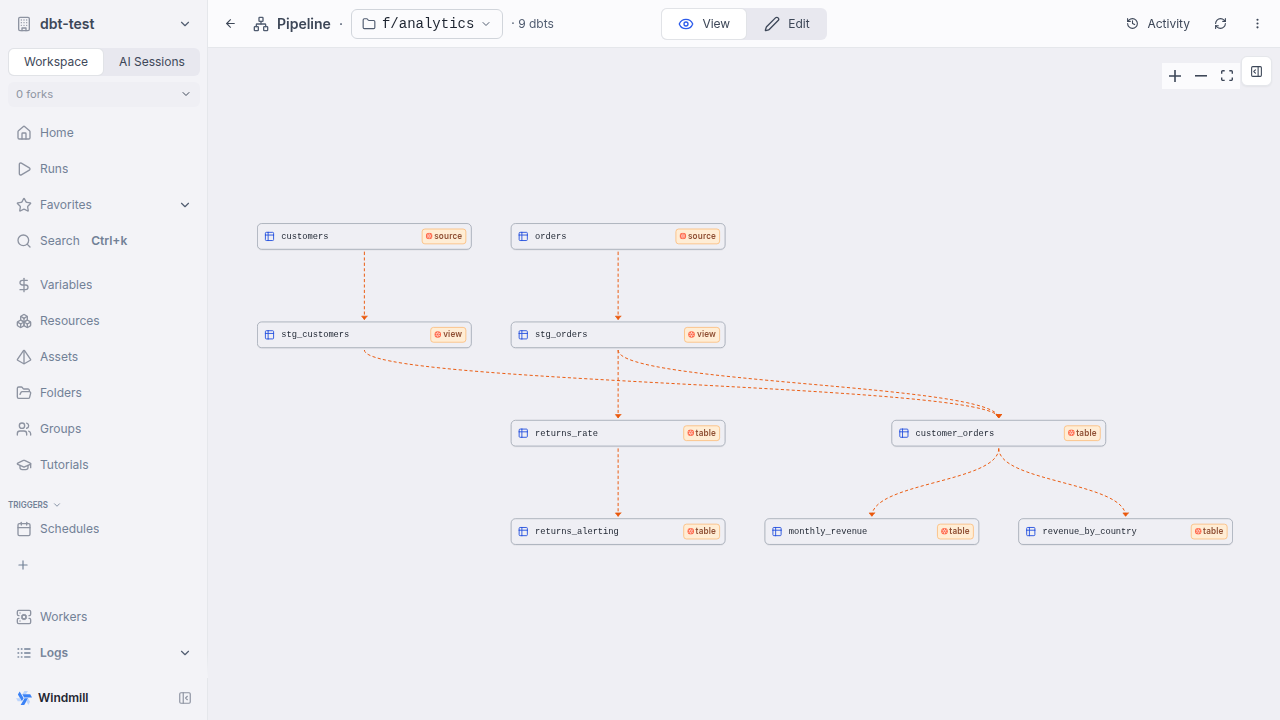
The workspace graph is written at deploy time, so redeploying is what refreshes it. A descriptor that is dynamic by construction (a {{ }} placeholder in vars, or a $var: value in env) can select a different model set per run, so those runs re-parse and each run page shows the models that run actually built. The editor's own Refresh models draws from a parse of the buffer instead, which is why it can show a project that has never been deployed and why its graph stays inside that editing session.
A native script joins the same lineage by naming a relation in its own code: a dbt:// URI written as a string literal in a Python, TypeScript, DuckDB or Ansible script is detected as an asset there, and marking it a read in the editor's asset panel renders the script as a consumer of the very node the dbt model writes.
# The URI literal is what puts this script on the graph, beside the model.
CUSTOMERS = "dbt://main/analytics/customers"

def main():
    ...
One limit worth knowing: two workspace warehouses pointing at one physical warehouse do not unify, so point both projects at one warehouse to link them.
Declaring a write from a native script
The reverse edge is an annotation.
A script in any language but dbt's own can declare that it writes a warehouse relation with // materialize manual dbt://<warehouse>/<schema>/<name>, so an ingestion step and the dbt project consuming its output are one lineage rather than two disconnected pictures:
# pipeline
# materialize manual dbt://main/analytics/raw_orders

def main():
    ...  # your own write against the warehouse
The script and the dbt model that reads analytics.raw_orders as a source land on the same node, because identity is the physical relation rather than the tool that produced it.
manual is the only mode the target has: Windmill generates no warehouse DDL, so the script issues its own write and Windmill records the outcome.
A dbt script may not declare one - what a project builds is read from its manifest.json.
See declaring a warehouse relation write for the rest of the deploy-time rules and for what a run records.
Which subscriptions fire
A dbt run does not trigger downstream runs.
dbt already orders its own DAG, and a run's select can build any subset of the project, so the deploy-time write set is not what ran.
A native producer does trigger them: a script that declares the write above wakes # on dbt://<relation> subscribers when it completes, like any other asset write.
So # on dbt://... is refused at deploy only for a relation dbt projects alone build, which would draw a cascade arrow that can never fire; schedule the consumer of such a mart, or run it from the graph.
A dbt script may not subscribe at all: a project runs on its own schedule rather than being woken by an asset cascade.
For the same reason it is not a member of its folder's pipeline - its models are on the shared asset graph regardless, which is what puts a native reader beside them.
Column-level lineage
On top of the ref() graph, a project can publish column-level lineage: the real column list of every relation, typed and in the order the model emits it, and the column-to-column edges between them.
Neither comes from manifest.json, whose columns are the ones an author wrote down in a schema.yml and which carries no column-to-column edges at all.
Both come from the static-analysis index the engine writes, which is a dbt compile of its own, so it is opt-in per project:
# wm_dbt.yaml
engine: fusion
column_lineage: true
Strict static analysis is a stricter dialect than a build: select no_such_column from ref(...) compiles under dbt's default and is an error under it.
That is why it is a separate compile rather than a flag on the build - nothing it decides can change what a build does, and a project it cannot analyze keeps exactly the graph it had.
The pass runs wherever the graph is ingested: at deploy, on Refresh models, and on a run that re-parses.
It gets half the job's remaining time, so the build behind it is not starved.
It also needs an engine that does the analysis.
dbt-core-1x has no such option, and dbt-core-2x accepts the flag today without writing the index, so fusion is the engine that produces lineage - and only for the warehouses it analyzes natively, since an adapter it still treats as experimental turns static analysis off on its own.
None of that can fail a build: a wrong engine, a rejected analysis, a missing or unreadable index and a pass that outran its budget all end in partial lineage or none, plus a line in the job log naming which.
Where it shows
Selecting a model in the dbt editor's Models pane, or a dbt:// relation on a folder's pipeline page, opens two things above the model's SQL:
columns- every column the model produces, with its type and whatever description the project documented for it. Without the analysis pass the list is the declared metadata only, and says so.- The column trace - the columns feeding the selected relation's columns, and the ones derived from them.
Only direct edges are drawn: copy, where the value passes through, and mod, where it is transformed.
dbt also records the columns a model reads to pick its rows - a join key, a where predicate, a group by - and those are stored but not drawn, since such a column reaches every output column of its model and would draw the diagram as a solid block of edges.
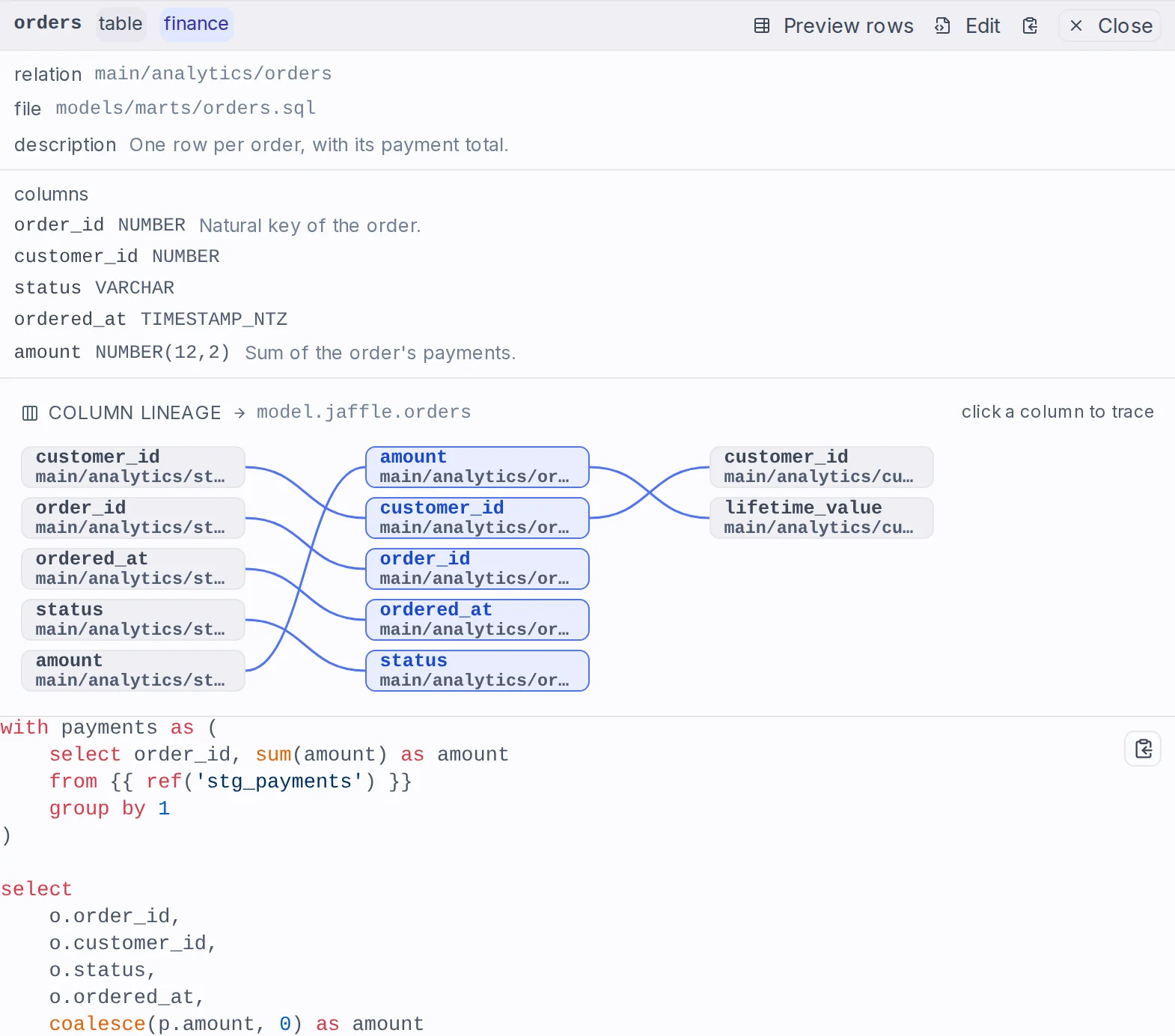
Across projects, and into pipelines
A trace is not one project's.
A relation one project produces is another's source, so a trace follows the columns into whichever project owns the relation it just reached, and repeats from there.
That is what the pipeline page draws: the workspace's live graph, expanded until the columns run out.
The dbt editor is the exception - it draws one project as of one parse, its deployed version or the parse behind Refresh models, and its trace stays inside that project, since another project's live graph is not the one on screen.
A trace crosses the boundary into pipelines the same way. A DuckDB pipeline script that names a dbt model's column as the source of one of its own:
-- pipeline
-- materialize ducklake://main/orders_enriched
-- column amount <- dbt://main/analytics/orders.amount
puts that model's column on the pipeline's column-level lineage graph under the same identity dbt's own lineage gives it, so the two are one graph. Selecting a DuckLake table traces back through the script that wrote it into the dbt models that fed it, and selecting a dbt model traces forward into what a pipeline derived from it.
Who sees a trace, and where it stops
Column-level lineage is gated on being able to read the project that produces the relation, exactly like the model's SQL: it is the shape of what an author wrote, one level finer than the ref() graph, which is ungated only because it draws relations the caller already sees.
Someone entitled to a dbt run but not to the project therefore gets the run's relations and ref() edges, and neither the SQL nor the columns.
Because a trace crosses projects, that check is re-decided for every project it reaches rather than once for the one selected - reaching a relation says nothing about who may read the project on the far side of it - so both the project's own visibility and a token's scripts:read scope apply per project, and a trace ends where the caller's access does.
A trace also stops at 5000 edges. It is walked outwards from the selected relation, so a bounded answer holds the part nearest the selection, and the pane says the lineage reaches further than it can draw rather than letting a cut trace look like one that ended.
From the API
GET /api/w/<workspace>/assets/column_lineage returns the trace around one or more relations.
asset_path is repeated once per relation - the dbt:// URI without its scheme - and the relations are answered as one union, since one selection can reach several.
At least one and at most 1000: a request naming none, or more than that, is refused rather than answered with an empty component.
dbt_script_hash pins the answer to one deployed version of one project; without it the answer crosses projects as above.
curl -H "Authorization: Bearer $WM_TOKEN" \
  "$BASE_INTERNAL_URL/api/w/$WM_WORKSPACE/assets/column_lineage?asset_path=main/analytics/customers"
{
  "edges": [
    {
      "from_asset_path": "main/analytics/stg_customers",
      "from_column": "customer_id",
      "to_asset_path": "main/analytics/customers",
      "to_column": "customer_id",
      "kind": "copy"
    }
  ],
  "truncated": false
}
truncated is how a cut trace is told apart from a complete one.
GET /api/w/<workspace>/jobs/dbt_column_lineage/<job_id> takes the same repeated asset_path and answers for the project version one job ran, authorized through the job - which is the only way to reach a graph that names no deployed version, such as the editor's parse of its own buffer.
Engines
engine picks which dbt runs the project. None is baked into the images - each is fetched or built on first use and cached on the worker.
| Engine | What it is | Cold start | Live per-model progress |
|---|---|---|---|
dbt-core-1x (default) | dbt Core 1.x, a uv virtualenv resolved per adapter | One venv build per (core range, adapter) | Yes |
dbt-core-2x | dbt Core 2.x, one adapter-agnostic binary fetched from GitHub releases | One download | No, settled at the end of the run |
fusion | The dbt Fusion engine, fetched from dbt Labs and subject to their license agreement | One ~290 MB download | No, settled at the end of the run |
The shipped default is dbt-core-1x because it runs today's projects untouched. dbt Core 2.x and Fusion are v2 semantics and drop all deprecated functionality, so a valid 1.x project may fail to parse on them until its deprecations are resolved.
Engine provisioning is tunable with environment variables on the worker: DBT_CORE_1X_FLOOR / DBT_CORE_1X_CEILING bound the resolved 1.x range, DBT_CORE_2X_VERSION pins 2.x, and DBT_BUNDLED_DIR (default /usr/local/dbt) lets an operator pre-stage an engine in a derived image for an air-gapped instance - the worker prefers it over its own cache. dbt jobs run on the dbt worker tag, which is in the default set.
Which adapters an instance installs
dbt-core-1x builds a virtualenv per adapter and fetches the adapter itself from PyPI as dbt-<adapter>, so which packages it may install is an operator's decision rather than a script author's. Windmill vouches for the published dbt-* adapters (postgres, snowflake, bigquery, databricks, redshift, trino, athena, clickhouse, duckdb, spark and the rest of the list it ships); DBT_EXTRA_ADAPTERS on the worker adds to it, as comma-separated adapter names spelled the way dbt's own type: spells them. An adapter on neither list fails the job naming itself, rather than being fetched.
dbt-core-2x and fusion carry their adapters in the binary and install nothing, so they take any adapter, with no list to extend.
What the bundle carries
The bundle is the project's authored files, and nothing else:
- Directories dbt generates are excluded:
target,dbt_packages,logs,.git,.venv,__pycache__, plus whateverdbt_project.ymlconfigures astarget-path,packages-install-pathorclean-targets. - Only text is carried. A binary file - an image under
docs/, a.DS_Store, a parquet seed - is skipped with the reason. .env,.env.*and.envrcare skipped. What a.gitignorewas keeping out of the repository must not become a script version instead; dbt readsenv_var()from the process environment, which the descriptor'senvmap fills.- Files over 5 MB are an error, not a skip: dbt would have read the file, so deploying without it ships a project that fails at run time with a missing relation. A committed dataset belongs in the warehouse.
The dbt editor edits the bundle in place, but a browser is still not where a dbt project is developed: that is a local dbt run / dbt test loop against a warehouse you can iterate on. Windmill is the runner, the viewer and the place a project is corrected. A module-only edit still pushes its parent script, so wmill sync push after editing a model deploys the project once.
Dependencies
A project declaring packages.yml ranges asks dbt to resolve them, and dbt re-resolves on every dbt deps. Windmill resolves once, at deploy, and pins the result in the script's lockfile alongside the engine and adapter versions - the same contract every other language gets here. A run restores the package tree from a worker-local cache keyed on that resolution; a worker that resolves anything else is refused rather than run.
Two consequences: to pick up a newer version of a ranged dependency you have to deploy a change, since only a deploy re-resolves; and committing package-lock.yml lets a deploy hit the cache instead of paying a real dbt deps, which is dbt's own recommendation for the same reason.
Worker-local caches - package trees, engine installs and retry state - live under $WINDMILL_DIR/cache_nomount/ and are not reclaimed by cache_clear. Engine installs dominate the space, at roughly 270-290 MB each.