Sandbox isolation
Sandbox isolation renders a deployed app in an opaque-origin iframe, so the app's browser-side code cannot reach the viewer's Windmill session. It applies to both low-code apps and full-code apps.
This happens in the viewer's browser, and is unrelated to the process isolation that sandboxes job execution on a worker.
It is set from the app editor's Deploy panel, under Sandbox isolation. It is on by default for new apps, and is being made the norm in stages.
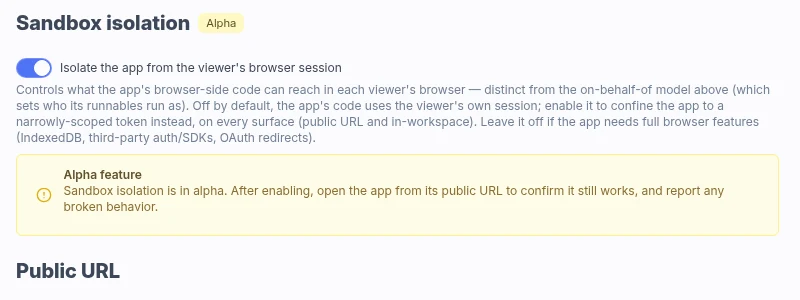
Why enable it
An app runs code its author wrote, in the browser of whoever opens it. Without isolation that code runs on the Windmill origin with the viewer's session, so it acts as the viewer: a silent privilege escalation for a malicious app author. An XSS bug in an otherwise trusted app gives an attacker the same thing.
Isolation removes that reach:
- Low-code apps render in the opaque iframe with a scoped embed token instead of the session cookie. Its app scopes name that one app, so it cannot drive another. It lasts 12 hours and cannot mint a further token.
- Full-code apps have their bundle served under a
sandboxcontent security policy, which confines the bundle without needing a token. One is minted only if the app declares frontend API access, and that one is the viewer's.
It applies wherever the app is reachable, on the public URL and in-workspace alike.
We recommend turning it on. It also removes the warning viewers get before a public app renders HTML or SVG produced by a runnable.
Isolation is a separate question from the app's execution policy, which decides which user the runnables execute as. The two are configured independently.
Rollout
Isolation is becoming the default in three stages:
- Previously: optional and off by default.
- Now: on by default for newly created apps. Existing apps keep whatever they are set to.
- January 2027: viewers see a warning when they load an app that is not sandboxed.
That date is an intention, not a commitment. Turning isolation on now means the last stage changes nothing for your apps.
We are looking for feedback, particularly on apps it breaks. Tell us on Discord or open a GitHub issue.
Limitations
An opaque origin has no real web storage and no cookies. Windmill shims them so apps that use them keep working, but they are not the browser's own:
localStorageis backed by the hosting page, keyed per workspace and app, so two sandboxed apps never share a store.sessionStorageis in-memory and lasts only for the session.document.cookieis an in-memory jar, not the Windmill session cookie.
Anything that needs a real origin does not work: IndexedDB, third-party authentication SDKs, and OAuth redirects that return to a named origin. Turn isolation off for apps that depend on those.
After turning it on, open the app from its public URL and confirm it still behaves as expected.
Frontend API access
A separate opt-in, for full-code apps only and only once isolation is on. A sandboxed bundle can no longer reach the API on the viewer's session, so if its frontend code needs the API, give it a credential of its own.
Toggle the capabilities individually: running scripts and flows, reading jobs and results, reading the viewer's identity, reading resources, reading variables, and reading or managing the viewer's flow chats. The token is minted for the viewer rather than the publisher and carries only what you toggled. It is a different credential from the one a sandboxed low-code app gets, and a broader one where it counts: running scripts and flows covers anything that viewer could run, and the resource and variable scopes expose credential values.
Each viewer approves the list before the app runs, and can choose to open the app without granting it. Ticking "Do not ask again" skips the prompt on later visits, until the app declares a scope they have not already approved.
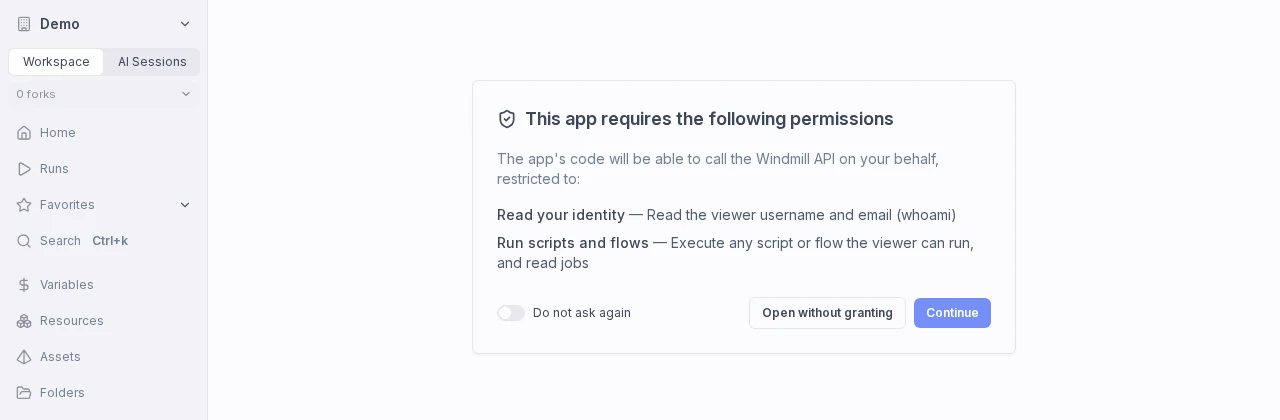
Grant only what the app needs: its code, or an XSS bug in it, can use every granted scope as that viewer.
Add windmill-client to the app's dependencies to make the calls, and note that an app bundled before frontend API access existed fails with a CORS error until you deploy it again.