Materialization
A DuckDB script can declare that it produces a managed DuckLake table with // materialize. This is the canonical, most powerful way to build a pipeline step (see the canonical stack). Instead of writing the table yourself, you write the query for one slice and Windmill owns the write: it is idempotent, captured as a DuckLake snapshot, and tracked. A slice is one partition when the script is also // partitioned, or the whole table when it isn't — materialize works either way (// partitioned is optional and independent; see Strategy and unit below).
-- pipeline
-- materialize ducklake://main/orders_daily key=order_id
-- partitioned daily

ATTACH 'ducklake://main' AS dl;

SELECT order_id, amount, created_at
FROM dl.orders
WHERE created_at::date = '{partition}'
The script is setup statements (ATTACH, SET, CREATE TEMP …) followed by one trailing SELECT. Windmill wraps that SELECT in the write — creating the table on first run, partitioning it (when // partitioned), and reconciling the slice — then records the produced snapshot id and row count. Re-running the same slice is safe by construction (that is also how a backfill or a failed-run retry works). For a partitioned target the slice is tracked in a managed _wm_partition column appended to the table (it is also the Hive partition key of the parquet files on the underlying storage), so your SELECT never has to project the partition itself.
The trailing SELECT may reference SQL arguments declared with -- $name (type) (for example -- $cutoff (date) then WHERE created_at < $cutoff); they bind at run time like any other DuckDB script argument, including s3object arguments translated to s3:// URIs.
Filtering the source to the active partition
A // partitioned materialize runs once per partition and its SELECT should return only that slice. The {partition} token substitutes to the partition's identity string as a quoted SQL literal - the same value stored in _wm_partition: '2026-07-05' (daily), '2026-07-05T23' (hourly), '2026-W27' (weekly) or '2026-07' (monthly).
Only the daily identity is a valid DuckDB DATE/TIMESTAMP, so a naive WHERE ts = TIMESTAMP {partition} parses for daily but raises a Conversion Error on the other grains. To filter a timestamp column regardless of grain, use the wm_partition(<ts_col>) macro, which Windmill injects automatically as the first setup statement of every time-partitioned materialize:
-- pipeline
-- materialize ducklake://main/orders_hourly
-- partitioned hourly

ATTACH 'ducklake://main' AS dl;
SELECT order_id, amount, created_at
FROM dl.orders
WHERE wm_partition(created_at) = {partition}
wm_partition(ts) renders ts with the same format the resolver used to stamp {partition}, so the equality both parses and selects the whole bucket (every row in the slice, not just the boundary instant) on any time grain. It honours a custom format= override and is timezone-agnostic (it formats ts as given): when a non-UTC tz= is set, express ts in that zone yourself.
dynamic partitions get no macro - their identity is a caller-supplied key, not a timestamp - so filter on your key column directly with WHERE tenant_id = {partition}.
Grammar
// materialize ducklake://<name>/<table> [append] [key=<col>]                          # managed (default)
// materialize ducklake://<name>/<table> key=<col> history [track=<c1,…>] [deletes=close]  # managed SCD2 history
// materialize ducklake://<name>/<table> … on_schema_change=warn|ignore|fail|sync      # any managed form: how a schema change is handled
// materialize manual ducklake://<name>/<table>                                        # track-only escape hatch
// materialize manual dbt://<warehouse>/<schema>/<name>                                # track-only warehouse relation, any language but dbt's own
- Managed (default) — Windmill generates the write. DuckDB-only; validated at deploy (a script that is not a single trailing SELECT is rejected with a clear error). The strategy decides how each slice is reconciled:
- neither option → replace: the slice becomes exactly what the SELECT returned. The whole table is rebuilt with
CREATE OR REPLACE(so changing theSELECT's columns between runs just works); a partition is reconciled withDELETE+INSERT. key=<col>→ merge: upsert the slice on<col>(rows absent from the SELECT are left in place).append→ insert-only: for immutable event logs. Re-running duplicates rows, so use only for append-only sources. (appendwins overkey=if both are given.)key=<col> history→ SCD2 history: keep every version of every row instead of overwriting on change. See SCD2 history.on_schema_change=<warn|ignore|fail|sync>combines with any strategy and controls what a run does when the SELECT's columns diverge from the target's stored schema, from warning downstream consumers (warn, the default) to aborting the run (fail) or auto-syncing the table (sync). See on_schema_change.
- neither option → replace: the slice becomes exactly what the SELECT returned. The whole table is rebuilt with
manual— the escape hatch: your script writes its own DDL and Windmill only records that the slice was materialized (no snapshot capture, no idempotency guarantee). Rare; explicit. See Manual materialization.dbt://<warehouse>/<schema>/<name>is a warehouse relation rather than a lake table: track-only by construction (manualis the only mode) and open to any language but dbt's own. See Declaring a warehouse relation write.
A ducklake:// target is for DuckDB SQL, managed and manual alike: the write engine is DuckDB's, so the annotation is rejected at deploy on any other language. From Python or TypeScript, use the wmill.ducklake helpers (upsert_partition, append_partition, read) which give the same managed, idempotent write from arbitrary code.
Manual materialization (track-only)
// materialize manual is the escape hatch for a write the managed wrapper cannot express: multi-statement DDL, a MERGE you want to own, a reshape the strategies don't cover. The single-trailing-SELECT rule does not apply - the script is ordinary DuckDB that creates and writes the target itself - and Windmill only records that the slice was materialized.
-- pipeline
-- on ducklake://main/stg_payments
-- partitioned daily
-- materialize manual ducklake://main/payment_totals

ATTACH 'ducklake://main' AS dl;

CREATE TABLE IF NOT EXISTS dl.payment_totals (
  day DATE, method TEXT, total DECIMAL(18, 2)
);

-- You own idempotency: delete-then-insert makes re-runs and backfills safe.
DELETE FROM dl.payment_totals WHERE day = $partition::DATE;

INSERT INTO dl.payment_totals
SELECT created_at::DATE, method, sum(amount)
FROM dl.stg_payments
WHERE created_at::DATE = $partition::DATE
GROUP BY 1, 2;
Note $partition, not {partition}: the {partition} token is substituted only in managed materialize scripts (and the injected wm_partition macro is managed-only too), but the partition argument is auto-declared for every // partitioned DuckDB script, so a manual script binds $partition like any other argument.
What the track-only edge records, and what it gives up:
- Recorded: the asset and partition are marked materialized (or failed) with the producing job id and time, so the partition-status grid fills in, backfill enumerates and re-runs the script per partition, and the write fires downstream subscribers through the cascade like any other output.
- Not recorded: no snapshot id and no row count - the run result is your query's own output rather than the managed summary, and consumers' Upstream snapshots panels skip the asset. Idempotency is whatever your own SQL does (the delete-then-insert above).
- Inert: data tests are rejected on a manual target, no schema capture happens (so consumers get no schema-contract warnings against it), and
on_schema_changehas nothing to act on - the deploy logs a warning saying so.
If replace, key= merge or append can express the write, prefer the managed form: manual trades the whole safety net for full control of the SQL.
Declaring a warehouse relation write
The other target kind is a warehouse relation, the same dbt://<warehouse>/<schema>/<name> node a dbt project puts on the graph.
A script in any language but dbt's own can declare that it writes one:
# pipeline
# materialize manual dbt://main/analytics/raw_orders

def main():
    # Your own INSERT / COPY / MERGE against the warehouse, in whatever
    # client the language uses. Windmill records the outcome, not the write.
    ...
Identity is the physical relation, never the tool that produced it, so the ingestion script above and a dbt model reading analytics.raw_orders as a source land on the same node.
That is what makes an ingestion step and the dbt project consuming it one lineage instead of two disconnected pictures, and it is what lets a downstream script subscribe with // on dbt://main/analytics/raw_orders.
manual is not one mode among several here, it is the only one: Windmill generates no warehouse DDL, so the script issues its own write and Windmill records what happened.
Writing the annotation without manual is refused at deploy rather than quietly downgraded, so nobody ships it expecting a generated write.
Checked at deploy:
- The target is a whole three-segment relation.
dbt://main/analyticsis refused, since no producer and no reader can ever name it. <warehouse>is one the workspace configures, resolved the same way a dbt project'sprofile.warehouseis. A name no warehouse answers to would strand the write on a node nothing else reaches.- A dbt script itself may not declare it: what a project builds is read from its
manifest.jsonand republished on every deploy, so an annotated write would be wiped by the deploy that accepted it. // data_testbeside adbt://target is refused. Those checks are probes spliced around a managed write, and a warehouse relation is written by the script itself, so nothing would run them. Assert on the relation with a dbt test in the project that reads it.
What a run records is the same track-only edge a manual DuckLake target gets: the relation is marked materialized (or failed, with the error) and stamped with the producing job, keyed by the partition when the script is also // partitioned.
Everything the managed path adds is absent: no snapshot id, no row count, no schema capture and so no contract warnings for consumers.
The partition-status grid and backfill are DuckLake-only surfaces, so unlike a manual DuckLake target a warehouse relation gets neither.
The cascade is unaffected: it fans out from the deploy-time asset rows, so subscribers on the relation fire when the script completes.
A // on dbt://<relation> subscription goes through the same relation and warehouse checks as the target above, and is refused when every script that writes the relation is a dbt one, since a dbt run does not dispatch.
Nothing producing the relation yet is fine: a subscriber may be deployed before its producer, as for every other asset kind.
Like every other runtime pipeline annotation, the recording happens on the normal execution path.
A run handed to a dedicated worker or a flow runner skips that path, exactly as it skips // partitioned resolution, so such a run performs its write and leaves the relation with no last writer.
Strategy and unit
materialize, partitioned, append and key sit on two independent axes, and materialize runs the chosen strategy over the chosen unit:
- Strategy — how a slice is reconciled.
append/key=are options on the// materializeline (mutually exclusive); they have no meaning without// materialize. - Unit — what a slice is.
// partitionedis a separate, optional annotation (it also drives the cascade and scheduling). With it, a slice is one partition; without it, a slice is the whole table.
The two combine:
| replace (default) | key=<col> (merge) | append | |
|---|---|---|---|
// partitioned | replace the partition | upsert within the partition | append to the partition |
whole table (no // partitioned) | replace the whole table | upsert the whole table | append to the whole table |
A whole-table materialization is just // materialize with no // partitioned — e.g. a dimension table rebuilt each run:
-- pipeline
-- materialize ducklake://main/customer_dim key=customer_id

ATTACH 'ducklake://main' AS dl;
SELECT customer_id, name, tier FROM dl.customers
The history strategy is the exception: it is whole-table only, and combining it with // partitioned is rejected at deploy.
key= merge is a cross-run upsert, not a within-run de-duplicatorkey=<col> reconciles this run's SELECT against the rows already in the target: existing keys are updated, new keys inserted, and keys absent from the SELECT left untouched. That reconciliation is across runs, not within one - it does not collapse duplicate keys inside a single SELECT. If the SELECT returns the same key twice in one run, both rows are inserted as-is (the merge does not pick a winner), so the SELECT must already be unique on <col>. De-duplicate in the query when the source can emit a key more than once, for example with QUALIFY row_number() OVER (PARTITION BY <col> ORDER BY updated_at DESC) = 1 or a GROUP BY.
SCD2 history (slowly changing dimensions)
Adding history to a keyed materialization turns the SCD1 merge (overwrite on change) into a type-2 slowly changing dimension: the runtime keeps every version of every row. When a tracked column changes, the prior version is closed and a new one is opened, so an entity's full version history stays queryable as rows. The leading keyword scd2 is a recognized alias (// materialize scd2 ducklake://… key=id).
-- pipeline
-- on ducklake://analytics/stg_customers
-- materialize ducklake://analytics/dim_customer key=id history track=name,tier
-- data_test not_null id

ATTACH 'ducklake://analytics' AS dl;

SELECT id, name, tier          -- the current snapshot, one row per key
FROM dl.stg_customers;
The SELECT returns the current desired state, one row per key - exactly like merge. You never write validity columns; the runtime appends and manages three:
| Column | Type | Meaning |
|---|---|---|
valid_from | TIMESTAMP | when this version became effective |
valid_to | TIMESTAMP | when it was superseded; NULL = still open |
is_current | BOOLEAN | true for the live version of each key |
Options on the // materialize line:
key=<col>(required) - the natural/business key that identifies an entity across versions.track=<c1,c2,…>(optional) - the columns whose change opens a new version. Default: all non-key columns. Bare comma list with no spaces (track=name,tier).deletes=close(optional) - a key that disappears from the snapshot has its current version closed. Default is soft delete: absent keys stay current. A closed key that later reappears opens a fresh version, leaving a validity gap.
Each run diffs the snapshot against the live rows: a changed tracked column closes the prior version (valid_to set, is_current = false) and opens a new one; a new key opens as current; a change to an untracked column is ignored; an unchanged snapshot writes 0 rows and advances no snapshot (idempotent). Within a run, the closed version's valid_to equals the new version's valid_from, so versions are contiguous and gap-free.
Each run also maintains a companion view <table>_current containing only the is_current rows, so the common "give me the latest version" case needs no filter:
-- pipeline
-- on ducklake://analytics/dim_customer_current
ATTACH 'ducklake://analytics' AS dl;
SELECT * FROM dl.dim_customer_current;
Read <table>_current (not the base table) whenever you want exactly one row per key - the live version - without an is_current filter or an as-of join. Declare it as an input with // on ducklake://…/<table>_current, as above, so the read is a first-class edge of the pipeline graph.
The graph traces a <table>_current read to the companion view, but does not yet automatically draw the edge back through it to the base history dimension. Until that link is inferred, add an explicit // on ducklake://…/<table> (the base dimension) alongside the _current read if you want the lineage edge to the base table shown. This is annotation-only and forward-compatible: the extra // on stays correct once the view-to-base link is inferred, so you can add it now and remove it later, or leave it in place.
The payoff over time-travel (which is keyed by commit, not business-effective time) is the effective-dated as-of join - for each fact row, the dimension version that was current at that moment:
-- pipeline
-- on ducklake://analytics/dim_customer
-- on ducklake://analytics/stg_orders
-- materialize ducklake://analytics/fct_orders
ATTACH 'ducklake://analytics' AS dl;
SELECT o.order_id, o.amount, o.ordered_at,
       d.tier AS tier_at_order_time
FROM dl.stg_orders o
ASOF JOIN dl.dim_customer d
  ON o.customer_id = d.id AND o.ordered_at >= d.valid_from;
Constraints:
- Whole-table only:
// partitioned+historyis rejected at deploy. valid_from,valid_toandis_currentare reserved column names (a SELECT projecting one fails at run time), and the<table>_currentsuffix is reserved for the companion view.- The schema is frozen at first run: an append-only history cannot reshape closed versions, so changing the SELECT's projected columns later fails and needs a manual rebuild.
Built-in data tests on an SCD2 target are scoped to current rows (is_current), so unique(<key>) keeps passing as closed versions accumulate in the history.
What a run returns
A managed run returns a small summary — the asset it produced, the row count of the slice, and the DuckLake snapshot_id — and the run's Result panel renders a live, read-only preview of the materialized table beneath it. For a // partitioned target the preview adds a This partition / Whole table toggle, and the summary's row count is the slice (partition) the run wrote. The same values are recorded as the asset's materialization state.
To run a partitioned script manually (e.g. from the editor's Test panel), fill the partition field — Windmill surfaces it automatically for // partitioned DuckDB scripts, as a date picker for date kinds. Selecting the producer in the pipeline graph opens a richer partition picker with materialization and upstream-data hints. In a pipeline the cascade injects it for you.
Versioning and time-travel
Every managed write is a DuckLake commit, so versioning is free — you never annotate for it. Each run records the snapshot it produced, which means you can read a table as of a past snapshot (FROM dl.orders_daily AT (VERSION => 42)), roll back, and reproduce a past run. This is what // materialize gives you over hand-writing the same SQL.
Snapshots are kept forever by default. If scheduled maintenance is enabled on the lake, snapshots older than its retention window are expired and can no longer be read with AT (VERSION => n), so size the retention window to the history you need to query.
Upstream snapshots
Snapshots are also recorded on the read side of the cascade. When a run is dispatched because an upstream asset was written, Windmill captures the current DuckLake snapshot id of each of the run's direct upstream assets at dispatch time and stores it on the job. The run detail page then shows a read-only Upstream snapshots panel: one row per upstream asset (<asset> @ <snapshot_id>, plus the partition when the upstream is partitioned), with a copy button per row that puts the matching time-travel clause on your clipboard.

This answers "what data did this run actually see?" long after the upstream tables have moved on. When a nightly report comes out wrong, open its run, read ducklake://main/raw_orders @ 34 · partition 2026-07-04, and query the input exactly as the run saw it by pasting the copied clause into any DuckDB script:
SELECT * FROM dl.raw_orders AT (VERSION => 34)
Notes on semantics:
- It is a debugging record, not a pin: the run still reads the latest data, and recording changes nothing about execution.
- Only direct upstream assets with a materialized snapshot appear. Non-materialized upstreams (for example plain
s3://objects) are skipped, and manual or non-cascade runs show no panel. - The raw record is stored in the job's
triggerargument underupstream_snapshots, so it is also visible in the run's inputs table and through the API, wherever job arguments surface. - Recorded snapshots are subject to the lake's retention: if scheduled maintenance expires a snapshot, its time-travel clause can no longer be queried.
Partition status and backfill
Selecting a materialized ducklake:// asset in the pipeline graph shows its partition-status grid — which partitions are materialized, their snapshot id, row count, and time — along with the producer's latest run and its data-test results.
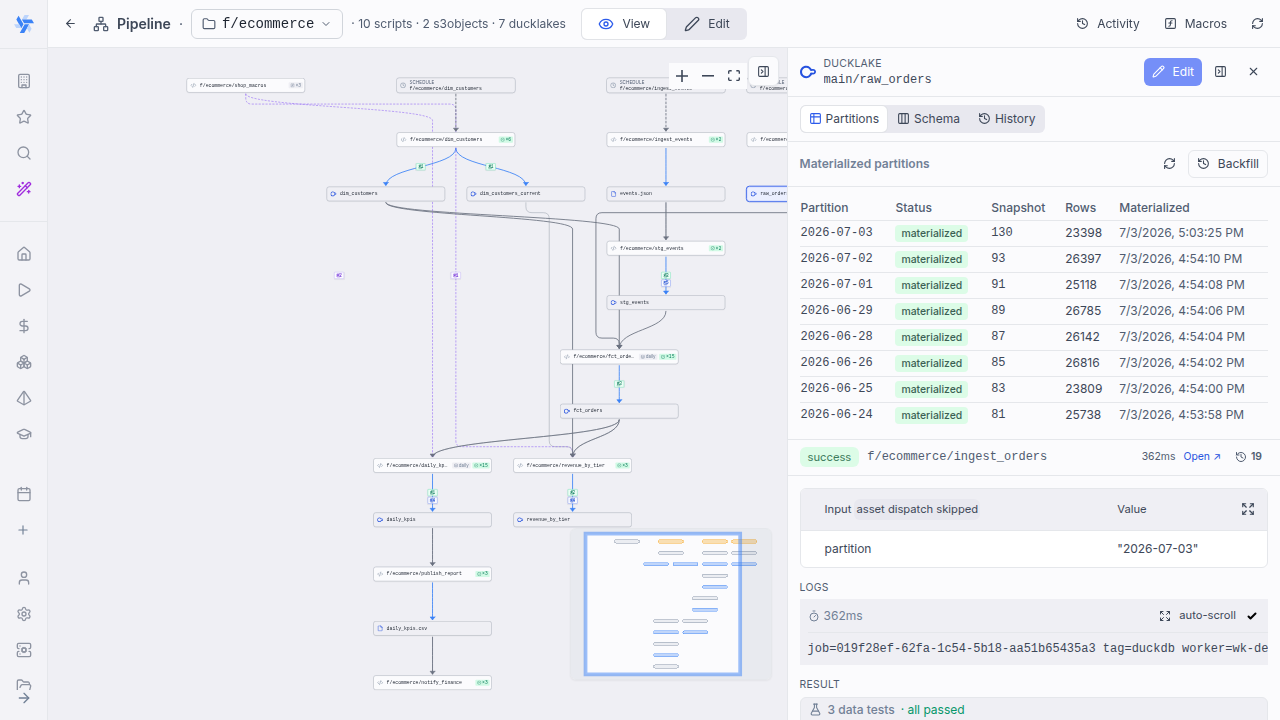
From there, Backfill re-runs the materialization for a range of partitions; range backfill is an Enterprise Edition feature (single-partition runs with an explicit partition argument remain available in all editions).
The Backfill button opens a range picker that previews the status of every partition in [from, to] - missing, failed or materialized - so the missing/failed set is the backfill worklist. A toggle (on by default) restricts the run to missing and failed partitions; turn it off to re-run the whole range. Launching runs the producing script once per partition with an explicit partition argument, sequentially (concurrent materializations of one DuckLake table would contend on the catalog commit); each run is idempotent, and a failed partition does not stop the rest. Progress streams in the dialog and, when it is closed, in the asset drawer header, and the grid refreshes as each partition lands.
Range backfill enumerates time partition kinds only (daily, hourly, weekly, monthly), honours the spec's start anchor (partitions before it are not enumerated), and caps a single backfill at 1000 partitions. dynamic partitions cannot be enumerated over a range - backfill them one at a time with an explicit partition argument.
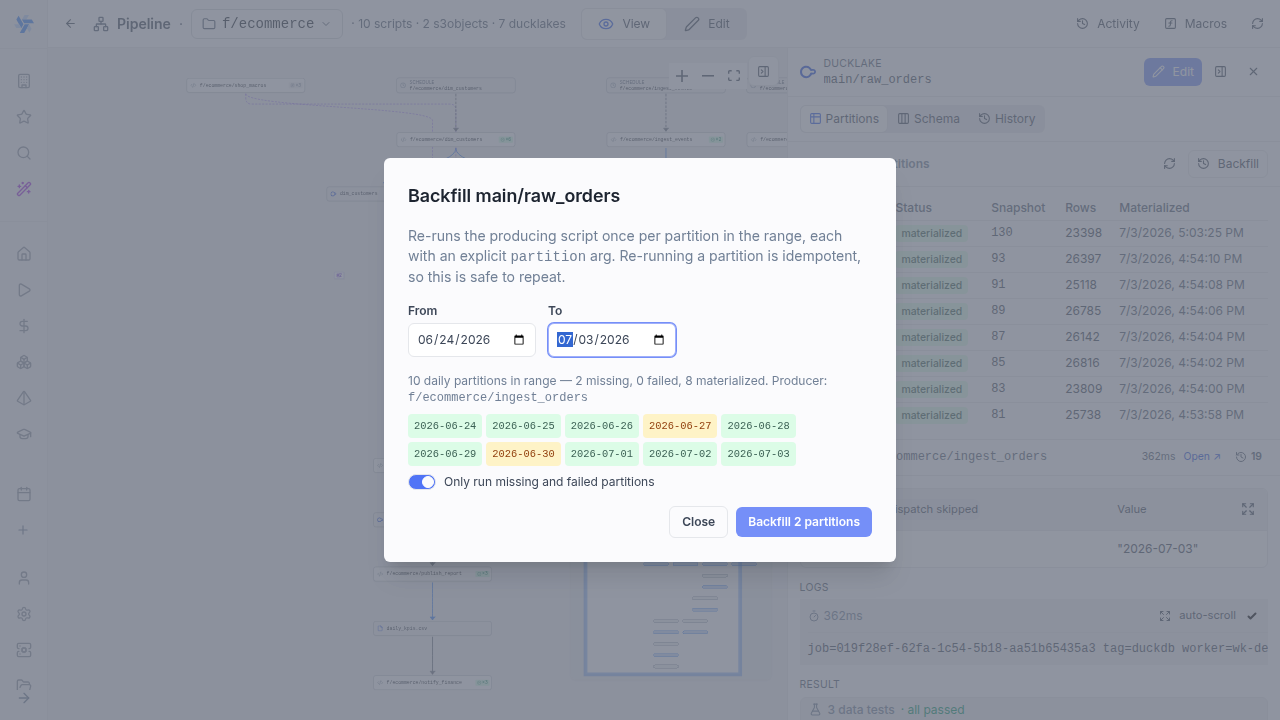
The same backfill works headlessly from the CLI by passing an explicit partition per run: wmill pipeline run <folder> --partition 2026-06-30 (see local development).
Schema capture
After a managed materialize run, Windmill captures the table's output schema (column names and types) and stores it as versioned asset metadata. Selecting a materialized ducklake:// asset shows a Schema tab listing each captured version. A new version is recorded only when the column set actually changes (a column added, dropped, retyped, or reordered), so the tab is a compact schema-evolution history rather than one row per run.
The captured schema also doubles as a contract for downstream consumers - see Schema contracts.
Schema contracts
The captured schema is read back as a contract: when a consumer script is saved or deployed, Windmill checks every ducklake:// reference it makes against the latest captured schema of that asset, and surfaces mismatches as warnings - never errors. Renaming a column upstream no longer breaks downstream consumers silently at run time; but because a deliberate upstream reshape should not fail every consumer save either, the consumer-side contract never blocks a deploy - it warns only. How a producer reconciles a change to its own schema (from warning downstream to a strict abort or an automatic ALTER) is a separate, producer-side control - see on_schema_change.
The same check shows up in three places:
- Save-time warnings - right after a successful deploy, mismatches are listed in a warning toast. This is the authoritative check, run server-side against the deployed content.
- Editor squiggles - the check also runs live on the open buffer, underlining the offending column read,
// columnline or// data_testline with a warning squiggle as you type. - Schema-aware autocomplete - on annotation lines, typing
.after aducklake://…reference completes column names (with their captured types), so a broken reference never gets typed in the first place.
What is checked (for ducklake:// assets only, the substrate with schema capture):
- Columns your script reads from or writes to the asset that are missing from its captured schema.
// columnlineage annotations whose source column no longer exists.// data_test relationshipsreferences: a referenced column that is missing, and a type difference between the two join columns when both sides are captured (reported as a difference, not a failure - the runtime probe coerces types, so the test may still pass).
Comparison follows DuckDB semantics: column names compare case-insensitively, {partition} tokens are stripped before lookup, and the managed _wm_partition column is always accepted. A <table>_current reference is checked against its SCD2 base table's capture (the view has the same columns by construction). An asset with no capture at all - never materialized, // materialize manual, or a non-DuckLake target - produces no warnings. Each warning cites the schema version and capture time it was checked against, so you can tell when a warning is due to a stale capture rather than an actual mismatch.
on_schema_change
on_schema_change is a producer-side option on the // materialize line that controls what a managed run does when the trailing SELECT's column set diverges from the target table's stored schema. It mirrors dbt's option of the same name:
| Value | Behavior |
|---|---|
warn (default) | The write proceeds and the new schema is captured; downstream consumers get a schema-contract warning on their next save. |
ignore | Same as warn but no downstream warning - for a table whose schema is deliberately unstable (a raw landing table tracking an external payload). |
fail | The run aborts before writing when the SELECT's column set diverges from the stored schema. |
sync | Windmill ALTERs the target table to match the SELECT (adding and dropping columns) and writes with INSERT BY NAME, so column order no longer has to match. |
warn and ignore only govern the downstream contract warning, so they apply to every strategy. fail and sync are write-time guardrails and apply only to the persist-and-mutate strategies: partitioned replace, key= merge and append. Those create the table once and then write into that fixed schema by column position, so a drifted SELECT silently lands values in the wrong column. Whole-table replace (a non-partitioned default materialize) rebuilds the table from scratch each run, and an SCD2 history target has no positional write, so on both there is nothing to guard and fail/sync fall back to warn.
Drift is detected on the set of column names, so fail catches an added, dropped or renamed column but not a pure reordering of same-named columns (SELECT b, a into an (a, b) table keeps the same set, so fail does not fire and the positional write swaps the values). Reorder-safety is exactly what sync adds: INSERT BY NAME maps by name, so a SELECT whose column order is not pinned to the table's should use sync, not fail.
Unknown values keep the default (warn). On // materialize manual the option is inert since nothing is captured; the deploy logs a warning saying so.
Declare ignore on a raw landing table whose columns track an external payload:
-- pipeline
-- materialize ducklake://main/raw_events append on_schema_change=ignore

ATTACH 'ducklake://main' AS dl;
SELECT * FROM read_json('s3://landing/events/*.json')
Consumers of that asset then get a single informational note instead of per-column warnings. Use fail instead when a schema change should stop the pipeline for review, and sync when the target should follow the source's columns automatically - an evolving ingestion where a new source column should just appear in the table without a manual ALTER (compare the schema-drift recovery options for the merge/append strategies).
Column-level lineage
On top of asset-to-asset lineage, Windmill tracks column-to-column lineage for DuckLake pipelines: which source columns each output column is derived from. For DuckDB scripts this is inferred automatically from the SQL — Windmill walks the query's projection and maps every output column to the source columns its expression reads, both passthroughs and computed columns (amount + tax AS order_total records both amount and tax as sources). No annotation is needed in the common case.
The deployed pipeline graph shows a columns ×N badge on the write edge into a materialized asset; hovering it lists every mapping, and selecting the asset opens a column-to-column diagram in the details pane.
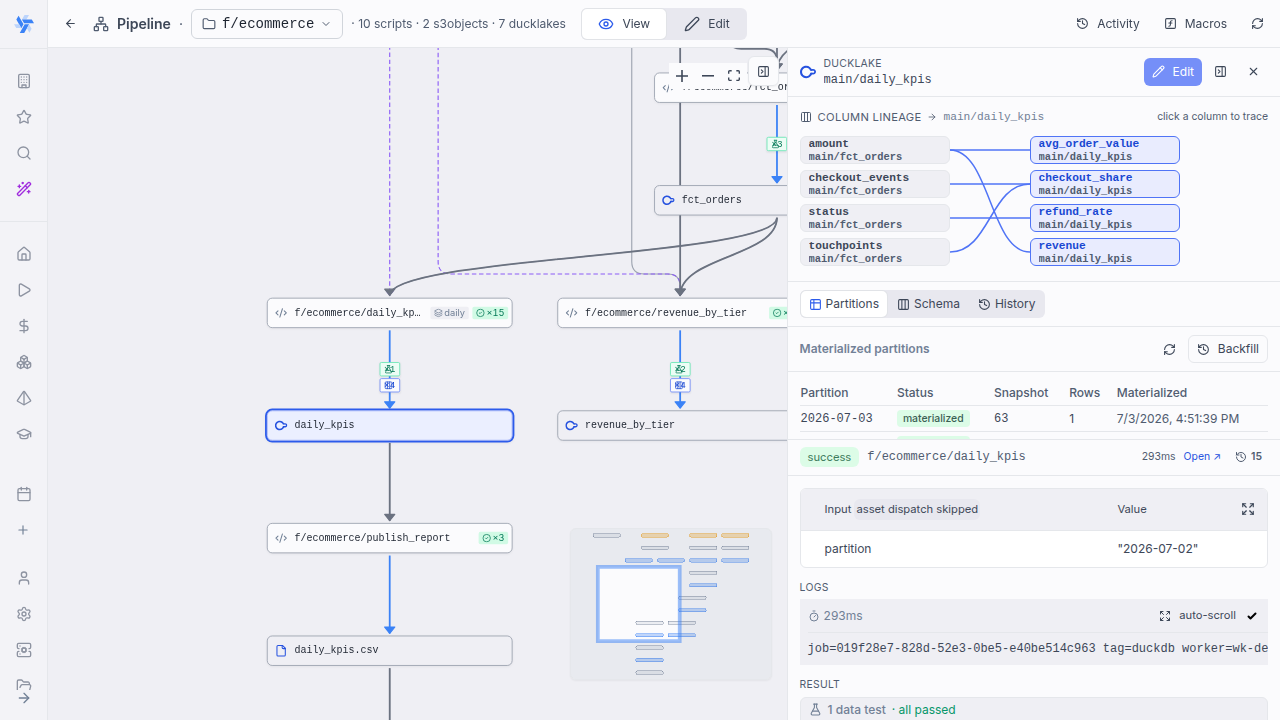
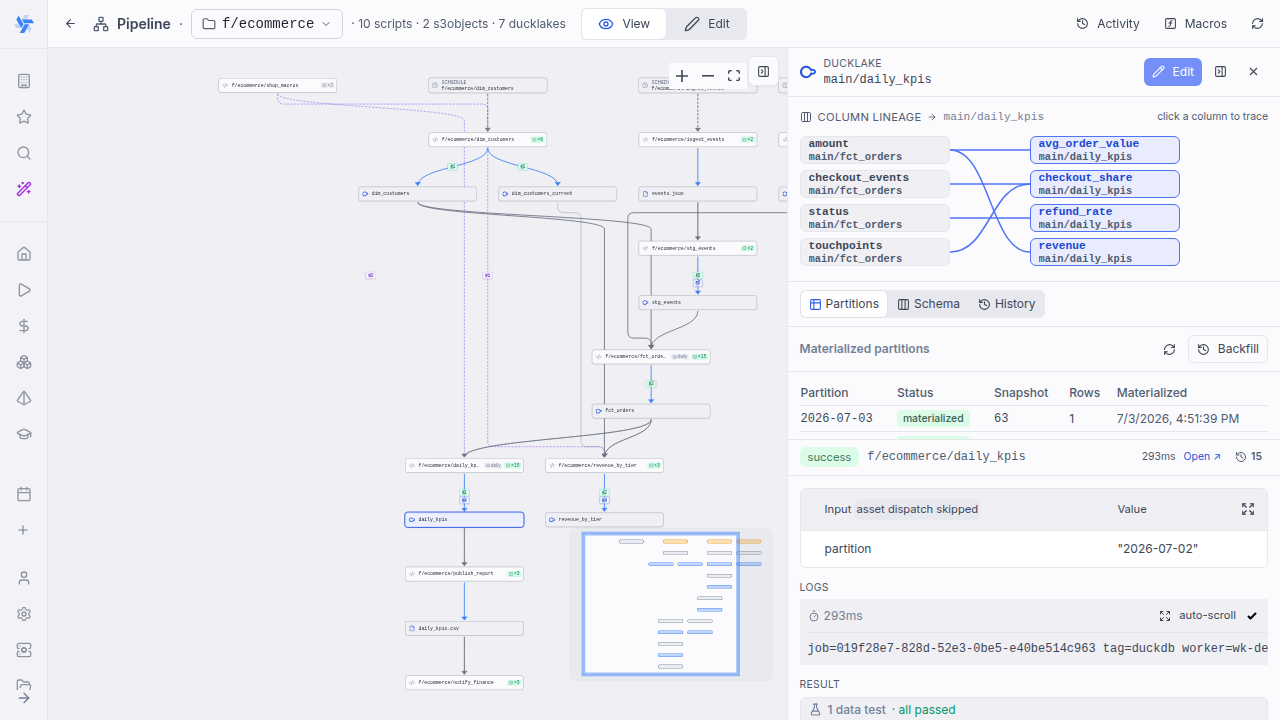
When inference cannot reach a mapping — a polyglot transform (Python/TS/Bash has no SQL AST), dynamic SQL (${sql.raw(...)}), or a mis-inferred edge — declare it explicitly with // column:
// column <out_col> <- <asset-uri>.<col>[, <asset-uri>.<col> …]
Each line maps one output column to the source columns it derives from. Annotated and inferred lineage merge per output column, with the annotation winning. Column lineage is pure metadata — it drives the graph view and never runs a probe. The example below shows the annotation form on a plain SELECT for clarity; in practice you only annotate what inference can't derive (this particular mapping would be inferred automatically).
-- pipeline
-- materialize ducklake://warehouse/orders_enriched
-- column order_total <- ducklake://warehouse/orders.amount, ducklake://warehouse/orders.tax

ATTACH 'ducklake://warehouse' AS dl;
SELECT order_id, amount + tax AS order_total FROM dl.orders
SQL-AST inference runs when a pipeline is deployed, so column lineage shows on deployed members. An unsaved draft shows // column annotations only.
Crossing into dbt
A // column source can name a dbt model's column as well as a ducklake:// one:
-- column amount <- dbt://main/analytics/orders.amount
That names the same column node dbt's own column-level lineage does, so the pipeline's graph and the dbt project's are drawn as one. Selecting a DuckLake table traces back through the script that wrote it into the dbt models that fed it, and selecting a dbt model traces forward into the pipeline that derives from it. The dbt half only exists for a project that opted into dbt's static-analysis pass, and it is fetched per selection, so it lands a moment after the selection does.
Data tests
A materialized asset can declare data tests that run against the freshly-materialized slice and fail the pipeline run on violation — propagating through the cascade like any other step failure. They are the pipeline equivalent of dbt/Dagster data tests. Whether the data written by a failing run stays visible depends on the edition - see Failing tests: publish or roll back.
// data_test unique <col>
// data_test not_null <col>
// data_test accepted_values <col> = a,b,c
// data_test relationships <col> -> <asset-uri>.<col>
// data_test <script_path>
unique/not_null— column constraints.accepted_values <col> = a,b,c— the column may only contain the listed values.relationships <col> -> <asset-uri>.<col>— referential integrity: every value must exist in the referenced asset's column.<script_path>— a custom DuckDB test script (the escape hatch), e.g.// data_test f/tests/orders_amount_sane.
// data_test lines accumulate (a script can declare several). A malformed line (one whose right-hand side doesn't parse) still drops fail-safe rather than registering a broken check, but the deploy now surfaces a warning naming it, so a typo can't silently disable a data-quality assertion. For a // partitioned target the built-in checks are scoped to the slice just written, and for an SCD2 history target to the current rows (is_current). Data tests require managed // materialize (they are rejected on // materialize manual or a non-DuckLake target). The producer→asset edge shows a test-count badge, and the run result lists each test with a pass/fail outcome; failed tests also include a sample of their violating rows.
-- pipeline
-- materialize ducklake://main/orders_daily key=order_id
-- partitioned daily
-- data_test not_null order_id
-- data_test unique order_id
-- data_test accepted_values status = paid,pending,refunded

ATTACH 'ducklake://main' AS dl;
SELECT order_id, status, amount FROM dl.orders WHERE created_at::date = '{partition}'
Custom data tests
When the four built-in checks are not enough, point // data_test at a script path instead of a keyword:
// data_test <script_path>
The referenced script is a plain DuckDB script whose body is a single SELECT that returns the violating rows - one row per violation, in whatever shape you choose. The test passes when the SELECT returns no rows and fails otherwise, exactly like a built-in check: a failure fails the run and stops the cascade, and the returned rows become the test's violating-row sample.
To scaffold one, the pipeline editor's "+" script creator has a Data test output kind (DuckDB only) that generates a correct starter body - a single SELECT * FROM _wm_target.<table> WHERE <condition> plus the -- data_test <this-script-path> line you paste into the producing script.
Authoring contract:
- Read the freshly-materialized target through the internal
_wm_targetschema. Windmill attaches the slice this run just wrote as_wm_target, so reference the target as_wm_target.<table>(the table name is the last segment of theducklake://URI). Referencing the bare table name instead is the most common mistake, and is rejected at deploy. Reading the target this way sees this run's slice, not stale committed data - on Enterprise Edition it is the pre-commit write being audited (see write-audit-publish). You do notATTACHthe target yourself. - A single
SELECTreturning the offending rows - one statement, no setup statements, writes or DDL. The body is embedded as a subquery, so it must be oneSELECT(aWITH … SELECTCTE or DuckDB's FROM-first form both count); a multi-statement body (e.g.SET …; SELECT …) is rejected. Cross-table joins are still fine as long as the other source is referenceable inline (a file path, or a catalog already attached in the target's connection). - Zero rows = pass, any rows = fail. The count of returned rows is the violation count.
- Scope matches the built-ins: for a
// partitionedtarget_wm_target.<table>is the partition just written, and for an SCD2historytarget it is the current rows.
Each of these rules is enforced at deploy: a malformed custom test fails codegen with an error that names the exact violation (empty body, multiple statements, non-SELECT, or a body that never references _wm_target) and appends a copyable one-line example, so the fix is discoverable without leaving the editor.
Example - a custom test f/tests/orders_amount_sane that flags any order with a non-positive amount, referenced from the orders_daily producer with // data_test f/tests/orders_amount_sane:
-- Violating rows: orders whose amount is not strictly positive.
-- An empty result means the test passes.
SELECT order_id, amount
FROM _wm_target.orders_daily
WHERE amount <= 0;
Violating-row samples
When a test fails, the result does not just report a count: each failed test also captures a sample of its violating rows, so you can see which rows broke the check without re-running the SELECT by hand. In the run view, each failed test expands into a table of its sample rows, with CSV download.
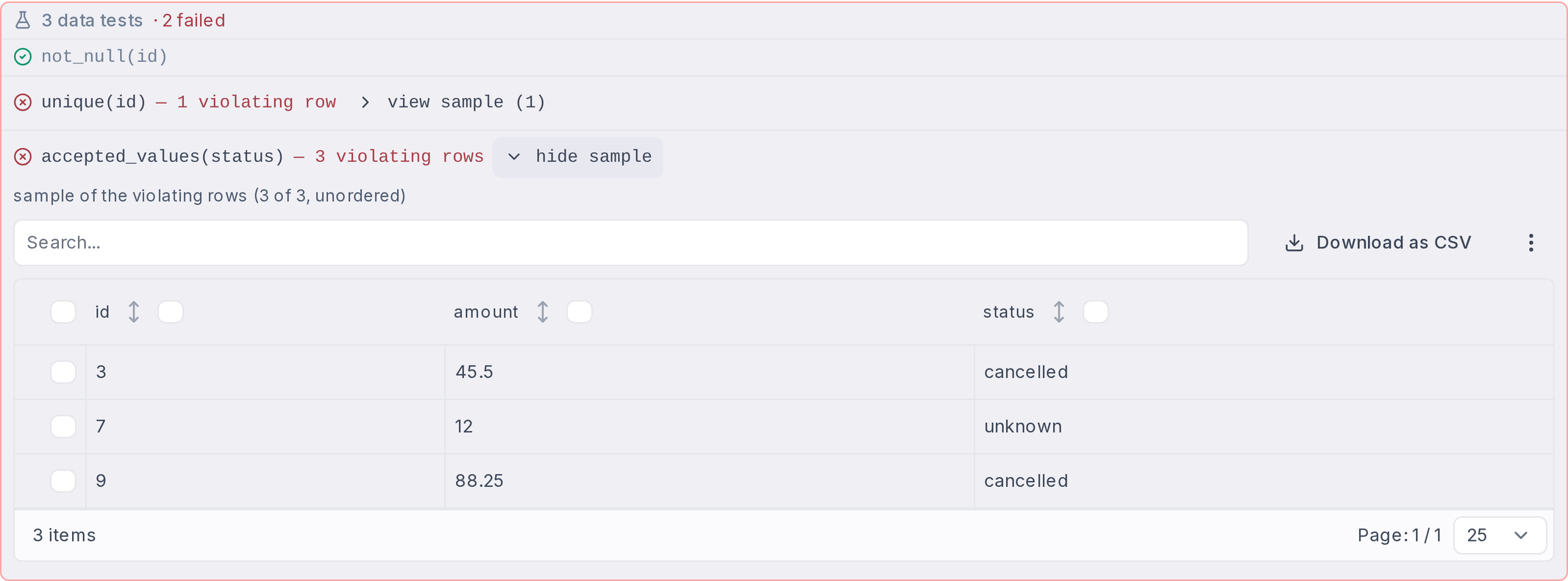
Samples are bounded and best-effort:
- At most 20 rows and 50KB of serialized data per test. A sample over the size cap is dropped entirely, never truncated.
- A sample can never change a test's outcome: pass/fail is decided from the violating-row count alone, and a missing sample just means that test shows counts only.
- Which rows land in the sample is not deterministic (it is a sample of the violating rows, not the full set).
uniquesamples the duplicated values as{value, count}pairs rather than raw rows, matching how its count is defined (number of duplicated values). On partitioned targets the managed_wm_partitioncolumn is excluded from samples.
The error message of a failed run stays counts-only (✗ unique(id) — 3 violating row(s)), so run descriptions and alerts built from the message carry no row data. The samples live in the structured result of the failed job, under error.data_tests (a list of {test, violating, sample?}). An error handler that formats only the error message keeps alerting with counts; one that wants the offending rows can read them from error.data_tests in the job result it receives.
On Enterprise Edition, where a violating run is rolled back before it commits (see below), the violating rows no longer exist to sample: an EE failed run shows the per-test checklist with counts only.
Failing tests: publish or roll back (CE vs EE)
What happens to the data written by a failing run depends on the edition:
- On the Community Edition, materialization is commit-then-test, like dbt: the write is committed first, then the tests run. A failing test fails the run and stops the cascade, but the slice it wrote is already published - BI tools and ad-hoc readers see the failing data until the next successful run.
- On Enterprise Edition, materialization uses write-audit-publish (WAP): the same checks are also evaluated inside the write transaction, just before commit. Any violation aborts the transaction before it commits, so the write is rolled back - readers keep the previous version and no DuckLake snapshot is created. This is automatic on EE; no configuration or annotation change is needed.
| On a failing data test | CE (commit-then-test) | EE (write-audit-publish) |
|---|---|---|
| Freshly written slice | Published: committed before the tests run, so readers see the failing data | Rolled back: readers keep the previous version |
| DuckLake snapshot | New snapshot created (time-travel can inspect the bad write) | No snapshot created |
| First run of a brand-new asset | Table created, filled with the failing data | No table created at all |
| Job result, error message, cascade | Run fails with the per-test pass/fail breakdown; downstream cascade stops | Identical |
| Violating-row samples | Failed tests include a sample of their violating rows | Counts only: the rolled-back rows no longer exist to sample |
Passing runs behave identically in both editions, and the run result shows the same per-test breakdown either way. The difference is whether the data written by a failing run is visible afterwards - and, as a consequence, whether its violating rows are still there to sample.
Materialization in workspace forks (dev data)
Getting an isolated dev-data environment for a pipeline is just forking the workspace - no separate setup. The fork's id is always wm-fork-<name> (the prefix is what lets Windmill route its data to an isolated namespace), and in a fork, materialization does not touch the parent workspace's tables. By default each lake resolves to a fork-scoped namespace (separate metadata schema and bucket prefix), and tables the fork has not materialized yet are read from the parent through read-only defer views, so you can iterate on one node without rebuilding upstream. The pipeline graph marks each DuckLake asset with a deferred (reading parent data) or fork (fork-materialized) chip. No annotation changes are needed: the same ducklake:// URIs transparently target the fork's environment, and a per-lake option at fork creation lets you opt out and share the parent's lake instead.