Macro libraries (DuckDB)
Shared SQL logic can be factored into workspace macro libraries — engine-native DuckDB CREATE MACRO definitions rather than text templating, the pipeline equivalent of dbt macros. A DuckDB script annotated // macros is a macro library: its body is CREATE OR REPLACE MACRO statements (scalar or AS TABLE), plus optional plain setup statements (ATTACH, INSTALL/LOAD, SET, CREATE TEMP TABLE). Deploying is publishing: the macros are callable from every DuckDB script in the workspace the instant the deploy commits, and macro names are workspace-unique.
-- macros
CREATE OR REPLACE MACRO safe_div(a, b, fallback := 0) AS
  CASE WHEN b = 0 THEN fallback ELSE a / b END;

CREATE OR REPLACE MACRO pct(part, total) AS round(100 * safe_div(part, total), 2);

CREATE OR REPLACE MACRO sample_rows(src, n) AS TABLE
  SELECT * FROM query_table(src) LIMIT n;
In the pipeline editor, the "+" script creator has a Macro library output kind that scaffolds one. Deploy validates the library with precise errors: only macro definitions plus setup are allowed, a macro must be defined before a macro that calls it, and a name may not collide with another library's macro or shadow a DuckDB built-in function.
Calling a macro
No import, no annotation, no config: any DuckDB script that calls a registered macro just works, in deployed runs, editor tests and previews alike. At job time the worker detects the calls, resolves transitive macro dependencies (pct pulls in safe_div), and injects the definitions — and the providing library's setup statements — ahead of your statements.
-- pipeline
SELECT safe_div(revenue, users) AS arpu,
       pct(paid, total) AS conversion
FROM sample_rows('lake.events', 10000);
Macros are late-bound, like dbt packages: redeploy the library and the very next run of every consumer uses the new definition, without redeploying the consumers. To opt a script out, define your own macro with the same name — a local CREATE MACRO always wins and its name is excluded from injection entirely. Local and injected definitions still compose in both directions: a local macro can call a registry macro, and an injected macro can call a local one.
Detection is lexical, so a call hidden inside a string — for example dynamic SQL built with query('…') — is not seen. For that case, // use <lib_path> force-injects a whole library (definitions and setup). Libraries can declare // use themselves and it is honored transitively, so a library whose macros build SQL strings calling another library declares the dependency once and every consumer inherits it.
Deploying a script whose // use target is not deployed yet is a warning rather than an error, so git-synced workspaces can deploy in any order; the missing library only fails at run time. Renaming a library keeps the registry consistent automatically, but // use <lib_path> strings in consumers are plain text and fail at run time until updated.
Testing macros
Deploy validates a library's shape (definition order, name collisions, built-in shadowing) but never runs the macros on data. Two lightweight patterns cover behavior.
An assertion script: registered macros are callable from any DuckDB script, including one you run from the editor's Test panel, so a plain script next to the library can call each macro on known inputs and fail loudly on a regression. DuckDB's error() function aborts the query with a message, so wrap each expectation in a CASE:
-- Assertions for shop_macros: any failing case aborts the run with its message.
SELECT * FROM (VALUES
  (CASE WHEN safe_div(10, 0, fallback := -1) <> -1 THEN error('safe_div: fallback not used on /0') ELSE 'safe_div /0 ok' END),
  (CASE WHEN safe_div(10, 4) <> 2.5 THEN error('safe_div: wrong quotient') ELSE 'safe_div ok' END),
  (CASE WHEN pct(1, 3) <> 33.33 THEN error('pct: expected 33.33') ELSE 'pct ok' END)
) AS t(assertion);
Macros are late-bound, so the script always exercises the deployed definitions: redeploy the library, re-run the test. To iterate on definitions you have not deployed yet, paste them at the top of the assertion script - a local CREATE MACRO wins over the registry, so the same assertions run against the work-in-progress version, and deleting the local copies points them back at the registry.
A fixture data test: to assert macro behavior as part of the pipeline rather than on demand, materialize a tiny fixture through the macros and attach a data test:
-- pipeline
-- on schedule
-- materialize ducklake://main/shop_macro_checks
-- data_test f/shop/macro_checks_test

SELECT 'safe_div fallback' AS check_name, safe_div(10, 0, fallback := -1) = -1 AS ok
UNION ALL
SELECT 'pct rounding', pct(1, 3) = 33.33;
with the custom data test f/shop/macro_checks_test returning the checks that did not pass:
-- Violating rows: an empty result means every macro check passed.
SELECT check_name FROM _wm_target.shop_macro_checks WHERE NOT ok;
A regression in the library then fails this producer's run like any other data-test violation, so macro breakage surfaces on the pipeline graph instead of in a downstream consumer's numbers.
Discovering macros
- The DuckDB editor autocompletes every workspace macro while you type, showing the signature, scalar/table kind and provider path, with the full definition on hover.
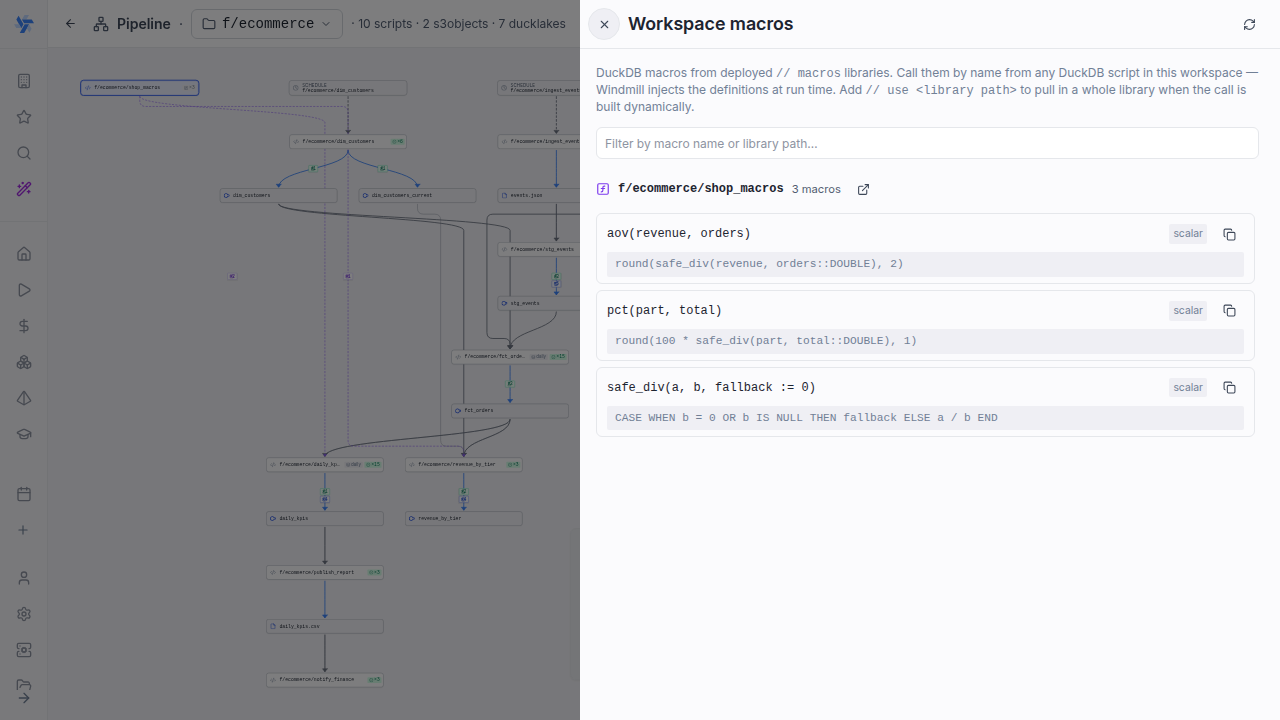
- The Macros button on the pipeline page toolbar opens a workspace-wide explorer drawer: every macro grouped by library, with signature, body preview, copy-call button and filter. It only lists libraries in folders you can read.
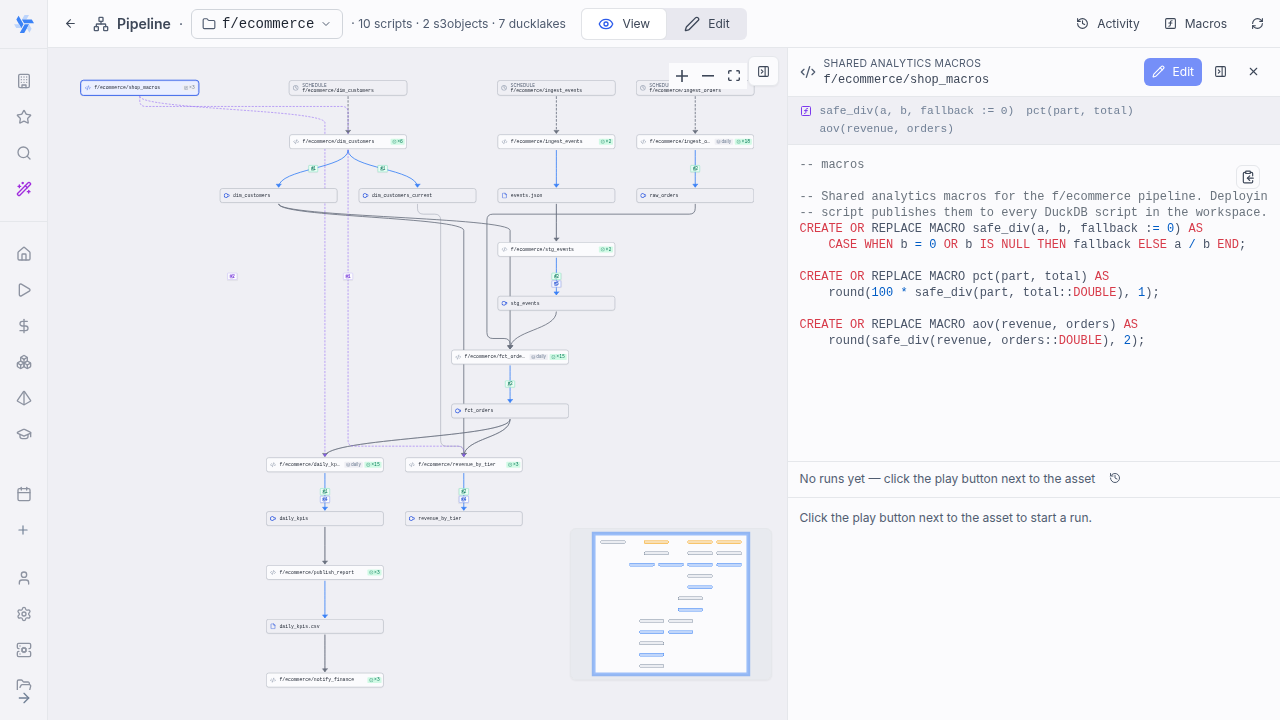
- In the pipeline graph, a library renders as a node with a ƒ ×N badge and dashed edges to each consumer, labeled with the detected calls (or "uses lib" for
// use). Selecting the library shows a signature strip above its source.
Macro libraries are workspace-trusted code: a deployed library is injected into other DuckDB scripts in the workspace and runs with the consuming job's permissions, the same boundary as a dbt package. Control who can deploy library scripts with folder permissions.
Calling a macro that does not exist (a typo, or a library not deployed yet) fails at run time with DuckDB's Catalog Error. Agent (HTTP) workers cannot read the macro registry: implicit macro calls fail there with the same error and // use errors explicitly.
Archiving or deleting a library removes its macros from the registry (and the recorded consumer edges), and forking a workspace clones the registry, so consumers in the fork run immediately.