Pipelines
Pipelines are in alpha. The entry points are deliberately kept out of the way while we develop the feature - open the pipelines index at /pipeline (it lists existing pipelines and lets you pick or create a folder), or create one from the home page by clicking New and selecting Data pipelines (badged Alpha) in the popover. The annotation syntax and behavior described on this page are still evolving and may change in future releases. We would love your feedback - share it on Discord or GitHub.
A pipeline is a set of scripts in the same folder that are wired together by the data they read and write. Instead of assembling steps by hand in a flow, you declare a few comment annotations at the top of each script and Windmill infers the execution graph from asset lineage: when a script writes an asset, every script that reads that asset is triggered automatically.
Pipelines are a modern take on asset-based data orchestration, in the spirit of dbt and Dagster: you describe assets and their lineage rather than wiring tasks by hand. The difference is what powers them - DuckDB (and managed DuckLake tables) as the analytics engine for transformations and materializations, and Windmill itself for orchestration, scheduling and compute, so every step is an ordinary Windmill script that runs on your own workers.
The canonical stack: DuckDB + DuckLake + materialize
Any language works through the same annotations - a // pipeline Python, TypeScript or Bash script that reads and writes assets is a first-class step. But the way to build a powerful pipeline is DuckDB transformations that materialize into a managed DuckLake table: you write the query for one slice and Windmill owns the write. That single choice unlocks the rest of the feature set:
- Managed, idempotent materialization into DuckLake - Windmill generates the write (replace / merge / append), captures a snapshot and tracks the row count, so re-runs, retries and backfills are safe by construction.
- Versioning and time-travel on every write, for free - read a table as of a past snapshot, roll back, reproduce a past run.
- SCD2 history - keep every version of every row and do effective-dated as-of joins.
- Column-level lineage inferred automatically from the SQL - no annotation needed in the common case.
- Data tests (
unique,not_null,accepted_values,relationships) that run against the freshly-materialized slice and fail the run on violation. - Schema capture and contracts - each run captures the table's schema, and consumer scripts are checked against it at save time, with warnings after deploy, live editor squiggles and schema-aware column autocomplete.
- One-click backfill over a range of partitions from the pipeline graph.
- Macro libraries - shared, engine-native DuckDB macros callable from every script in the workspace.
- Measures and dimensions - declare a table's canonical aggregations next to it, catalogued so the editor and agents compose the right SQL instead of guessing.
Materialization, column lineage, data tests and macros are DuckDB-specific; from Python or TypeScript you get the same managed DuckLake write through the wmill.ducklake helpers.
Pipelines are well suited to event-driven and data-engineering workloads where steps are owned independently, run on their own cadence, and are connected only by the datasets they exchange (S3 objects, resources, data tables, volumes). For the underlying data-processing recipes (efficient S3 streaming, DuckDB connection settings, benchmarks), see ETL and data processing.
This page is the full reference for every pipeline annotation and option, with an example for each case. Annotations are plain comment lines, so they use the comment prefix of the script language. Any of the three prefixes below is accepted by the parser; use the one that is a comment in your language.
| Prefix | Languages |
|---|---|
// | TypeScript / JavaScript (Bun, Deno) |
# | Python, Bash, PowerShell, and other #-comment languages |
-- | SQL (DuckDB, PostgreSQL, MySQL, BigQuery, Snowflake, MS SQL) |
The quickstart below uses DuckDB (--), the canonical pipeline language; the reference sections that follow use the // (TypeScript) prefix for the generic annotation examples. Substitute the prefix that is a comment in your language. Annotations live in the leading comment block at the top of the file, one per line: parsing stops at the first line of code, so a commented line further down the file is never treated as an annotation.
Quickstart
Build a two-step DuckLake pipeline in a folder. The first DuckDB script materializes a table; the second declares it as an input and materializes an aggregate whenever it changes. This needs a workspace storage and a DuckLake configured (the default DuckLake is named main); until both are set, the pipelines page shows a setup checklist linking to the settings that configure them.
- Create a folder (for example
f/demo) and add a DuckDB scriptf/demo/ingest:
-- pipeline
-- materialize ducklake://main/events

SELECT * FROM (VALUES
  (1, 'click', TIMESTAMP '2026-01-01 10:00'),
  (2, 'view',  TIMESTAMP '2026-01-01 10:05'),
  (3, 'click', TIMESTAMP '2026-01-01 11:00')
) AS t(id, kind, ts);
-- materialize makes Windmill own the write: it creates ducklake://main/events, writes the trailing SELECT into it, and records a snapshot id and row count.
- Add a second DuckDB script
f/demo/rollupthat reads it:
-- pipeline
-- on ducklake://main/events
-- materialize ducklake://main/events_by_kind

ATTACH 'ducklake://main' AS dl;

SELECT kind, count(*) AS n
FROM dl.events
GROUP BY kind;
- Open the folder and select the pipeline view. You will see
ingest → ducklake://main/events → rollup → ducklake://main/events_by_kind. Runingestwith "Run + downstream":rollupfires automatically onceeventsis materialized, and each node shows its snapshot and row count.
That is the whole model: mark scripts with -- pipeline, declare inputs with -- on, produce tables with -- materialize, and Windmill wires the rest from asset lineage. Because every write is a managed DuckLake snapshot, you get idempotent re-runs, time-travel, column lineage, data tests and backfill for free (see the canonical stack). The sections below cover every option. For a guided walkthrough see the pipeline quickstart.
Materialization is optional. The base model is any-language scripts (-- pipeline, // pipeline, # pipeline) that read and write assets - S3 objects, resources, data tables or volumes - wired by the datasets they exchange; a Python or TypeScript step that just reads and writes an S3 file is a first-class pipeline member. -- materialize (and the DuckDB-only data tests, column lineage and macros) is a managed layer you add on top when a step produces a DuckLake table. Everything below - marking a script, inputs and outputs, triggers, joins, debounce, partitions - applies to both, with or without materialization.
An end-to-end example
The rest of this page uses a complete e-commerce analytics pipeline as its running example: ten scripts in a folder f/ecommerce, three schedules, and no manual wiring anywhere - every edge below is inferred from the assets the scripts read and write.
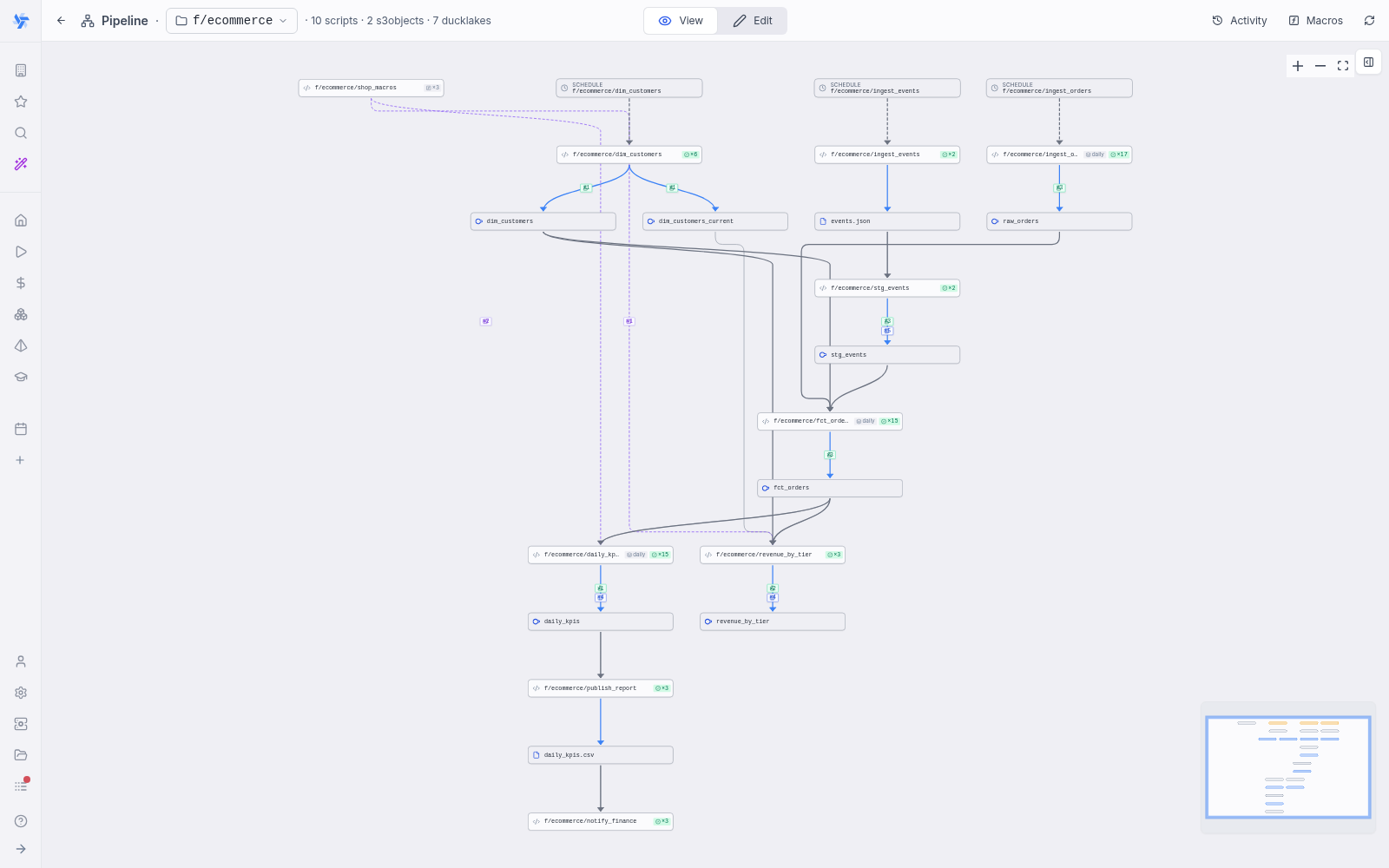
ingest_orders(DuckDB, scheduled,partitioned daily) materializes one day of orders per run intoducklake://main/raw_orders, withnot_null/unique/accepted_valuesdata tests on the slice.ingest_events(Python, scheduled) pulls a JSON-lines dump from the event tracker and writes it tos3:///ecommerce/raw/events.jsonwithwmill.write_s3_file.stg_events(DuckDB) fires whenever that dump is written, and merge-materializes it intoducklake://main/stg_eventskeyed onevent_id- overlapping exports dedupe on re-run.dim_customers(DuckDB, scheduled) is an SCD2 history dimension: every tier or city change closes the prior version and opens a new one, and thedim_customers_currentcompanion view always holds the live slice.fct_orders(DuckDB,partitioned daily) joins the day's orders with the tracked events andASOF JOINs the customer dimension to record the tier each customer had when the order was placed. Arelationshipsdata test checks referential integrity againstdim_customers.daily_kpisandrevenue_by_tieraggregate the fact table, callingpct()andaov()from theshop_macrosmacro library (the ƒ node in the graph) - no import needed.publish_report(DuckDB) exports the KPI table to a CSV on S3, andnotify_finance(TypeScript) fires when that file is written - the kind of leaf step you would point at Slack or email.
Running the top of the pipeline cascades through the whole graph: each write fires its subscribers, the partition travels with the run, and every node shows live status as the wave propagates.
One step of the example in full - the fact table - to show how the annotations compose. Everything it uses is covered in the sections below:
-- pipeline
-- the three ducklake reads in the FROM/JOIN clauses below auto-derive their
-- cascade edges, so no `-- on` line is needed for them
-- partitioned daily
-- materialize ducklake://main/fct_orders key=order_id
-- data_test not_null order_id
-- data_test unique order_id
-- data_test relationships customer_id -> ducklake://main/dim_customers.customer_id

ATTACH 'ducklake://main' AS dl;

-- One row per order for the partition day, enriched with the customer tier
-- that was current when the order was placed (SCD2 as-of join) and the
-- number of tracked events that touched the order.
SELECT
    o.order_id,
    o.customer_id,
    o.amount,
    o.status,
    o.created_at,
    coalesce(d.tier, 'unassigned') AS tier_at_order_time,
    count(e.event_id) AS touchpoints,
    count(e.event_id) FILTER (WHERE e.event_type = 'checkout') AS checkout_events
FROM dl.raw_orders o
ASOF LEFT JOIN dl.dim_customers d
    ON o.customer_id = d.customer_id AND o.created_at >= d.valid_from
LEFT JOIN dl.stg_events e ON e.order_id = o.order_id
WHERE o.created_at::DATE = '{partition}'
GROUP BY ALL;
Marking a script as part of a pipeline
Add a bare // pipeline line to the leading comment block of the script. It opts the script into its folder's pipeline and makes it appear in the pipeline graph.
// pipeline
import * as wmill from 'windmill-client';

export async function main() {
	await wmill.writeS3File({ s3: 'datasets/raw/events.parquet' }, await fetchEvents());
}
Pipeline membership is broader than materialization: a script that only validates, notifies or cleans up is still a member if it is marked and lives in the folder. A script does not need // pipeline to be detected as an asset producer or consumer, but the marker is what places it in the folder's pipeline view and enables the asset-driven triggers below.
Inputs and outputs (assets)
A pipeline's edges come from assets, not from manual wiring:
- Outputs are detected automatically from your code. Writing an S3 file, a
COPY (...) TO filein DuckDB, or a resource write is recognized as a produced asset. See assets for how detection works and how to override an ambiguous read/write. - Inputs are detected the same way. Inside a
// pipeline, a read of a DuckLake table or an S3 object auto-derives its incoming cascade edge straight from the code - no// on <asset>needed.// on <asset>stays required for edges detection can't see (a read built from dynamic SQL), for the other asset kinds (resource, data table, volume, warehouse relation), and to carry per-edge options such asdebounce.
Assets are referenced by URI. Every asset kind Windmill tracks can be used in a // on input and is detected as an output from code:
| Asset kind | URI prefix | Example | Typical producer |
|---|---|---|---|
| S3 object | s3:// | s3:///path/to/file.parquet (workspace storage), s3://secondary/path (named secondary storage) | wmill.writeS3File, DuckDB COPY (...) TO 's3:///...' |
| Resource | $res: | $res:f/team/postgres | writing/updating a resource |
| Data table | datatable:// | datatable://main | wmill.datatable(...) write |
| Ducklake | ducklake:// | ducklake://main/orders | managed // materialize, wmill.ducklake write |
| Volume | volume:// | volume://name | volume write |
| Warehouse relation | dbt:// | dbt://main/analytics/orders | a dbt project's models, or a // materialize manual dbt://… script |
Mind the S3 URI shape: the first segment after s3:// is the storage name, and the default workspace storage is the empty name - so a file datasets/raw/events.parquet in the workspace storage is s3:///datasets/raw/events.parquet, with three slashes. s3://datasets/raw/events.parquet would point at a secondary storage named datasets. The SDK helpers normalize to the same form (wmill.writeS3File({ s3: 'datasets/raw/events.parquet' }) produces the asset s3:///datasets/raw/events.parquet), so the // on line of a consumer must use the triple-slash form to match.
Read/write is inferred from code context (a COPY (...) TO is a write, a read_parquet is a read). Only asset URIs are valid here; a // on with an unrecognized URI is ignored. Duplicate identical // on lines are de-duplicated.
dbt:// is the one kind whose subscriptions are restricted.
A dbt run does not trigger downstream runs, so // on dbt://<relation> is refused when dbt is the only thing that writes the relation, rather than drawing an arrow that can never fire.
What makes the edge fire is a // materialize manual dbt://… producer, and a relation nothing produces yet is accepted like any other asset kind.
The store an asset points at has to exist before a pipeline can write to it. A DuckLake is one click to create in workspace settings -> Object storage (S3) (the default lake is main), so ducklake:// targets work as soon as a lake is configured. The data table substrate behind datatable:// is a separate Postgres database that must be configured first in the workspace's data-tables settings; until it is, datatable:// reads and writes have no backing store. s3://, $res: and volume:// assets need only their usual object storage / resource / volume configuration. A dbt:// relation needs its <warehouse> configured on the workspace; a name no warehouse answers to is refused at deploy.
// pipeline
import * as wmill from 'windmill-client';

export async function main() {
	const events = await wmill.loadS3File({ s3: 'datasets/raw/events.parquet' });
	await wmill.writeS3File({ s3: 'datasets/clean/events.parquet' }, transform(events));
}
The loadS3File read auto-derives the incoming edge, so no // on is needed. When the producer above writes s3:///datasets/raw/events.parquet, this consumer runs automatically. If it in turn writes s3:///datasets/clean/events.parquet, any script that reads s3:///datasets/clean/events.parquet runs next, and so on down the chain.
How outputs are detected
Output edges drive the cascade, so they must be statically visible in your code. Detection is static analysis, not runtime tracing:
- SDK calls with literal arguments are detected with their access type:
wmill.writeS3File({ s3: '...' })/wmill.write_s3_file(S3Object(s3="..."))are writes, theloadvariants are reads. DuckDB statements are parsed the same way (COPY ... TOwrites,read_parquetreads,// materializetargets are writes). - A path built at runtime (a template literal, an f-string, string concatenation) is invisible to detection - the call is skipped.
- A bare string constant anywhere in the file that looks like an asset URI (
"s3:///lake/raw/{partition}/orders.json") is detected as an asset with an ambiguous access type, and the editor's asset panel lets you set it to read or write.
The last two rules combine into the pattern for producers that write a different file per run (per partition, per tenant): declare the path once as a URI constant - which makes it a detected asset - mark it as a write in the asset panel, and build the concrete key from that same constant at run time. See partitioned pipelines for the full example.
The asset cascade is depth-capped so a cycle or a runaway fan-out cannot loop forever. To run a producer without triggering its downstream (for example while iterating on it), pass _wmill_skip_asset_dispatch: true in the run arguments.
Plain S3 outputs (S3 object and S3 Parquet)
DuckLake is the canonical target, but not the only dataset a step can produce: a step can output a plain S3 object - a Parquet dataset, a JSON or CSV export, any file in object storage - and the cascade treats it exactly like a materialized table. The write is detected from code (no annotation needed), the object shows as an asset node in the graph, and every script that reads it runs when it is written.
In the pipeline editor, the "+" script creator asks for the new step's output kind and scaffolds a runnable body for it. Besides the kinds documented on their own pages (Materialized table, Data test, Macro library), it offers S3 Parquet (a columnar file in object storage), S3 Object (a generic file: JSON, CSV, binary), Data table (Postgres-backed), Ducklake (a raw, unmanaged write) and No output (side-effect only). The S3 kinds are available for TypeScript, Python and DuckDB (S3 Object also for Bash and PowerShell), and the scaffold seeds a write to s3:///pipelines/<folder>/<name>.parquet (or .json / .csv) that you can repoint anywhere.
A producer/consumer pair, with no lake anywhere:
// pipeline
// on schedule
import * as wmill from 'windmill-client';

export async function main() {
	const orders = await (await fetch('https://shop.example.com/api/orders')).json();
	// Detected as a write of s3:///pipelines/f/demo/orders.json
	await wmill.writeS3File({ s3: 'pipelines/f/demo/orders.json' }, JSON.stringify(orders));
}
-- pipeline

-- The read_json auto-derives the cascade edge: this script runs whenever
-- orders.json is written. The COPY ... TO is detected as the parquet output.
COPY (
  SELECT order_id, amount, status
  FROM read_json('s3:///pipelines/f/demo/orders.json')
) TO 's3:///pipelines/f/demo/orders.parquet' (FORMAT 'parquet');
Any script that reads s3:///pipelines/f/demo/orders.parquet (a DuckDB read_parquet, an SDK loadS3File) chains next. Steps like these compose with every feature that is not tied to the managed DuckDB write - partitions, joins, debounce, freshness - and a later step can materialize the same data into DuckLake when you want the managed layer.
Volumes in pipelines (volume://)
Steps whose data is a directory of files rather than a single object - a model checkpoint, a build cache, an agent workspace - can exchange a volume. Volumes are an Enterprise Edition feature (the Community Edition caps them at 20 volumes per workspace and 50 MB per file).
A script mounts a volume with the // volume: <name> <mount_path> annotation (see Volumes for the grammar and permissions). In a pipeline, that mount is the asset usage: the script is recorded as a read-write user of volume://<name>, it shows connected to the volume node in the graph, and each of its completed runs counts as a write of the volume.
Volume reads are not auto-derived (only ducklake:// and s3:// reads are), so a consumer must declare its edge explicitly with // on volume://<name>. The URI is the volume name only - volume assets are tracked per volume, not per file inside it.
# pipeline
# on schedule
# volume: model-artifacts models

def main():
    weights = train()
    # Files written under models/ are synced back when the run ends, and the
    # completed run fires every `# on volume://model-artifacts` subscriber.
    with open("models/weights.bin", "wb") as f:
        f.write(weights)
# pipeline
# on volume://model-artifacts
# volume: model-artifacts models

def main():
    with open("models/weights.bin", "rb") as f:
        report_quality(evaluate(f.read()))
Volume access is exclusively leased (one job at a time), so overlapping runs serialize instead of reading a half-synced directory. One caveat: a mount is always recorded as read-write, so the consumer above is itself a producer of volume://model-artifacts - when several subscribers mount one volume, each completed run re-fires the others (the cascade's cycle guard keeps this bounded, but it multiplies runs). Prefer a single mounting consumer per volume, or s3:// objects when many readers should fan out.
The pipeline graph
Open the folder and select the pipeline view to see the graph (the example above shows it for f/ecommerce). Script nodes are connected to the assets they read and write, so you can see the full lineage at a glance: schedule nodes at the top, run-count and daily badges on scripts, test and column badges on write edges, a bell-off badge on a muted read edge (read but not cascaded on), and dashed ƒ edges from macro libraries to their consumers. From any node you can run a single step or a step and everything downstream of it, and the Activity panel streams live run status as a cascade progresses.
The page has two modes: view, the read-only default showing the deployed pipeline, and edit, where your unsaved drafts overlay the deployed graph. Running does not require edit mode: the Run pipeline button in the header is available in both (it runs every step in dependency order, roots first, cascading downstream), and the node-level Run + downstream and bounded selective runs work from view mode too. A view-mode run targets the deployed version of each script; an edit-mode run covers the displayed graph, drafts included.
Selecting a node opens its details pane: source and annotations for a script, and for a materialized asset its partition grid, captured schema and column lineage. When a selected script declares inputs, a compact arguments form appears under the Test button so the run can be parameterized before launching it from the graph. A // partitioned producer gets a dedicated partition picker here instead of a bare text field.
Pipelines are first-class items on the home page and in search: each pipeline shows as a single entry (member scripts are folded into it), including pipelines that only exist as a draft. They can also be built and edited from the AI chat: when a pipeline editor is open, the chat gains tools to read the graph and build, edit, remove or test pipeline steps; changes apply as ordinary unsaved drafts, like in the flow and script editors. Building pipelines from AI session chats is disabled while pipelines are in alpha.
Selective execution (run up to here)
Beyond running a single step or a step and everything downstream of it, you can start a run from any node in the graph and, optionally, bound it to a chosen end. Any node that can run on its own - a schedule-rooted or manual root, but also a mid-DAG model (an asset subscriber or a pure reader) - shows a Run + downstream… entry in its cascade menu. Choosing it runs that node plus its transitive downstream, and never re-runs anything upstream. This is dbt's model+ gesture: rebuild a model and everything that depends on it, without recomputing its inputs.
wmill pipeline run f/orders --from fct_orders_daily # = dbt run --select fct_orders_daily+
To bound the run further, click the node(s) where it should stop (eligible nodes highlight, out-of-reach ones dim) before launching. Windmill then runs exactly the path between the start and the ends - every step needed to produce the chosen ends and nothing past them - in topological order, stopping on the first failure.
Nodes that can't run on empty arguments - event triggers (kafka/mqtt/nats/postgres/sqs/gcp/email) and input-only entry points (webhook/data_upload) - can't be picked as a start; they fan out per event or need caller-supplied input. Bind one with --upload from the CLI to run it as a start anyway.
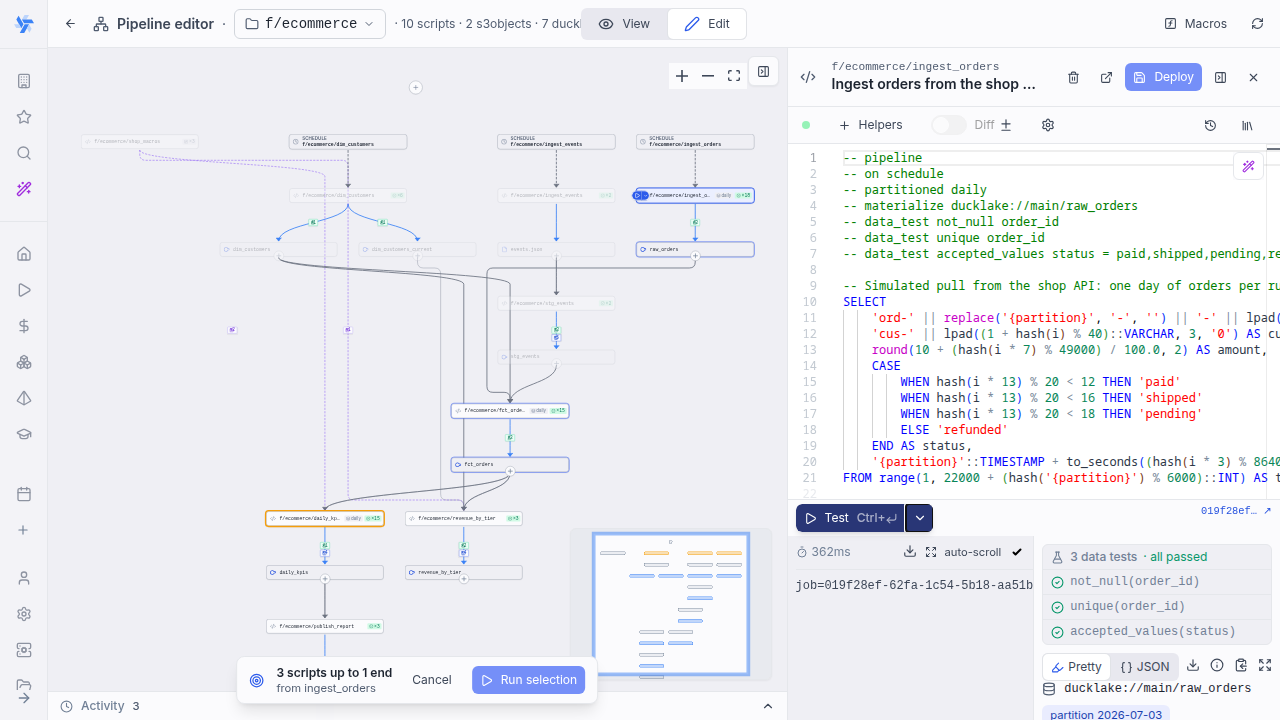
The same run is available from the CLI:
wmill pipeline run <folder> [--from <start>] [--to <node>[,<node>…]] [--dry-run] [--json]
--from is any runnable node, mid-DAG models included, and defaults to the folder's sole schedule/manual root; --to accepts script names, paths, or asset URIs (e.g. datatable://main/staged); --dry-run prints the planned set without running it.
Triggering a pipeline
A step runs when any of its triggers fire. There are two trigger forms: asset writes (the cascade) and markers for native triggers that target the script.
Asset triggers (the cascade)
Asset writes are the default way data flows through a pipeline: when an upstream script writes an asset, every script that reads it runs next. Inside a // pipeline, a read of a DuckLake table or an S3 object auto-derives that edge from the code - the DuckDB FROM clause, a read_parquet, or an SDK load call wires the cascade edge with no annotation. Auto-derived edges render as ordinary trigger edges. A cascade-dispatched run also records the DuckLake snapshot id of each direct upstream asset at dispatch time, shown as an Upstream snapshots panel on its run page, so you can query the inputs exactly as the run saw them.
Auto-derivation covers read-only DuckLake and S3 reads only. A read the script also writes (an incremental model that SELECTs from the table it materializes) is not turned into a self-triggering edge, an ambiguous read is skipped, and the other asset kinds (resource, data table, volume, warehouse relation) stay explicit.
// on <asset-uri> [debounce=<duration>]
Use // on <asset-uri> for edges detection can't derive on its own:
- a read hidden from static analysis (a table name built from dynamic SQL),
- an input of a kind that isn't auto-derived (resource, data table, volume, warehouse relation),
- or to carry the per-edge
debounce=option (the only inline option, see debounce; meaningful for asset inputs only). An explicit// onwins over the derived edge for the same asset, so it is how you attach options to an otherwise-derived read.
<asset-uri> is any of the asset kinds in the table above.
// pipeline
// on ducklake://main/orders debounce=60s
// on $res:f/team/config
Muting a read edge
An auto-derived edge is occasionally unwanted: a script reads an asset but should not re-run when it changes - a lookup table or slowly-changing dimension it reads on every run. Two annotations opt out:
// mute <asset>   suppress the auto-derived edge for one asset (asset is still read, just not cascaded on)
// mute all       opt the whole script out of auto-derivation (only explicit `// on` edges remain)
A muted read shows on the pipeline graph as an edge with a bell-off badge: the script reads the asset, but changes to it won't re-run the script. Only ducklake:// and s3:// refs are muteable (the only auto-derived kinds), and // mute all leaves explicit // on edges untouched.
// pipeline
// mute ducklake://main/country_codes
Native-trigger markers (schedule, webhook, kafka, …)
// on <kind>
Besides asset writes, a step can be triggered by a native trigger (including a schedule) that targets the script. This marker is keyword-only — there is no path or cron in the annotation. The binding lives on the trigger row itself (its script_path points at this script), and all of the trigger's options — cron and timezone for a schedule, connection / broker / topic / queue / filters / authentication / mapping for the others — live in that trigger's own configuration page. The // on <kind> line just surfaces the trigger on the pipeline graph and opts the step into firing from it. Anything after the keyword makes the line malformed (so // schedule "<cron>" and // on kafka f/foo are not valid forms).
| Kind keyword | Trigger | Where the cron / options live |
|---|---|---|
schedule | a schedule | the schedule's cron + timezone |
webhook | a route / webhook | Webhooks |
email | an email trigger | Triggers |
kafka | a Kafka trigger | Kafka triggers |
nats | a NATS trigger | NATS triggers |
mqtt | an MQTT trigger | MQTT triggers |
postgres | a Postgres trigger | Postgres triggers |
sqs | an AWS SQS trigger | SQS triggers |
gcp | a GCP Pub/Sub trigger | GCP triggers |
data_upload | a UI file-upload entry point | the run form's S3 file picker |
If a // on <kind> marker has no matching trigger yet, the pipeline graph shows a placeholder node you can click to create one (for a schedule, that is where you set the cron).
A data_upload entry point has no trigger to create: clicking the node opens the target script's run form with an auto-generated S3 file picker. Because these scripts declare a required input (an uploaded file or a JSON payload), you must stage that input before the pipeline can run - pick the file (or fill the form) and the node turns green with a checkmark to mark it ready. The Run pipeline button is gated on every data_upload entry being green: if any still need data, clicking it shows a toast and focuses the first unstaged node instead of launching a run that would immediately fail on the empty argument. Once all entries are staged, the run proceeds with the data you provided.
// pipeline
// on schedule
// on kafka
// on webhook
import * as wmill from 'windmill-client';

export async function main() {
	await wmill.writeS3File({ s3: 'datasets/raw/orders.parquet' }, await pull());
}
By default all of a script's triggers are combined with OR: any one firing runs the script once. See joining inputs to require all inputs instead.
The asset cascade only dispatches script subscribers (flow subscribers are not wired in this version). It is depth-capped: a chain stops after a fixed number of hops so a cycle or runaway fan-out cannot loop forever. Pass _wmill_skip_asset_dispatch: true in a run's arguments to run a producer without firing its downstream (useful while iterating).
Ingestion (EL)
How to land external data in the lake - choosing the extract engine, incremental cursors, schema drift and worked examples - is covered on the dedicated Ingestion (EL) page.
Freshness
// freshness <duration>
Declares a service-level objective: the script's outputs should be at most <duration> old. Freshness is a consumer guarantee, not a schedule: it applies regardless of which trigger last ran the script (a schedule is a producer cadence; the two are independent and can coexist). All editions show a fresh/stale verdict on the pipeline graph; on Enterprise Edition a watchdog also re-runs stale scripts automatically.
- The duration is a plain string such as
30m,2h,1d. Whitespace after the keyword is required; an empty value is ignored. - If several
// freshnesslines are present, the first one wins.
// pipeline
// on s3:///datasets/clean/events.parquet
// freshness 2h
import * as wmill from 'windmill-client';

export async function main() {
	await wmill.writeS3File({ s3: 'datasets/marts/daily.parquet' }, await rollup());
}
Fresh/stale badge
On the pipeline graph, every script with a // freshness annotation carries a badge showing the window and a verdict computed from the script's run history:
- Emerald (fresh): the script's most recent successful root run completed within the window.
- Amber (stale): the last successful run is older than the window, or the script has never run successfully. The tooltip shows how long ago the last successful run completed, or "no successful run yet".
- Neutral (no verdict): draft scripts and windows that cannot be parsed.

Only root runs of the script itself count toward the verdict; a flow that contains a step on the same path does not make the script fresh. The verdict is computed from the runs you are allowed to see, so users without job visibility get no verdict. An open graph re-evaluates every 30 seconds, so a badge flips to stale as its window ages out and turns fresh shortly after a successful run.
Freshness watchdog (EE)
On Enterprise Edition, a watchdog enforces the SLO as a backstop: if no successful root run of the script completed inside the window, it re-runs the script automatically. Whenever any trigger runs the script successfully, the window resets and the watchdog stays out of the way.
- The watchdog checks deployed pipeline scripts about once a minute. Partitioned scripts are not covered in this version, and a script that already has a run queued and due (or running) is left alone.
- Watchdog runs use the latest deployed version of the script with its own settings (worker tag, retries, ...), run with the deploying user's permissions, and are attributed to the pseudo-user
freshness-<path>with trigger kindfreshness, so they can be filtered on the Runs page. - They pass
_wmill_skip_asset_dispatch: true: a watchdog run refreshes the script's own outputs but never fires the downstream cascade. - If the script stays stale (for example because the re-run keeps failing), attempts back off exponentially starting at one minute and capped at the window, so a persistently failing hourly script converges to about one attempt per hour. A successful run resets the backoff.
- Set the
DISABLE_FRESHNESS_WATCHDOGenvironment variable totrueon servers to turn the watchdog off instance-wide.
Partitioned pipelines
Materializing one dataset slice per time bucket or key - the // partitioned annotation, partition kinds and options, the {partition} token, and backfill semantics - is covered on the dedicated Partitioned pipelines page.
Materialization
Managed DuckLake writes (the // materialize grammar and strategies, SCD2 history, versioning and time-travel, upstream snapshots, partition status and backfill, schema capture, column-level lineage and data tests) and declared dbt:// warehouse-relation writes are covered on the dedicated Materialization page.
Macro libraries (DuckDB)
Reusable DuckDB macros shared across the workspace are covered on the dedicated Macro libraries page.
Measures and dimensions (DuckDB)
Declaring a materialized DuckLake table's canonical aggregations (-- measure) and slicers (-- dimension) so the editor and agents compose the right SQL is covered on the dedicated Measures and dimensions page.
Joining inputs: any vs all
When a script declares several // on inputs, // trigger controls how they combine:
// trigger any(default): the script runs whenever any input is written. Good for streaming and single-input steps.// trigger all: an AND join barrier. The script runs once for a given partition only when every partition-bearing input has been materialized for that partition.
An input is partition-bearing when its declared path contains the {partition} token. Only partition-bearing inputs are tracked by the AND barrier. Inputs without the token (a reference or dimension dataset refreshed on its own cadence) are not part of the barrier at all: they do not define the partition and, on their own, do not fire the join — a write to one of them while // trigger all is set is simply skipped. Read such reference data at run time when a partition-bearing input completes the join.
- DuckDB
- TypeScript
-- Daily enriched table: join the day's events with the day's sessions
-- (both partitioned, must agree on the day) plus the current customers
-- dimension (unpartitioned reference).
--
-- pipeline
-- on s3:///lake/raw/events/{partition}/events.parquet
-- on s3:///lake/raw/sessions/{partition}/sessions.parquet
-- on s3:///lake/dim/customers/current.parquet
-- trigger all
-- partitioned daily
-- materialize ducklake://main/enriched

-- '{partition}' is substituted at run time; the AND barrier guarantees
-- both partition-bearing inputs exist for this partition. The
-- unpartitioned customers dimension is read as-is.
SELECT e.*, s.session_id, c.tier
FROM read_parquet('s3:///lake/raw/events/' || '{partition}' || '/events.parquet') e
JOIN read_parquet('s3:///lake/raw/sessions/' || '{partition}' || '/sessions.parquet') s USING (user_id)
JOIN read_parquet('s3:///lake/dim/customers/current.parquet') c USING (customer_id);
// Daily enriched table: join the day's events with the day's sessions
// (both partitioned, must agree on the day) plus the current customers
// dimension (unpartitioned reference).
//
// pipeline
// on s3:///lake/raw/events/{partition}/events.parquet
// on s3:///lake/raw/sessions/{partition}/sessions.parquet
// on s3:///lake/dim/customers/current.parquet
// trigger all
// partitioned daily
import * as wmill from 'windmill-client';

// Detected as an asset; mark it as a write in the editor's asset panel.
const ENRICHED_URI = 's3:///lake/marts/enriched/{partition}/data.parquet';

export async function main(partition: string) {
	// guaranteed: both partition-bearing inputs exist for `partition`
	const events = await wmill.loadS3File({ s3: `lake/raw/events/${partition}/events.parquet` });
	const sessions = await wmill.loadS3File({ s3: `lake/raw/sessions/${partition}/sessions.parquet` });
	const customers = await wmill.loadS3File({ s3: 'lake/dim/customers/current.parquet' });
	const key = ENRICHED_URI.replace('s3:///', '').replace('{partition}', partition);
	await wmill.writeS3File({ s3: key }, join(events, sessions, customers));
}
The producers of the two partition-bearing inputs use the URI-constant pattern so their writes are detected with the {partition} token. Reads need no such care: the // on lines are the input edges, and the code can build read paths dynamically.
With this declaration, writing events for 2026-05-15 does not run the script yet (one of two partition-bearing inputs present). When sessions for 2026-05-15 is also written, the script runs exactly once for 2026-05-15. Writing events for 2026-05-16 opens a separate, independent slot. Refreshing the unpartitioned customers reference does not fire past partitions.
The AND barrier is correct only when every partition-bearing input of a step shares the same partitioning. There is no automatic cross-granularity check: partition values are opaque strings, so mixing (say) a daily and an hourly input under one // trigger all step just produces values that never coincide, and the join silently never completes. A write from an unpartitioned producer to such a step is skipped rather than firing the join with a wrong or empty partition. Keep the partition-bearing inputs of an // trigger all step on the same partition scheme.
Debounce
By default each upstream write fires the subscriber, which is usually the intended behavior. When an upstream is noisy (it rewrites the same asset many times in a short window) you can opt into debouncing so the downstream runs once instead of many times.
// debounce <duration>sets a default window for all of the script's asset inputs.// on <asset> debounce=<duration>overrides the default for that one input.
Effective window per edge, in precedence order: the per-// on debounce= value, else the script-level // debounce, else none (no debounce: every write fans out, the default and prior behavior).
Duration grammar:
| Form | Meaning | Example |
|---|---|---|
<n> | bare integer = seconds | 90 = 90s |
<n>s | seconds | 30s |
<n>m | minutes | 5m |
<n>h | hours | 2h |
<n>d | days | 1d |
Parsing is fail-safe: a malformed, non-positive or unrecognized duration resolves to no debounce (a typo fans out rather than silently swallowing runs). Debounce applies to asset-cascade edges only; native-trigger // on <kind> markers ignore it.
// pipeline
// debounce 1m
// on s3:///datasets/raw/events.parquet
// on s3:///datasets/dim/reference.parquet debounce=30s
import * as wmill from 'windmill-client';

export async function main() {
	await wmill.writeS3File({ s3: 'datasets/clean/events.parquet' }, await clean());
}
Debounce is keyed per subscriber and per partition, so two different partitions in flight at the same time never collapse into one, and within a window the most recent write wins. A manual run with an explicit partition argument (a backfill) is unaffected.
Per-step execution options
Two more annotations tune how a step runs, independently of how it is triggered.
Worker tag
// tag <name>
Overrides the worker tag the script runs on, so a pipeline step can be pinned to a dedicated worker group (a GPU pool, a high-memory queue, a network-restricted set). The value is taken verbatim; whitespace after the keyword is required and the first // tag wins.
// pipeline
// tag gpu
import * as wmill from 'windmill-client';

export async function main() {
	await wmill.writeS3File({ s3: 'datasets/marts/embeddings.parquet' }, await embed());
}
Retry
// retry <count> [<delay>]
Retries the step when it is run by the cascade (an upstream asset write fired it). <count> is a positive integer; the optional <delay> is a duration (same grammar as debounce). A non-numeric or zero count is ignored. The first // retry wins. This applies to cascade-dispatched runs only — a manual run or a run launched from the graph uses the editor's own test/run behavior.
// pipeline
// on s3:///datasets/raw/events.parquet
// retry 3 10s
import * as wmill from 'windmill-client';

export async function main() {
	await wmill.writeS3File({ s3: 'datasets/clean/events.parquet' }, await flakyTransform());
}
Local development
The CLI supports a local edit → preview → run loop for pipelines, the pipeline analog of wmill dev for flows and scripts. From a local checkout of the workspace (for example after wmill sync pull), the pipeline is built from your working-tree files with the same parser the UI uses — no deploy needed:
wmill pipeline show <folder> --local     # render the pipeline graph from local files
wmill pipeline run <folder> --local      # run the whole pipeline in topological order, via previews
wmill pipeline dev [folder]              # watch the folder and live-preview the graph in the browser
wmill pipeline docs <folder>             # write PIPELINE.md describing the graph and datatable schemas
wmill pipeline dev watches the folder and pushes the rebuilt graph to a live browser page on every save: the same graph view as the pipeline editor, with node selection, run forms, Run and Run + downstream, and live run activity. Editing stays in your own editor (or an agentic loop); adding, editing or renaming a script updates the graph without a reload. wmill pipeline docs writes a PIPELINE.md (with AGENTS.md/CLAUDE.md pointers) so a coding agent gets the pipeline's structure as context.
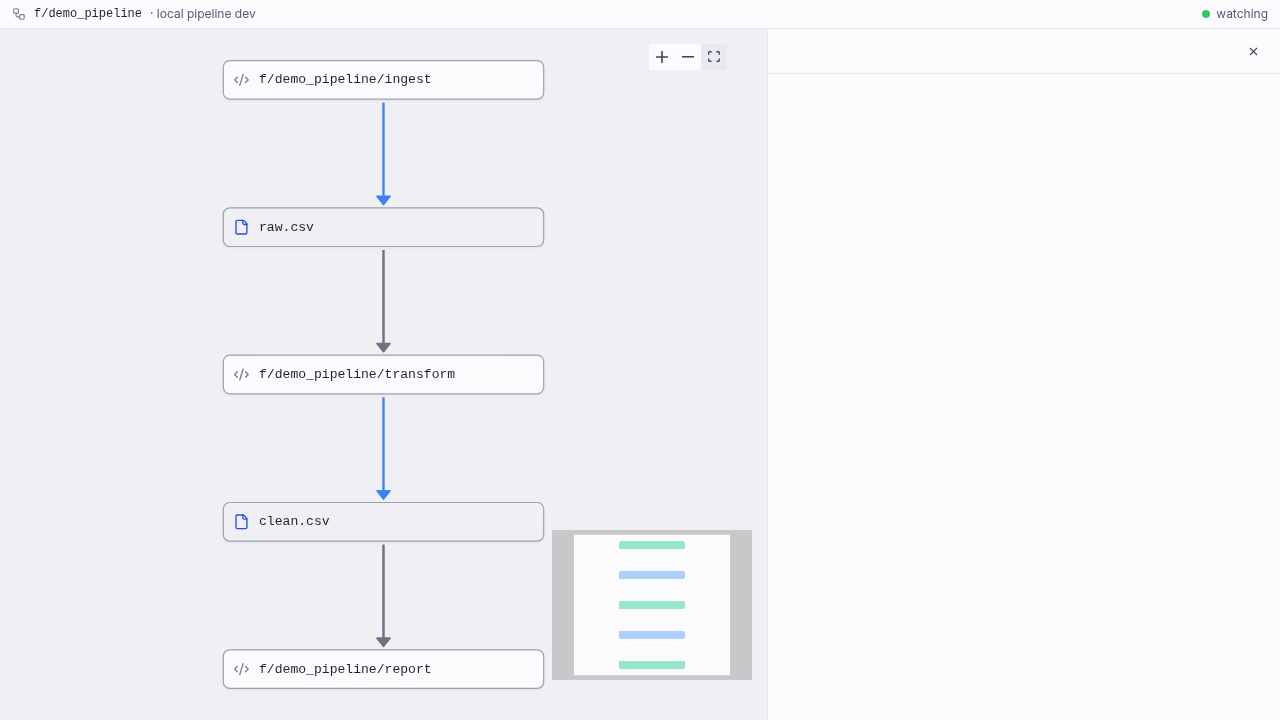
wmill pipeline run takes the same --from/--to/--dry-run bounds as selective execution, plus options to parameterize the cascade:
--partition <value>— run// partitionedscripts on an explicit partition. With--local, time kinds default to the current UTC period when the flag is absent;dynamicrequires an explicit value. With an explicit value this doubles as a headless backfill (--partition 2026-06-30).--arg <script>:<param>=<value>— pass a plain argument to one script in the cascade (repeatable; the value is parsed as JSON when possible, else taken as a string).--upload <script>=<file>— upload a local file and bind it to the script's S3 object parameter.
The full command reference (all options for show, run, dev and docs) is on the Pipelines (CLI) page.
Annotation reference
| Annotation | Scope | Options / values | Default | Purpose |
|---|---|---|---|---|
// pipeline | script | none (bare marker) | - | Include the script in its folder's pipeline graph |
// on <asset-uri> | input | debounce=<duration> | - | Run when the asset is written (cascade); <asset-uri>: s3:///<key> (workspace storage) or s3://<storage>/<key>, $res:, datatable://, ducklake://, volume://, dbt:// (see the restriction) |
// on <kind> | trigger | none (marker-only) | - | Fire from a native trigger that targets the script; <kind>: schedule, webhook, email, kafka, mqtt, nats, postgres, sqs, gcp, data_upload. The cron and all other options live on the trigger row |
// freshness <duration> | SLA | <n>[s|m|h|d] | - | Fresh/stale badge on the graph; on EE a watchdog re-runs stale scripts (first wins) |
// partitioned <kind> [opts] | output | kinds daily|hourly|weekly|monthly|dynamic; opts tz=, format=, start=, key= (dynamic) | tz=UTC, per-kind format, no start | Materialize one dataset per partition (first wins) |
// materialize [manual] <ducklake-uri> [opts] | output | manual (track-only); opts append, key=<col>, history (SCD2, with track=, deletes=close), on_schema_change=warn|ignore|fail|sync | managed, replace | Managed write into a DuckLake table — idempotent, snapshotted, tracked (first wins). DuckDB-only |
// materialize manual <dbt-uri> | output | manual only | - | Declare a write to a warehouse relation (dbt://<warehouse>/<schema>/<name>), from any language but dbt's own. Track-only: the script issues its own write |
// macros | script | none (bare marker) | - | Mark a DuckDB script as a workspace macro library; its macros become callable from every DuckDB script |
// use <lib_path> | script | macro library script path | - | Force-inject a macro library (definitions + setup), for calls hidden in dynamic SQL (accumulate) |
// column <out> <- <asset-uri>.<col>[, …] | lineage | comma-separated source columns | inferred from SQL | Column-to-column lineage; inferred from SQL for DuckDB, override/declare for other languages. Metadata only (accumulate) |
// data_test <kind> … | test | unique, not_null, accepted_values, relationships, <script_path> | - | Test the materialized slice; fail the run on violation. Managed // materialize only (accumulate) |
// measure <name> = <agg> [where <pred>] | metric | aggregate SQL + optional predicate | - | Declare a table's canonical aggregation; catalogued at deploy, informational (dedupe by name) |
// dimension <name> = <expr> | metric | slicing SQL expression | - | Declare a slicer any measure can be grouped by; catalogued at deploy, informational (dedupe by name) |
// trigger any | join | any | all | any | OR: any input fires the script |
// trigger all | join | any | all | any | AND barrier: fire once per partition when all partition-bearing inputs present |
// debounce <duration> | script | <n>[s|m|h|d] | none (fan-out) | Default debounce window for the script's asset inputs |
// on <asset> debounce=<duration> | input | <n>[s|m|h|d] | script // debounce | Per-input debounce override |
// tag <name> | script | worker tag name | - | Pin the step to a worker tag / group (first wins) |
// retry <count> [<delay>] | script | positive int + optional duration | - | Retry the step on cascade-dispatched runs (first wins) |
The {partition} token is used inside asset paths (in // on and in the paths your code writes) and is resolved at run time. Unknown annotations and unknown option values are ignored (the default is kept) rather than failing the deploy.
Community vs Enterprise
Every pipeline concept works on the Community Edition: the annotations, the asset cascade, materialization with all strategies, data tests, column lineage, macros, measures and dimensions, partitions, freshness badges and local development. A few operational capabilities are Enterprise Edition only, and each one degrades to a safe Community behavior rather than disappearing:
| Capability | Community Edition | Enterprise Edition |
|---|---|---|
| Backfill | Single-partition runs (an explicit partition argument from the graph, editor or CLI, one at a time) | One-click range backfill over [from, to] from the pipeline graph, up to 1000 partitions |
| Failing data tests | Commit-then-test: the failing slice is committed and published, then the run fails (dbt's behavior) | Write-audit-publish: the checks run inside the write transaction and a violation rolls the write back before commit, so readers keep the previous version |
| Freshness | Passive fresh/stale badge on the graph | Active watchdog that re-runs stale scripts automatically |
| DuckLake maintenance | None managed: the lake grows unboundedly unless you compact and expire snapshots yourself | Scheduled maintenance per lake: snapshot expiry, compaction and orphaned-file cleanup on a managed schedule |
The Community behavior is never a stub: a one-at-a-time backfill, a passive freshness verdict and commit-then-test are exactly how dbt and a hand-rolled orchestrator behave. Enterprise turns each into an automated, safe-by-default operation.
How this compares to dbt and Dagster
Pipelines borrow the asset-and-lineage model that dbt and Dagster popularized, but fold several tools into one platform:
- dbt transforms data with SQL and tracks lineage, but it is transform-only: it needs a separate orchestrator to run it on a schedule and a separate warehouse to run against. Windmill runs the transforms (DuckDB), owns the store and versioning (DuckLake), and schedules and triggers them natively.
- Dagster orchestrates assets and tracks metadata, but it relies on dbt (or your own code) for the transforms and a warehouse for compute. Windmill is the orchestrator, the compute (your own workers), and the transform engine at once.
The equivalents map closely: materializations, data tests, macros, column lineage, schema contracts, selective runs, backfill and freshness all have counterparts, while the compute, scheduling and triggers come from the same platform and run on your own infrastructure, in any language. Schema contracts differ in shape from dbt's: instead of a declaration you maintain by hand, the schema captured at materialization time is the contract, and consumer saves are checked against it with warnings only. On the producer side, on_schema_change mirrors dbt's option (warn, ignore, fail, sync) to control how a model handles a change to its own schema. In one place pipelines go further than dbt: on Enterprise Edition, a failing data test rolls back the write (write-audit-publish) instead of leaving the failed model live, which is dbt's behavior and the Community Edition default.
Pipelines are in alpha and do not yet cover everything those tools do: dbt's docs-site generation, seeds and semantic layer have no direct equivalent. The goal is not feature-for-feature parity but doing the whole asset-based workflow (transform, orchestrate, test, materialize, version) in a single platform, on your own compute.
If you already have a dbt project, you do not have to port it to get there: Windmill also runs an unmodified dbt project as a script of its own, with its models on the same asset graph as everything above. See dbt.