Dependencies in Python
In Windmill standard mode, dependencies in Python are handled directly within their scripts without the need to manage separate dependency files. From the import lines, Windmill automatically handles the resolution and caching of the script dependencies to ensure fast and consistent execution (this is standard mode).
There are however methods to have more control on your dependencies:
- Using workspace dependencies for centralized dependency management at the workspace level.
- Leveraging standard mode, from the web IDE or locally.
- Using PEP-723 inline script metadata for standardized dependency specification.
Moreover, there are other tricks, compatible with the methodologies mentioned above:
- Sharing common logic with Relative Imports.
- Pinning dependencies and requirements.
- Private PyPI Repository.
- Python runtime settings.
- Pre-installed packages via global site-packages.
To learn more about how dependencies from other languages are handled, see Dependency management & imports.
Lockfile per script inferred from imports (Standard)
In Windmill, you can run scripts without having to manage a requirements.txt directly. This is achieved by automatically parsing the top-level imports and resolving the dependencies. For automatic dependency installation, Windmill will only consider these top-level imports.
In Python, the top-level imports are automatically parsed on saving of the script and a list of imports is generated. For automatic dependency installation, Windmill will only consider these top-level imports.
A dependency job is then spawned to associate that list of PyPI packages with a lockfile, which will lock the versions. This ensures that the same version of a Python script is always executed with the same versions of its dependencies. It also avoids the hassle of having to maintain a separate requirements file.
We use a simple heuristics to infer the package name: the import root name must be the package name. We also maintain a list of exceptions. You can make a PR to add your dependency to the list of exceptions here.
Whether deployed from the Web IDE (where the lockfile is recomputed at each deployment by a dependency job) or from the CLI (where each script gets a content file, a metadata file and a lockfile managed with wmill generate-metadata), the lockfile generation mechanism is the same for all languages and is described in Dependency management & imports.
Other
Other tricks can be used: Sharing common logic with relative imports, Pinning dependencies and requirements and Private PyPI Repository. All are compatible with the methods described above.
Sharing common logic with relative imports
You can import directly from other Python scripts of the workspace by following the path layout, e.g. from f.<foldername>.script_name import foo or, relatively, from .common_logic import foo. See Sharing common logic for the full syntax and examples.
Pinning dependencies and requirements
Requirements
If the imports are not properly analyzed, there exists an escape hatch to
override the inferred imports. One needs to head the Script with the requirements comment followed by dependencies.
The standard pip requirement specifiers are supported. Some examples:
#requirements:
#dependency1[optional_module]
#dependency2>=0.40
#dependency3@git+https://github.com/myrepo/dependency3.git

import dependency1
import dependency2
import dependency3

def main(...):
  ...
Extra requirements
To add extra dependencies or pin the version of some dependencies
To combine both the inference of Windmill and being able to pin dependencies, use extra_requirements:
#extra_requirements:
#dependency==0.4

import pandas
import dependency

def main(...):
  ...
Pin and Repin
It is possible to pin specific import to different version or even another dependency
import pandas
import dependency # pin: dependency==0.4
import nested.modules # pin: nested-modules

def main(...):
  ...
If import was pinned once, whenever you use the same import again it will be pinned.
It is possible to have several pins to same import and all of them will be included.
However if you want to override all pins associated with an import you can use repin
# content of f/foo/bar:
import dependency # pin: dependency==0.4 Hard lock on 0.4
...

# content of f/foo/baz:
import dependency # pin: dependency==1.0 Hard lock on 1.0
...

# content of f/foo/main:
import f.foo.bar
import f.foo.baz
import dependency # repin: dependency==1.0 Repin to version that works for all scripts
...
Windmill assumes that imports directly map to requirements, however it is not always the case. To handle this there is windmill import map. And if you found a public python dependency that needs to be explicitly mapped you can submit an issue or contribute.
PEP-723 inline script metadata
Windmill supports PEP-723 inline script metadata, providing a standardized way to specify script dependencies and Python version requirements directly within your script. This implements the official Python packaging standard for inline script metadata.
# /// script
# requires-python = ">=3.12"
# dependencies = [
#     "requests",
#     "pandas>=1.0",
#     "numpy==1.21.0"
# ]
# ///

import requests
import pandas as pd
import numpy as np

def main():
    response = requests.get("https://api.example.com/data")
    df = pd.DataFrame(response.json())
    return df.to_dict()
The PEP-723 format allows you to:
- Specify exact Python version requirements with
requires-python - List dependencies with version constraints in the
dependenciesarray - Use standard PEP 440 version specifiers
Python version shortcut
For Python version requirements, Windmill also provides a convenient shortcut. Instead of using the full PEP-723 requires-python field, you can use the simple annotation format:
#py: >=3.12

def main():
    return "Hello from Python 3.12+"
This shortcut is equivalent to specifying requires-python = ">=3.12" in the PEP-723 format.
Private PyPI repository
Environment variables can be set to customize uv's index-url and extra-index-url and certificate.
This is useful for private repositories.
In a docker-compose file, you would add following lines:
windmill_worker:
  ...
  environment:
    ...
    # Completely whitelist pypi.org
    - PY_TRUSTED_HOST=pypi.org
    # or specify path to custom certificate
    - PY_INDEX_CERT=/custom-certs/root-ca.crt
UV is not using system certificates by default, if you wish to use them, set PY_NATIVE_CERT=true
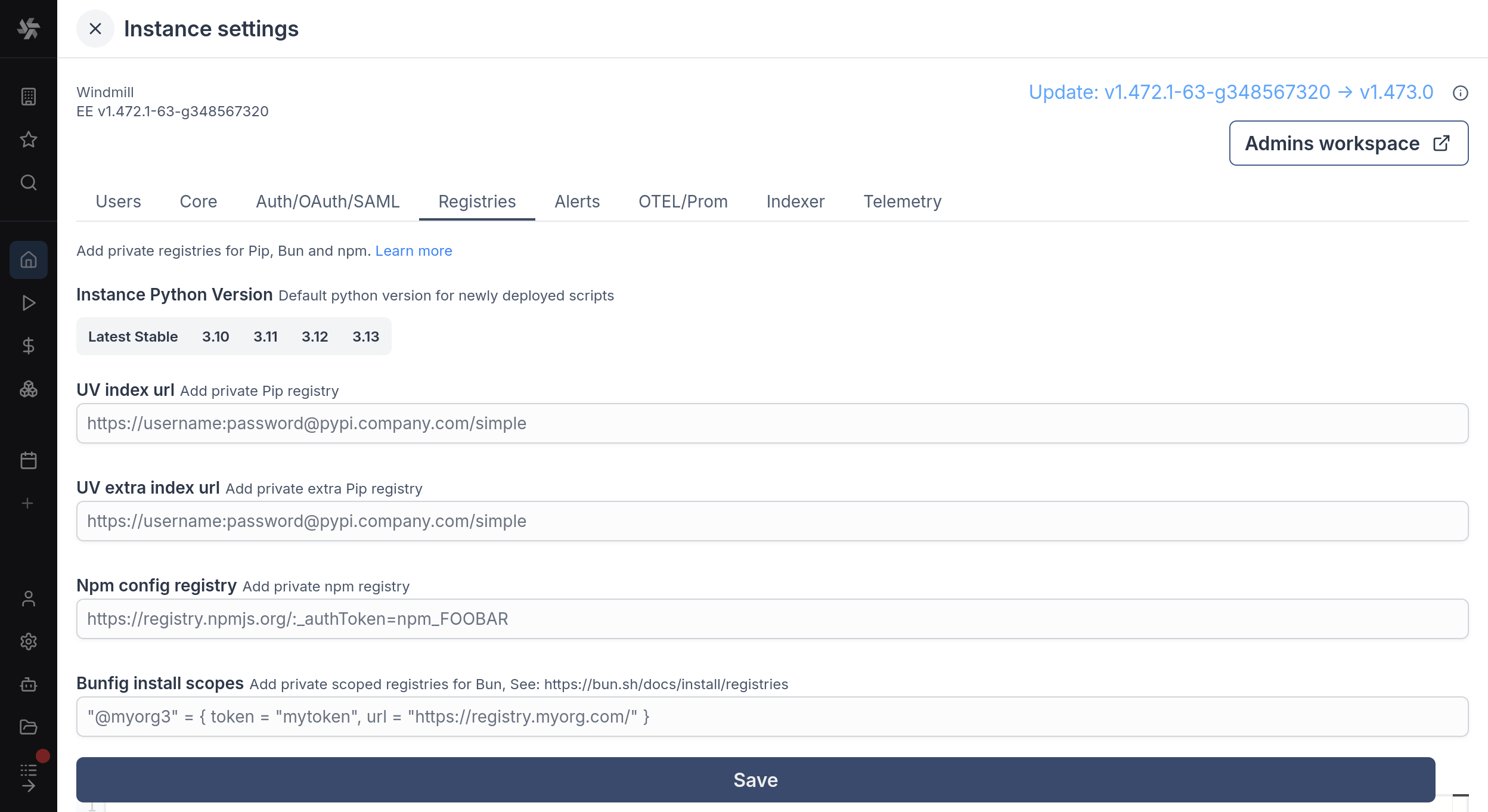
UV index url and UV extra index url are filled through Windmill UI, in Instance settings under Enterprise Edition. Debug sessions install their dependencies with these settings as well.
Python runtime settings
For a given worker group, you can add Python runtime specific settings like additional Python paths and PIP local dependencies.
Pre-installed packages via global site-packages
Windmill workers have a global-site-packages directory on the Python path. Packages installed there are available for import in all Python scripts on that worker, typically installed via init scripts or a custom Docker image.
uv pip install --system pandas --target /tmp/windmill/cache/python_3_11/global-site-packages
The path is version-specific: /tmp/windmill/cache/python_<major>_<minor>/global-site-packages. Make sure to target the Python version your scripts use.
Installing into global-site-packages only makes a package importable at runtime. The dependency resolver will still try to resolve those imports from PyPI when generating lockfiles. To prevent this, add the package names as regex patterns to the PIP local dependencies list in the worker group's Python runtime settings, or set the PIP_LOCAL_DEPENDENCIES environment variable (comma-separated). This tells the resolver to skip matching packages during lockfile generation.
Select Python version
You can annotate the version of Python you would like to use for a script using the annotations like py310, py311, py312, or py313.
More details: