Pipelines
The wmill pipeline commands inspect and run pipelines: folders of scripts marked // pipeline, wired together by // on <asset> annotations. All commands work against the deployed workspace by default; show, run and docs also accept --local to work from your working-tree files instead, and wmill pipeline dev live-previews local files in the browser (see local development with --local).
Pipelines are in alpha; the annotation syntax and behavior are still evolving. See the Pipelines page for the full annotation reference.
Listing pipelines
wmill pipeline list [--json]
Lists the pipeline folders in the workspace. --json outputs the list as JSON for piping to jq.
Showing the pipeline graph
wmill pipeline show <folder> [--json] [--local]
Renders the folder's pipeline DAG in the terminal: sources, asset lineage and subscriptions.
| Option | Description |
|---|---|
--json | Output the raw asset graph as JSON. |
--local | Build the graph from local working-tree files instead of the deployed workspace. Fully offline, no deploy needed. |
Running a pipeline
wmill pipeline run <folder> [options]
Runs a cascade: starting from --from, every downstream step runs in topological order, stopping at the --to end node(s) if given. --from may be any runnable node - a schedule/manual root or a mid-DAG model (asset subscriber or pure reader). A mid-DAG start runs that node plus its transitive downstream and never re-runs upstream, matching dbt's --select model+. This is the CLI counterpart of the graph's Run + downstream and selective execution.
| Option | Description |
|---|---|
--from <script> | Start script (short name or path). May be any runnable node, including a mid-DAG model - that node and its transitive downstream run, upstream is not re-run (dbt --select model+). Defaults to the folder's sole schedule / manual root. |
--to <node> | End node(s) to stop at: script names / paths or asset URIs (e.g. datatable://main/staged). Repeatable or comma-separated. Omit to run the full downstream. |
--dry-run | Print the topological run plan without executing it. |
--json | Output the plan as JSON (for piping to jq). |
--local | Run the local working-tree scripts via previews (no deploy); the graph is built from local files. |
--partition <value> | Partition value for // partitioned scripts in the run (e.g. 2026-06-30); with an explicit value this doubles as a headless backfill. With --local, time kinds default to the current UTC period when omitted; dynamic always needs a value. |
--arg <script>:<param>=<value> | Pass a plain argument to one script in the cascade. The value is parsed as JSON when possible, else taken as a string. Repeatable. |
--upload <script>[:<param>]=<source> | Bind an object to a data_upload / webhook entry point so it (and its downstream) runs. <source> is a local file (uploaded to the workspace store) or an s3://<storage>/<key> reference to an existing object (s3:///<key> for the default storage). The target S3 object parameter is inferred when the script declares exactly one; otherwise name it with :<param>. Repeatable. |
Scripts whose only trigger needs caller input or a per-event payload (data_upload, webhook, kafka, ...) are skipped by default; bind them with --upload to include them in the cascade.
Examples
# Full cascade from the folder's root
wmill pipeline run ecommerce

# Preview the plan without running anything
wmill pipeline run ecommerce --dry-run

# Bounded slice: run everything needed to produce daily_kpis and stop there
wmill pipeline run ecommerce --to daily_kpis

# Rebuild a mid-DAG model and everything downstream of it (dbt `--select model+`)
wmill pipeline run ecommerce --from fct_orders_daily

# Backfill one day from local working-tree files, without deploying
wmill pipeline run ecommerce --local --partition 2026-06-30

# Feed a data_upload entry point with a local file
wmill pipeline run ecommerce --upload ingest_events=./events.json
Local development with --local
With --local, the show, run and docs subcommands build the pipeline from the files in your working tree (for example after a wmill sync pull) using the same WebAssembly parser the frontend uses: asset reads and writes are inferred from the script bodies and the // pipeline / // on annotations are parsed, so the graph matches what the UI would show after deploying, without deploying anything. This is the pipeline analog of wmill dev for flows and scripts.
show --localanddocs --localare fully offline.run --localexecutes each script's local content via previews on the remote workspace's workers, in topological order. Data still flows through real asset storage, so the workspace needs its object storage configured for steps that write S3 or DuckLake assets.- TypeScript, Python and SQL scripts get full body inference; Go and Bash scripts are detected from their
// pipeline/// onannotations only.
Live preview with wmill pipeline dev
wmill pipeline dev [folder] [--port <port>] [--no-open] [--frontend <origin>]
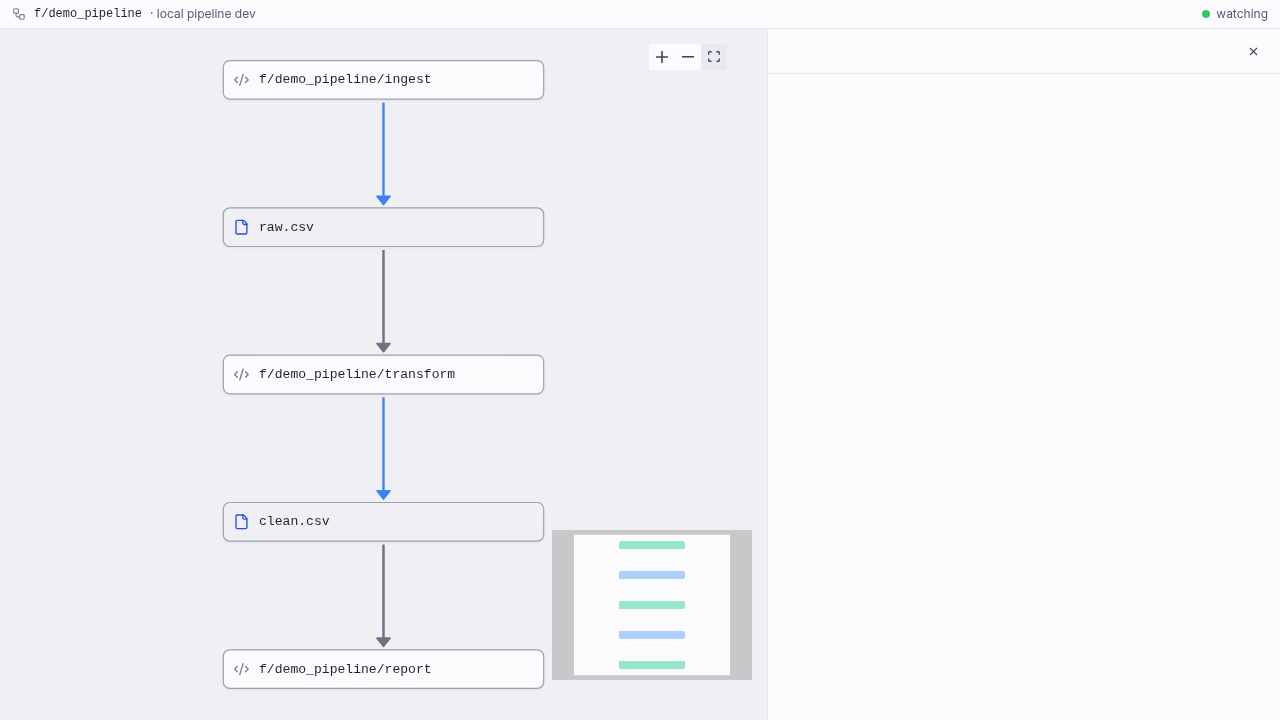
Watches a folder of // pipeline scripts and live-previews the pipeline in the browser: on every save the graph is rebuilt from your working-tree files and pushed over WebSocket to a dev page that renders the same graph view as the pipeline editor, with node selection, run forms, Run and Run + downstream, and live run activity. Editing stays in your own editor (or an agentic loop); adding, editing or renaming a script updates the graph without a reload. Runs launched from the page execute your local file contents via previews, so nothing is deployed.
The folder argument is optional: when run from inside an f/<folder> directory, the folder is auto-detected.
| Option | Description |
|---|---|
--port <port> | Port for the dev WebSocket server (default 3201). |
--no-open | Do not open the browser automatically; the URL is printed so the caller (e.g. an AI agent) can hand it to you. |
--frontend <origin> | Origin serving the /pipeline_dev page (e.g. http://localhost:3000 for a locally-run frontend). Defaults to the workspace remote; use it when the remote's deployed frontend predates the dev page. |
Generating pipeline documentation
wmill pipeline docs <folder> [--local]
Writes a PIPELINE.md in the folder describing the pipeline graph and data table schemas, plus AGENTS.md / CLAUDE.md pointers, so a code editor or coding agent gets the same context the UI surfaces. By default it documents the deployed graph; --local documents the working tree.