3 posts tagged with "wmill CLI"
View All TagsThe new wmill dev command runs a live-reload preview for flows, scripts, and raw apps from your local files, with round-trip editing back to disk and tighter Claude Code, Claude Desktop, and VS Code integrations.
New features
- New `wmill dev` command launches a workspace picker or jumps directly to a flow, script, or raw app with live reload from your local files
- Round-trip parity with the VS Code extension — edits made in the dev page write back to `flow.yaml` and inline-script files, preserving `PathScript` references
- Auto-detects the wm path when invoked from inside a `*__flow/` folder; new `--path`, `--proxy-port`, and `--no-open` flags
- Reverse-proxy mode (`--proxy-port`) used by Claude Code's port-detection preview pane
- New `preview` skill drives the visual preview from Claude Code or Claude Desktop; `write-flow` and `raw-app` skills offer it as a one-sentence next step
- `wmill flow new` and `wmill app new` now accept non-interactive flags (`--summary`, `--path`, `--framework`, `--datatable`, `--schema`, `--overwrite`)
The CLI now uses a single workspaces key in wmill.yaml instead of gitBranches, environments, and git_branches. Workspace names are human-friendly, gitBranch and workspaceId default to the key name, and a new --workspace flag selects the target. Legacy configs still work — run wmill config migrate to convert.
New features
- Single `workspaces:` key replaces `gitBranches`, `environments`, and `git_branches` in `wmill.yaml`
- Workspace names are human-friendly identifiers — `gitBranch` and `workspaceId` default to the key when omitted
- New `--workspace` global flag resolves config → profile automatically via `baseUrl` + `workspaceId` matching
- `wmill config migrate` auto-converts legacy configs to the new format in one command
- `wmill workspace bind` / `unbind` interactively create and remove `workspaces:` entries from the active profile
- `wmill init` revamped: interactive workspace setup from existing profiles
- Fully backward compatible: old `gitBranches`/`environments`/`git_branches` configs keep working with a one-time deprecation warning
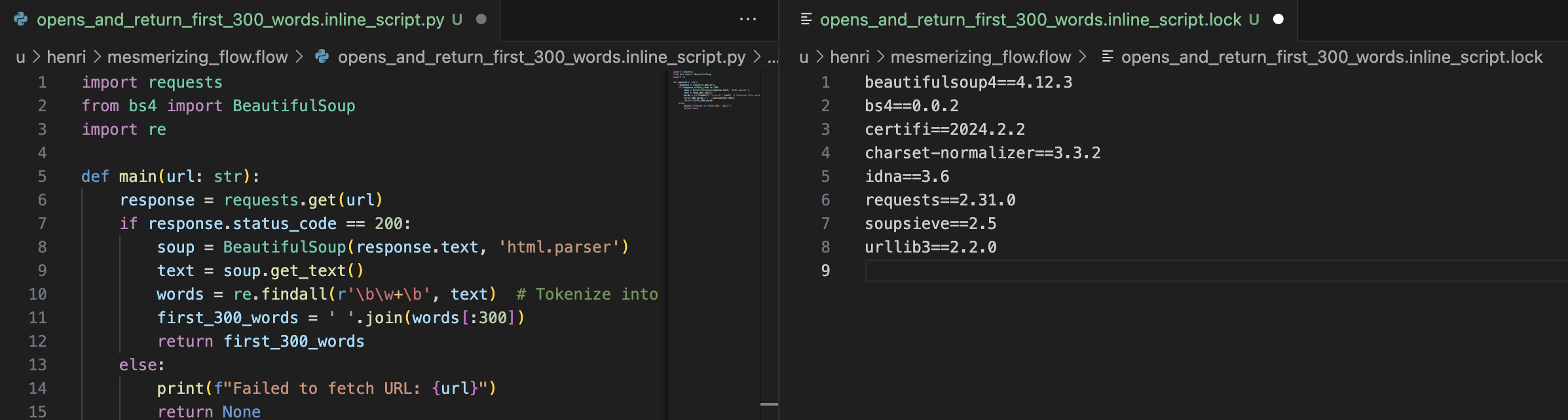
Latest CLI and Git sync have 2 major improvements:
1. Wherever there is a lockfile (in scripts, flows and apps), the lockfile is now stored in a separate file (<same_path_as_script_or_inline_script>.lock) and referenced in the yaml by !inline <path of lock>. We had numerous feedback from EE customers that the lockfile were hard to diff and added lots of boilerplate to otherwise clean yaml files.
2. Script in apps (even frontend scripts) are now stored in separate files, similar to what is the case for flows. Which mean now apps are their own folders:myapp.yaml -> myapp.app/app.yaml + myapp.app/inline_script1.ts + myapp.app/inline_script1.lock + ...
This will improve greatly the ability to use commits/PR to review scripts, flows and apps changes.
To do a clean update:
- Upgrade Deno.
- Upgrade wmill CLI to latest.
- Do a wmill sync pull and push to your repo.
-update the CLI used to 1.320.3 in your GitHub actions.
- Update your git sync script (we've made that easier, just click button and save git settings).
New features
- Scripts pulled locally come with a .lock file (separated from metadata file).
- Script in apps are now stored in separate files.