10 posts tagged with "Data pipelines"
View All TagsAn unmodified dbt project now runs as a Windmill script. Copy the project into a <script>__dbt/ folder, wmill sync push, and Windmill runs dbt build on your own workers with live per-model progress, per-model results, dbt retry and row previews. Since v1.777.0, dbt is in the new-script language picker and opens in an editor of its own - the project's file tree, its descriptor, the run form and a model graph that Refresh models redraws from a dbt parse of the files as they are in the editor, labelled with where it came from. Its models, sources, seeds and snapshots become dbt://warehouse/schema/model assets with their ref() lineage, so a Python or DuckDB script reading a mart appears on the same graph. Warehouses are configured once per workspace and named from the optional wm_dbt.yaml descriptor, so the project carries no connection and stays runnable locally. Three engines are selectable (dbt Core 1.x by default, dbt Core 2.x, dbt Fusion), all fetched or built on first use and cached per worker. Everything is in the community edition except the mssql and oracle adapters.
New features
- One dbt project is one Windmill script: the project rides with it as its module bundle, copied in verbatim and never cloned at run time
- Models, sources, seeds and snapshots become dbt:// assets with ref() lineage, materialization, tags and data tests, parsed at deploy
- A dbt editor (v1.777.0): project file tree, descriptor, run form and a model graph refreshed on demand from a dbt parse of the buffer, scriptable from a flow, the CLI or the API
- Live per-model progress during a run, structured per-model results, dbt retry from the run page and dbt show row previews
- Warehouses configured once per workspace and named by the optional wm_dbt.yaml descriptor, or bring the project its own profiles.yml
- Engine toggle between dbt Core 1.x (default), dbt Core 2.x and dbt Fusion, with dependencies resolved and pinned at deploy
Workspace forks now get an isolated data environment per DuckLake by default. Materializing pipelines in a fork write to a fork-scoped metadata schema and bucket prefix instead of the parent's tables, and tables the fork has not materialized yet are read from the parent through read-only defer views, so one node can be iterated on without rebuilding upstream. The fork-creation dialog adds a per-lake Isolated / Shared with parent choice, the pipeline graph shows deferred vs fork chips on DuckLake assets, and deleting a fork can drop its forked namespaces.
New features
- Forks default to an isolated data environment per lake: a fork-scoped metadata schema and a __wm_forks/<fork id>/ bucket prefix, with unchanged ducklake:// URIs and annotations
- Read-defer to the parent: tables the fork has not materialized are read through read-only views over the parent data, including the <table>_current companion view of SCD2 targets
- Parent lakes are attached read-only in forks, so a fork job cannot write parent data through DuckLake
- Fork-creation dialog gains a Ducklake data environment section with a per-lake Isolated (default) or Shared with parent choice; shared forks read and write the parent lake directly
- Pipeline graph marks each DuckLake asset in a fork with an amber deferred or emerald fork chip, with a matching banner in the details pane
- Fork deletion offers to drop forked DuckLake namespaces; also available as POST /w/<workspace>/workspaces/drop_forked_ducklake_namespaces
Consumer scripts referencing materialized DuckLake tables are now validated against the captured producer schemas at save time. Missing columns, dropped lineage sources and mismatched relationship types surface as warnings (never errors) after deploy, as live editor squiggles, and column names autocomplete with their types when typing . after a ducklake:// reference on annotation lines. Producers can declare a deliberately unstable schema with on_schema_change=ignore on the // materialize line to collapse downstream warnings into a single note.
New features
- Save-time check: deploying a consumer script diffs its `ducklake://` references (body column reads, `// column` lineage sources, `// data_test relationships` refs) against the latest captured schema and toasts warnings
- Warnings never block a save or deploy: a deliberate upstream reshape does not fail every consumer
- Live editor squiggles anchor the same warnings to the offending column read or annotation line as you type
- Typing `.` after a `ducklake://…` reference on an annotation line autocompletes column names with their captured types
- Column names compare case-insensitively, `{partition}` tokens are stripped, `_wm_partition` is always accepted, and a `<table>_current` view checks against its SCD2 base table
- `// materialize … on_schema_change=ignore` marks a producer schema as deliberately unstable and collapses downstream warnings into one informational note
- Each warning cites the schema version and capture time it was checked against

The // freshness <window> annotation on pipeline scripts now shows a live fresh/stale verdict on the pipeline graph, emerald when the last successful run completed within the window and amber when it is stale or has never run. On Enterprise Edition, a freshness watchdog re-runs stale unpartitioned scripts automatically with exponential backoff capped at the window; watchdog runs skip the downstream cascade, are attributed to pseudo-user freshness-
New features
- Freshness badge on pipeline graph nodes: emerald when the last successful root run completed within the declared window, amber when stale or never run, with tooltips showing the last successful run
- Badges re-evaluate every 30 seconds on an open graph and turn fresh shortly after a successful run in the session
- EE freshness watchdog checks deployed pipeline scripts about once a minute and re-runs stale unpartitioned scripts as a backstop; any successful run resets the window
- Watchdog re-runs back off exponentially (capped at the window) while a script stays stale, and skip scripts with a run already queued or running
- Watchdog runs never fire the downstream cascade and are attributed to pseudo-user freshness-<path> with the new freshness trigger kind, filterable on the Runs page
- DISABLE_FRESHNESS_WATCHDOG environment variable turns the watchdog off instance-wide
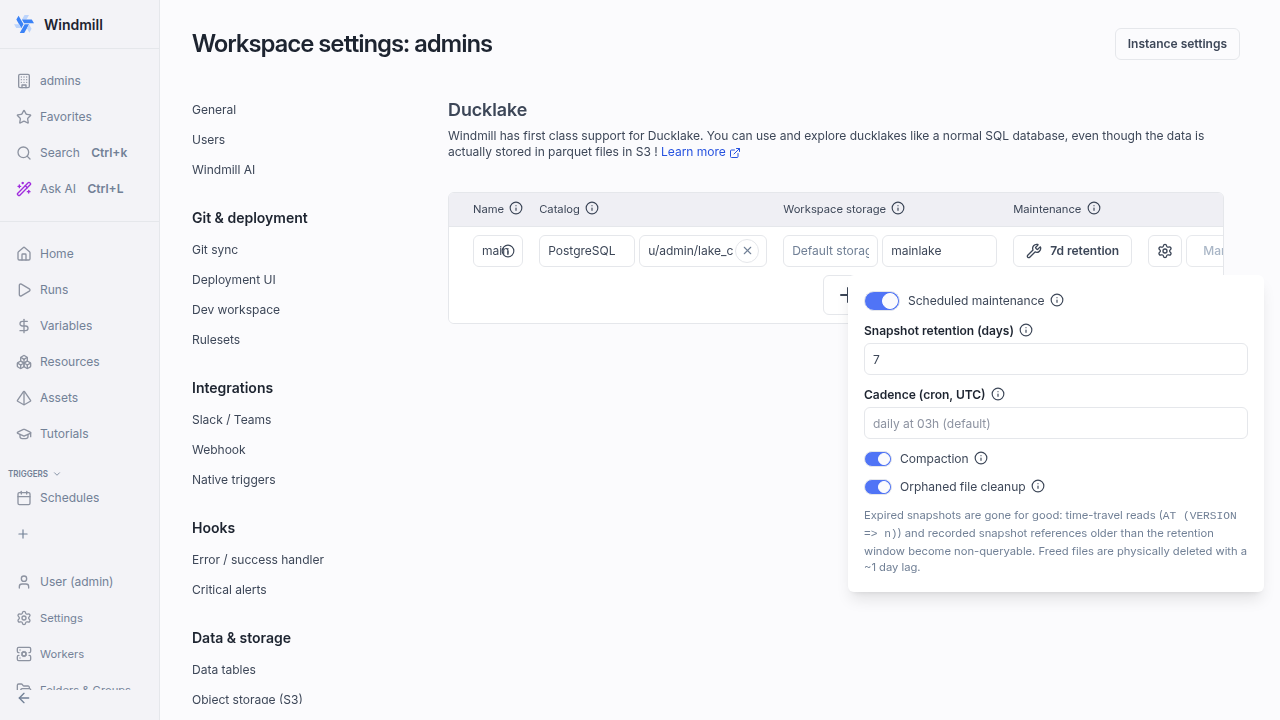
Ducklakes can now run scheduled maintenance to keep growth in check - snapshot expiry with a configurable retention window (default 7 days), compaction of adjacent small parquet files, and orphaned file cleanup. Configured per lake in the workspace Ducklake settings with a cron cadence (default daily at 03h UTC) and executed as observable jobs whose run history is the audit trail. Enterprise feature.
New features
- Per-lake maintenance settings in workspace Ducklake settings - enable toggle, snapshot retention in days (default 7), cron cadence (default daily at 03h UTC with a per-lake minute offset), and individual toggles for compaction and orphaned file cleanup
- Snapshot expiry reclaims files referenced only by snapshots older than the retention window; compaction merges adjacent small parquet files; orphaned file cleanup deletes files no longer referenced by the catalog
- Runs execute as normal jobs on the duckdb tag via a managed schedule at the reserved path f/ducklake_maintenance/<lake>, with run history as audit trail and a one-row summary result (expired snapshots, compacted file groups, cleaned and orphaned files deleted, remaining snapshots)
- Expired snapshots become non-queryable via time-travel (AT (VERSION => n)), so size the retention window to the history you need
- Safety margins - physical file deletion lags expiry by one day so long-running readers are not interrupted, and orphan cleanup never deletes files younger than one day; lake names are validated as [A-Za-z0-9_-]+
Share SQL logic across a workspace with macro libraries. A DuckDB script annotated // macros publishes engine-native CREATE MACRO definitions on deploy; any DuckDB script that calls a registered macro gets the definitions injected at run time, with no import or compile step. Includes editor autocomplete, a workspace macros explorer, and library nodes in the pipeline graph.
New features
- Annotate a DuckDB script with `// macros` to publish its CREATE MACRO statements (scalar or table) workspace-wide on deploy
- Calling a macro just works: definitions and the providing library setup are injected at job time, in dependency order
- Late-bound like dbt packages: redeploying a library applies to the next run of every consumer without redeploying them; a local macro of the same name always wins
- `// use <lib_path>` force-injects a whole library for calls hidden in dynamic SQL, honored transitively across libraries
- Deploy-time validation with precise errors: workspace-unique names, no shadowing of DuckDB built-ins, definition order checks
- Discovery: DuckDB editor autocomplete with signatures, a workspace macros explorer drawer on the pipeline page, and library nodes with consumer edges in the graph
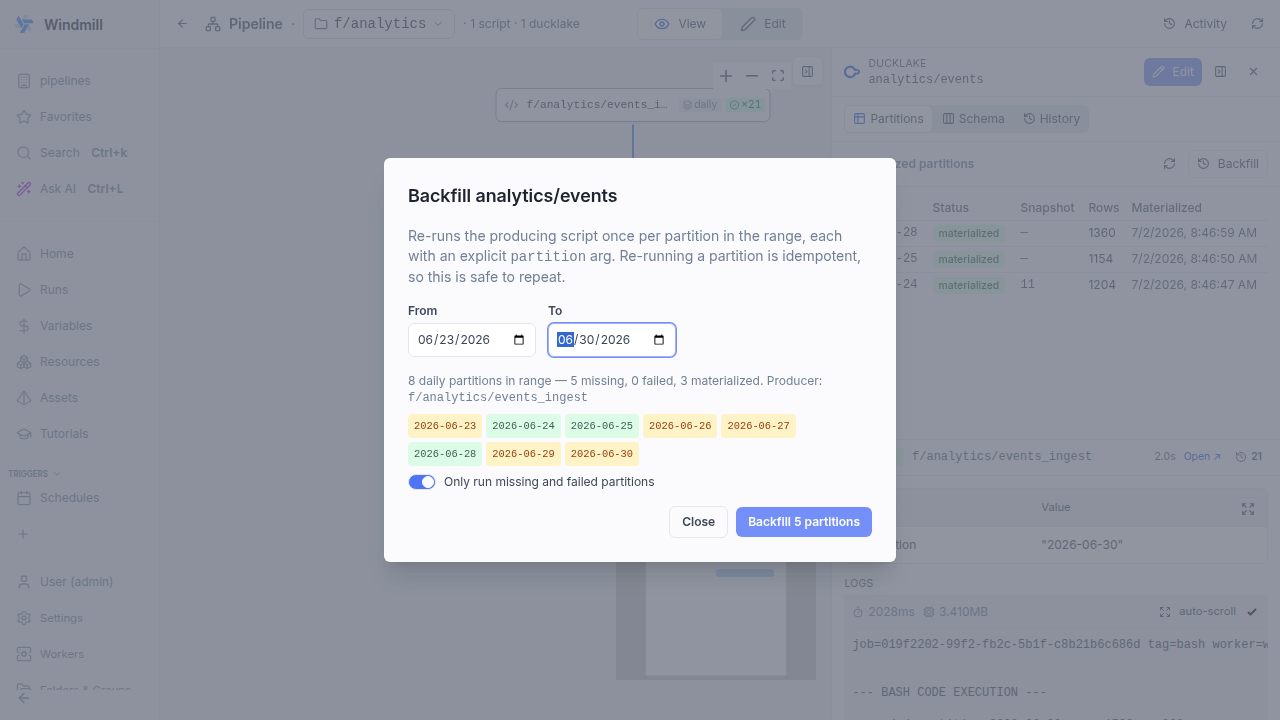
On a partitioned DuckLake asset, the Backfill button opens a range picker that previews which partitions are missing, failed or materialized, then re-runs the producing script once per partition with an explicit partition argument. Runs are sequential and idempotent, a failed partition does not stop the rest, and progress streams in the dialog and drawer header. Range backfill is an Enterprise feature; single-partition runs stay available in all editions.
New features
- Backfill button on the partition-status grid of a materialized ducklake:// asset opens a from/to range picker
- The preview classifies every partition in range as missing, failed or materialized; a toggle (default on) restricts the run to missing and failed partitions
- One deployed run per partition with an explicit partition argument, sequential to avoid catalog commit contention; each run is idempotent
- A failed partition does not stop the rest; progress streams in the dialog and, when closed, in the drawer header while the grid refreshes per slice
- Cancel stops after the in-flight partition and cancels its job
- Headless alternative: wmill pipeline run <folder> --partition <value>
Edit, preview and run data pipelines from local files without deploying. wmill pipeline show/run --local builds the graph from your working tree with the same parser the UI uses, wmill pipeline dev live-previews the graph in the browser on every save, and wmill pipeline docs writes a PIPELINE.md for coding agents.
New features
- `wmill pipeline show <folder> --local` renders the pipeline graph from working-tree files, fully offline
- `wmill pipeline run <folder> --local` runs the whole pipeline in topological order via previews, with `--from`/`--to`/`--dry-run` bounds
- `wmill pipeline dev [folder]` watches the folder and live-reloads the browser graph view on every save, with run buttons, run forms and live activity
- `wmill pipeline docs <folder>` writes PIPELINE.md (plus AGENTS.md/CLAUDE.md pointers) describing the graph and datatable schemas for an editor or agent
- `--partition <value>` runs partitioned scripts on an explicit partition (time kinds default to the current UTC period locally) and doubles as a headless backfill
- `--arg <script>:<param>=<value>` (repeatable) and `--upload <script>=<file>` parameterize scripts in the cascade
New managed history strategy on // materialize keeps every version of every row (slowly changing dimension type 2). A change closes the prior version and opens a new one, with managed valid_from/valid_to/is_current columns, an auto-maintained <table>_current view, and support for effective-dated ASOF joins. Data tests and schema capture keep working, unlike hand-written materialize manual SQL.
New features
- Add `key=<col> history` to `// materialize ducklake://…` (or use the `scd2` keyword alias) to turn a keyed merge into a type-2 history
- The runtime manages `valid_from`, `valid_to` and `is_current`; your SELECT stays the current snapshot, one row per key
- `track=<c1,c2,…>` limits which column changes open a new version (default: all non-key columns)
- `deletes=close` closes the current version of keys that disappear from the snapshot; default is soft delete (absent keys stay current)
- A companion `<table>_current` view is maintained so the latest-version case needs no filter
- Idempotent by construction: an unchanged snapshot writes 0 rows and advances no DuckLake snapshot
- Built-in `// data_test` checks scope to current rows on SCD2 targets, so `unique(<key>)` keeps passing as history accumulates
Connect scripts into a pipeline through the assets they read and write, with comment annotations for schedules, time and dynamic partitions, AND/OR joins, opt-in debounce, managed DuckLake materialization, column-level lineage and data tests. Pipelines are in alpha; the annotation syntax and behavior may still change.
New features
- Mark a script with `// pipeline` to place it in its folder pipeline graph; edges are inferred from asset reads (`// on <asset>`) and auto-detected writes
- Trigger steps from asset writes (the cascade) or a native trigger that targets the script via the marker `// on <kind>` (`schedule`/`webhook`/`email`/`kafka`/`mqtt`/`nats`/`postgres`/`sqs`/`gcp`/`data_upload`)
- `// freshness <duration>` is parsed and shown on the graph; watchdog runs are planned but not active yet
- `// partitioned daily|hourly|weekly|monthly|dynamic` with `tz`/`format`/`start` options; the `{partition}` token resolves once at run time and flows down the chain, with explicit-argument backfill
- `// trigger all` AND-join barrier: a step runs once per partition only when every partition-bearing input is present; unpartitioned reference inputs are not part of the barrier
- Opt-in `// debounce <duration>` (script-level) and per-input `// on <asset> debounce=<duration>`, keyed per subscriber and partition
- Per-step `// tag <name>` to pin a step to a worker tag, and `// retry <count> [<delay>]` for cascade-dispatched runs
- A pipeline graph view shows lineage, live run activity and per-node status, and lets you run a step or a step and everything downstream
- Selective execution: bound the cascade with "run downstream up to…" a chosen end node from the graph, or `wmill pipeline run <folder> --to <node>` from the CLI
- Managed DuckLake materialization with `// materialize`: write one slice and Windmill owns the idempotent, snapshotted write, with versioned schema capture surfaced on a Schema tab
- Column-level lineage for DuckLake pipelines, inferred automatically from the SQL and overridable with `// column <out> <- <asset>.<col>`
- `// data_test` (unique, not_null, accepted_values, relationships, custom scripts) runs against the freshly-materialized slice and fails the run on violation