16 posts tagged with "AI"
View All TagsAI agent steps have a new enabled_tools input that picks which of the agent's tools a run can call, as a static selection or an expression evaluated per run. Leaving it unset keeps every tool, an empty list gives the agent none, and flows reusing a saved agent can each enable a different set.
New features
- The enabled_tools step input is a multiselect of the step tools, or a JavaScript expression that returns a list of tool names on each run.
- Unset keeps every tool, an empty list runs the agent with no tools, and a list keeps only the tools it names.
- Script, flow and nested agent tools are named by their tool name, MCP servers by their resource path, and web search by the reserved name __wm_web_search.
- A disabled MCP server is never contacted, and names that match no tool are ignored and counted in the job logs.
Reusable AI agents can now be measured against a dataset of cases. Evals open from the agent card in the flow editor or from the ai_agent row on the resources page, and let you curate cases, score every answer with AI judges or code scorers, and compare two runs cell by cell. A run measures one state of the agent - what is deployed, an earlier version, or the unsaved edits in the step - fixed once when the run starts, and is kept so the next run has something to be compared against.
New features
- Datasets of cases (a question and an expected answer) belong to a reusable ai_agent resource, so they outlive the flow step and two runs of the same agent are comparable.
- Scorers are ordinary runnables: an AI judge handed the whole run, or a script created from a template. Each returns a number between 0 and 1, with an optional pass threshold that is applied when a score is read.
- A scorer sees the whole trajectory: the case, the answer, every tool call with its arguments, result, error and duration, the tools that were called with their schemas, and the run metrics.
- Run against the latest deployed agent, a pinned past version, or the unsaved edits the flow step is holding; the configuration is read once when the run starts, so every case runs the same one.
- A run is one flow job that outlives the tab that started it: a parallel loop over the cases, each answered and then scored by one branch per scorer.
- The run history lists every run of an agent with a score badge per scorer, and opening one gives a table of cases by scorer with per-cell and per-column deltas against any other run of that dataset.
Windmill now records the tokens every AI chat spends, per user, model and provider, and prices them. Workspace admins get an "AI usage" panel in the Windmill AI settings, grouped by day, user or model; every member sees their own spend under "Your AI usage" in user settings. Costs are estimates marked with a leading ~, except where the provider bills back an exact figure (OpenRouter).
New features
- Token spend from AI sessions and the AI chat is recorded per workspace, user, provider and model.
- An admin-only "AI usage" panel in the workspace Windmill AI settings, over the last 7, 30 or 90 days, grouped by day, user or model.
- A self-scoped "Your AI usage" panel in user settings, open to every member.
- Costs marked with ~ are estimated from a built-in price table; a cost the provider billed back is shown as is. A model with no known rate is reported as unpriced rather than guessed at.
- A "Model pricing" panel to override rates per model in USD per million tokens (input, output, cache read, cache write), on the workspace or instance AI config.
- GET and POST /w/{workspace}/ai/usage expose the same data over the API.
Plan mode is a read-only autonomy posture for AI sessions, picked from the chat footer. The assistant can only investigate; anything that writes, runs or deploys is refused until it hands over a plan and you approve it, which restores the posture you were in before. Session chats only, and never persisted.
New features
- Plan (read-only) joins Ask permission and Yolo in the autonomy picker of a session chat.
- Only read-only tools run while planning; writes, job runs and deploys are refused with a "Blocked in plan mode" row.
- You enter plan mode from the picker, or by accepting the "Start planning?" card the assistant raises on open-ended tasks.
- The proposed plan is shown for approval with "Approve and implement" or "Keep planning"; approving restores the exact posture that preceded plan mode.
- One versioned plan document per session, pinned to the top of the artifacts list, with the approved version marked and unapproved revisions labeled as drafts.
AI sessions are now in beta and enabled by default. Each session ties an AI chat to a workspace or fork with a live preview panel; the AI builds scripts, flows and apps as drafts you review in a unified diff drawer and deploy. Run many sessions in parallel; a banner switches back to the legacy chat.
New features
- Enabled by default during the beta: a banner under the session chat switches back to the legacy side panel chat (stored per browser), and a matching banner in the legacy chat reactivates sessions. Operators keep the legacy chat.
- Each session is tied to a workspace or fork, picked before the first message; forks are only created when the conversation actually starts.
- The preview panel opens edited items as live editors and workspace pages (runs, schedules, settings) as tabs, refreshing only what the AI touched.
- A chat-scoped edits bar and unified diff drawer track what the conversation changed, with per-item deploy and discard, and fork promotion via the compare page.
- Jobs the AI runs detach to a background jobs tray with live status, cancel and approval actions, and survive page reloads.
- The AI writes plans and specs as markdown artifacts that open in the preview panel with copy and download actions.
- With a full-code app preview open, the AI debugs the running app: console logs, job runs, live DOM queries (search_dom, read_dom), screenshots, and a click-to-attach element inspector.
- Slash commands: /compact summarizes the conversation in place, /clear starts a fresh chat, and workspace AI skills appear as commands.
- Sessions are grouped by workspace family in the sidebar, with unread badges and parallel draft sessions persisted in the browser.
Text files can now be attached to individual AI chat messages via picker, drag and drop, or paste. They show as chips in the input box and are sent with the next message. Content is read on demand by the AI through file tools instead of being inlined, so it is never resent with the conversation history.
New features
- Attach text files to a chat message via the attach button, drag and drop, or paste
- Up to 8 files per message, 1 MB per file
- Files appear as chips in the input box, sent with the next message and cleared after send
- The AI reads file content on demand via read_file and search_files tools, keeping the conversation history small
- Linked folders remain session-wide assets, shown in the footer next to the mode picker
When the AI chat searches the web (OpenAI and Anthropic providers), the tool card now shows the search query as it is typed and expands with the list of consulted sources (favicon, page title and link) as each search completes. Sources are kept with the conversation history.
New features
- The web search tool card shows the search query live in its label while the model types it.
- The card auto-expands with the list of consulted pages (favicon, title and link) as soon as each search completes, while the model continues its answer.
- Sources persist with the conversation history.
AI agent steps can now use extended thinking, configured with a model-adaptive reasoning effort dropdown in the provider/model picker. Supported on Anthropic Claude, OpenAI o-series and GPT-5, Azure OpenAI, Google AI Gemini, AWS Bedrock Claude, OpenRouter, DeepSeek, and Mistral, with an explicit off option. Reasoning tokens are billed, and thinking is streamed into a collapsible Thinking box in chat mode.
New features
- A reasoning effort dropdown appears below the model in the AI agent step provider/model picker, with model-adaptive levels (low / medium / high, plus minimal / xhigh / max on some models) and an explicit off option.
- Supported on Anthropic Claude, OpenAI o-series and GPT-5, Azure OpenAI, Google AI Gemini, AWS Bedrock Claude, OpenRouter, DeepSeek, and Mistral; available levels depend on the specific model.
- Reasoning tokens are billed and counted in the step token usage; thinking is streamed into a collapsible Thinking box in the flow chat interface during execution.
Azure AI Foundry is now natively supported as an AI provider in Windmill, exposing the broader Foundry catalog (OpenAI models plus Llama, DeepSeek, Mistral, Phi and more) over an OpenAI-compatible API in both AI chat and AI agent steps.
New features
- Azure AI Foundry now available as a native AI provider via the azure_foundry resource type
- Access to the broader Foundry model catalog beyond Azure OpenAI: Llama, DeepSeek, Mistral, Phi and more
- Uses the same Azure authentication (api-key header) and base URL configuration as Azure OpenAI
- Available in both AI chat (copilot) and AI agent flow steps
The customai resource accepts a headers object to attach arbitrary headers to every AI request, and a new AI_HTTP_HEADERS env var applies headers globally across all providers (OpenAI, Anthropic, Azure, Bedrock).
New features
- headers field on customai resources: map of header names to values, attached to every request made with that resource.
- AI_HTTP_HEADERS env var on the server and workers attaches headers to every outgoing AI request across all providers (OpenAI, Anthropic, Azure, Bedrock, etc.).
- Useful for upstream proxies, gateway authentication, and routing metadata.
AI agent steps can now accept PDF documents as input alongside images, with provider-specific encoding for Anthropic, OpenAI, and Google AI handled automatically. Requires a workspace-level S3 object storage.
New features
- PDF documents can be passed as attachments to AI agent steps.
- Provider-specific encoding handled automatically: Anthropic document blocks, OpenAI input_file blocks, Google AI inline data.
- MIME type detected from the file extension; requires workspace-level S3 object storage.
The googleai and anthropic AI resources now expose a platform field to switch between the provider's standard API and Google Vertex AI, using a Google Cloud service account access token for authentication.
New features
- platform: google_vertex_ai option on googleai and anthropic resources.
- Set base_url to your Vertex endpoint and api_key to a Google Cloud OAuth2 access token (Vertex AI User role).
- Run Claude models on Vertex AI from existing Anthropic-shaped scripts and AI agents.
Superadmins can configure AI providers (OpenAI, Anthropic, Google AI, Azure, Bedrock, customai) at the instance level so every workspace inherits the same models, headers, and routing without per-workspace setup.
New features
- Configure AI providers (OpenAI, Anthropic, Google AI, Azure, Bedrock, customai, etc.) once at the instance level.
- Workspaces inherit instance defaults and can still override per-workspace.
- Centralizes model selection, base URLs, and shared credentials for self-hosted deployments.
AWS Bedrock is now natively supported as an AI provider in Windmill.
New features
- AWS Bedrock now available as a native AI provider
- Simple configuration with AWS region and API key
- Access to all Bedrock-supported models
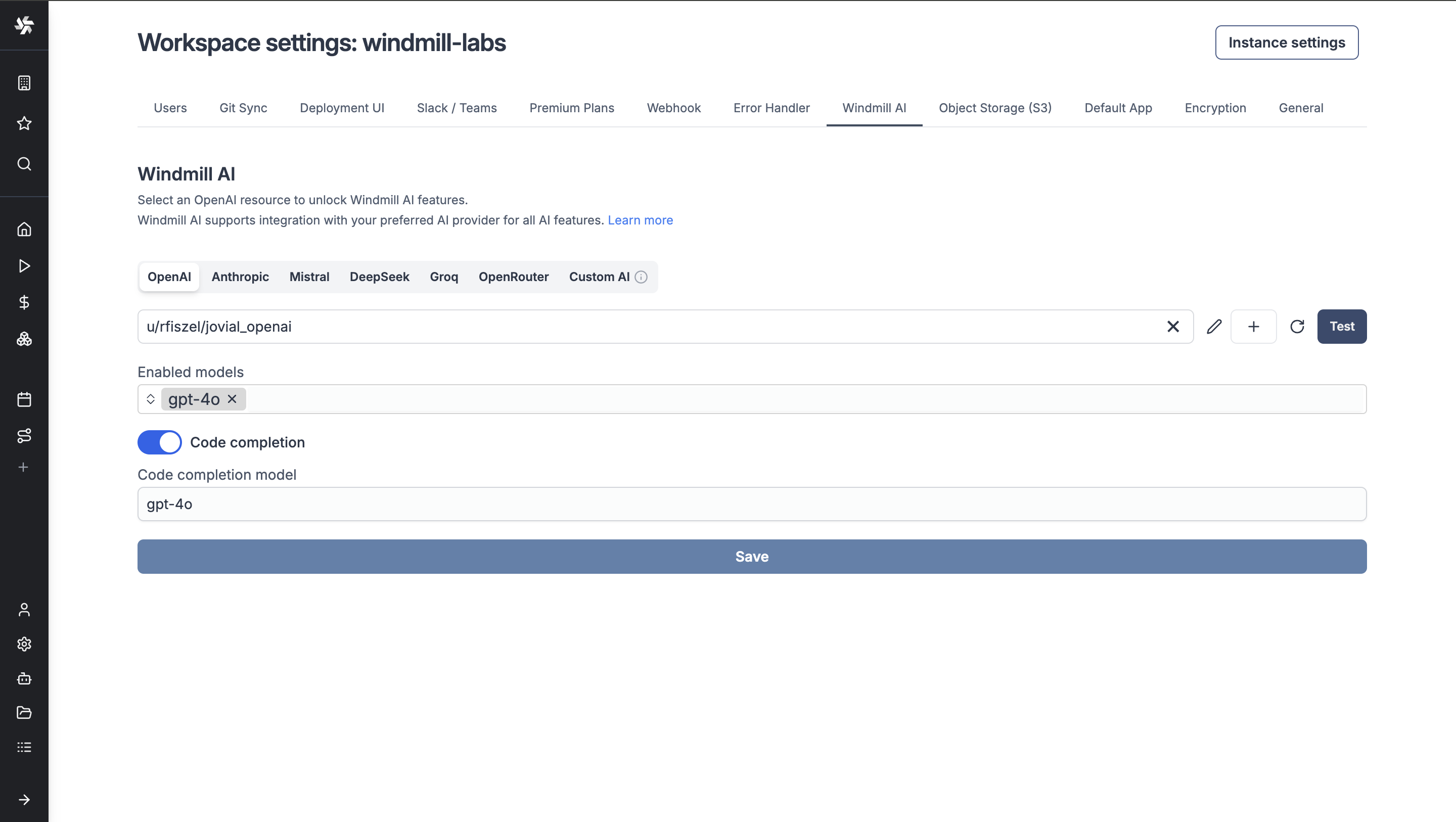
Windmill now supports more AI providers and models.
New features
- Anthropic Claude 3.7 Sonnet with extended thinking mode
- DeepSeek Chat & Reasoner
- Google Gemini
- Groq
- OpenRouter
- Custom OpenAI API-compatible provider
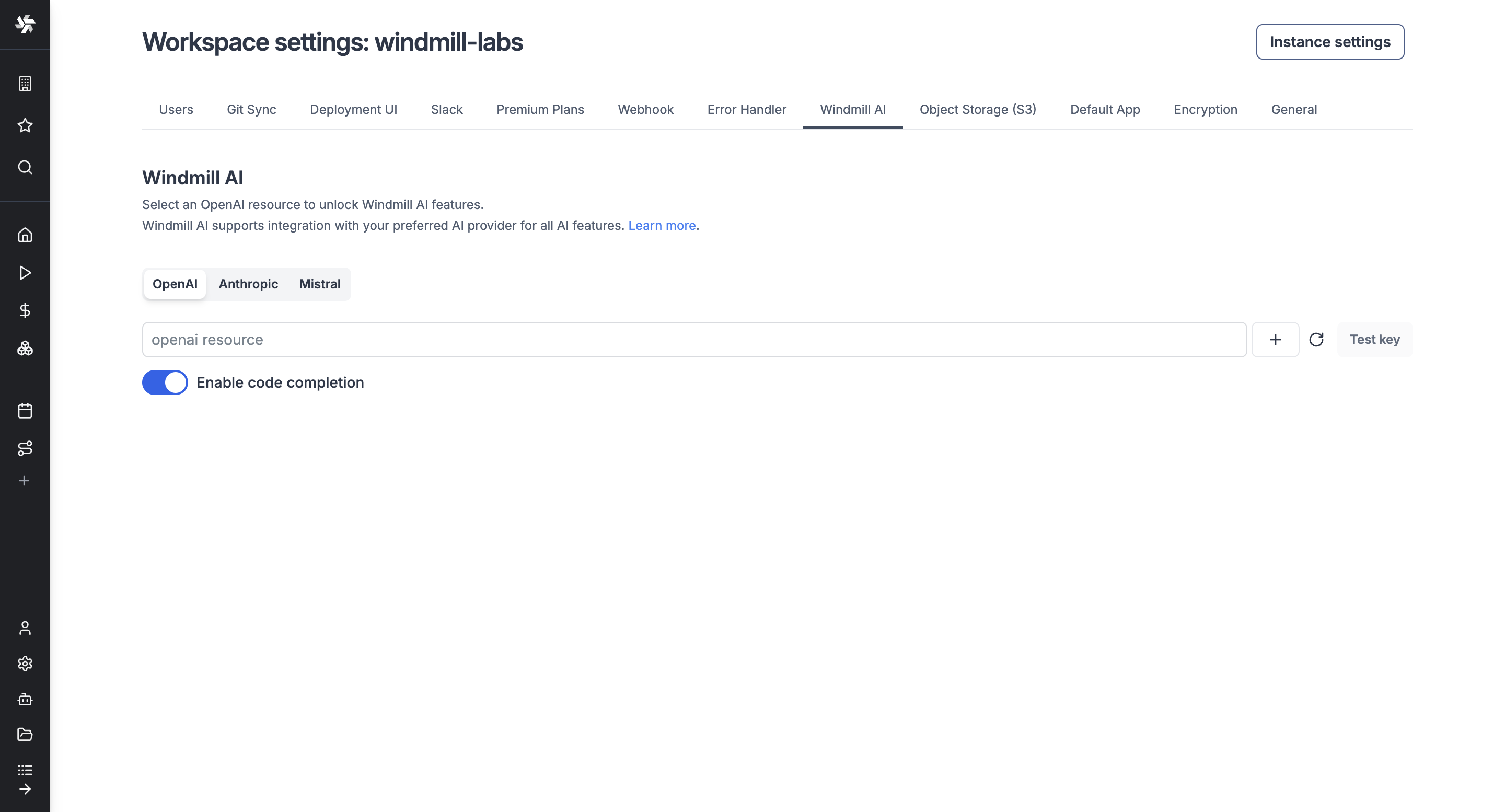
Windmill AI now supports Mistral's Codestral and Anthropic's Claude 3.5 models.
New features
- Added support for Mistral Codestral model
- Added support for Anthropic Claude 3.5 model