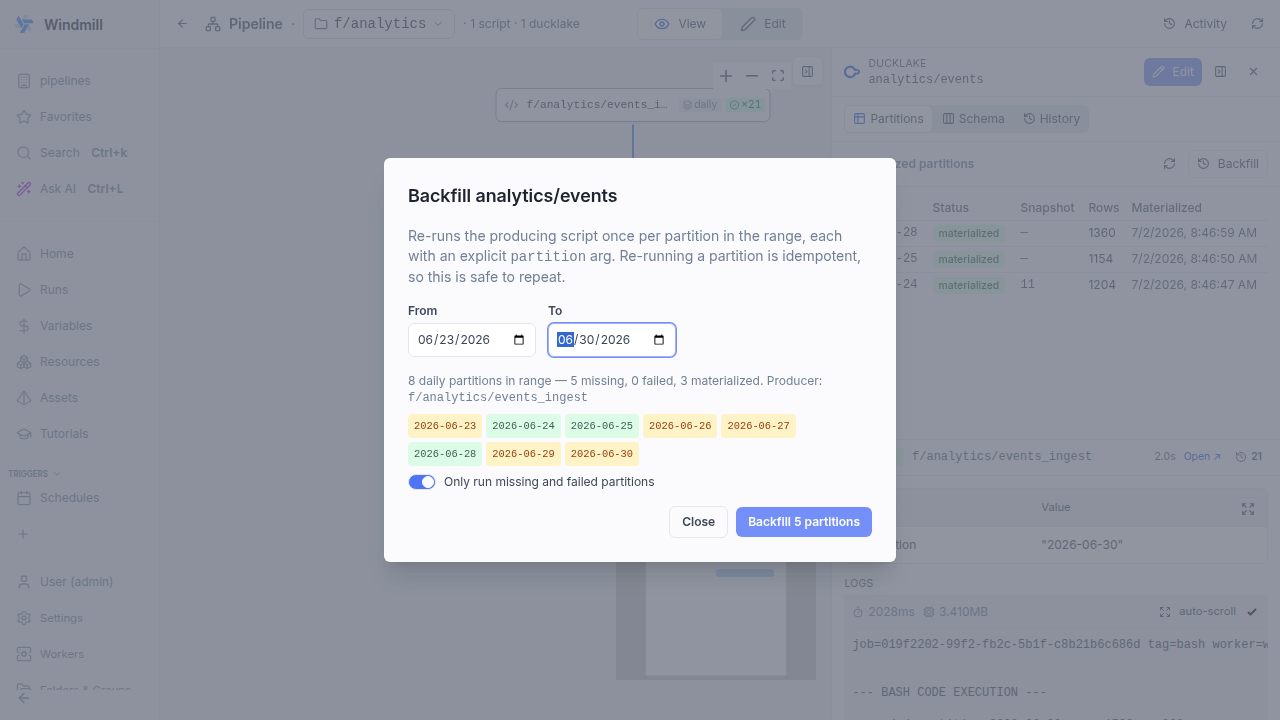
On a partitioned DuckLake asset, the Backfill button opens a range picker that previews which partitions are missing, failed or materialized, then re-runs the producing script once per partition with an explicit partition argument. Runs are sequential and idempotent, a failed partition does not stop the rest, and progress streams in the dialog and drawer header. Range backfill is an Enterprise feature; single-partition runs stay available in all editions.
New features
- Backfill button on the partition-status grid of a materialized ducklake:// asset opens a from/to range picker
- The preview classifies every partition in range as missing, failed or materialized; a toggle (default on) restricts the run to missing and failed partitions
- One deployed run per partition with an explicit partition argument, sequential to avoid catalog commit contention; each run is idempotent
- A failed partition does not stop the rest; progress streams in the dialog and, when closed, in the drawer header while the grid refreshes per slice
- Cancel stops after the in-flight partition and cancels its job
- Headless alternative: wmill pipeline run <folder> --partition <value>