
We're a little proud of how fast and how well we answer support, and we didn't want either to slip as we grew. We also didn't want support to eat the time we spend building the product, and for a small team those two usually pull against each other. So we automated as much of it as we could. Not to lower the bar: an AI with the codebase, the docs and the customer's telemetry in hand is often better at finding the root cause than a person skimming a thread. But customers only trust AI-drafted replies while those replies stay good, so a human still approves everything before it goes out.
Here's what a request looks like now, from the customer's message to the released fix:
Our support lives where our customers and users already are: shared Slack/Discord channels, an email inbox and GitHub issues. We funneled all of it into one Discord queue and put a pipeline on top, running on our own Windmill: it pulls in context, drafts the reply, and often drafts the fix too. The whole thing was built locally with Claude. Here's how it works.
One queue out of many channels
Each channel has its own way in, and they all feed the same entry flow:
- Slack Connect channels hit a webhook. The flow auto-joins new ones, so we never miss a customer's first message.
- Email to a dedicated address comes in through Windmill's email trigger, normalized into the same shape as everything else.
- Discord messages come in over a Windmill WebSocket trigger, so new messages in our channels and threads land in real time.
- GitHub issues on the open-source repo get mirrored into Linear and run through the same triage, so it's not only paying customers who benefit: community reports get the same treatment, with tighter guardrails because they're public.
A Slack message or an email doesn't stay stuck in Slack or email; it becomes a Discord thread, and Discord is where we actually work the queue. We read the triage, eyeball the draft, hit approve, and watch the fix land, all without leaving it. The reply just goes back out to wherever the customer wrote from. So when the rest of this post says "the thread," it means Discord, no matter which channel the customer started in.
That one queue has taken in around 3,100 conversations since we set it up.
The screenshots through the rest of this post follow one request, a real bug we ran through the pipeline ourselves, from the moment it lands to a fix getting dispatched.
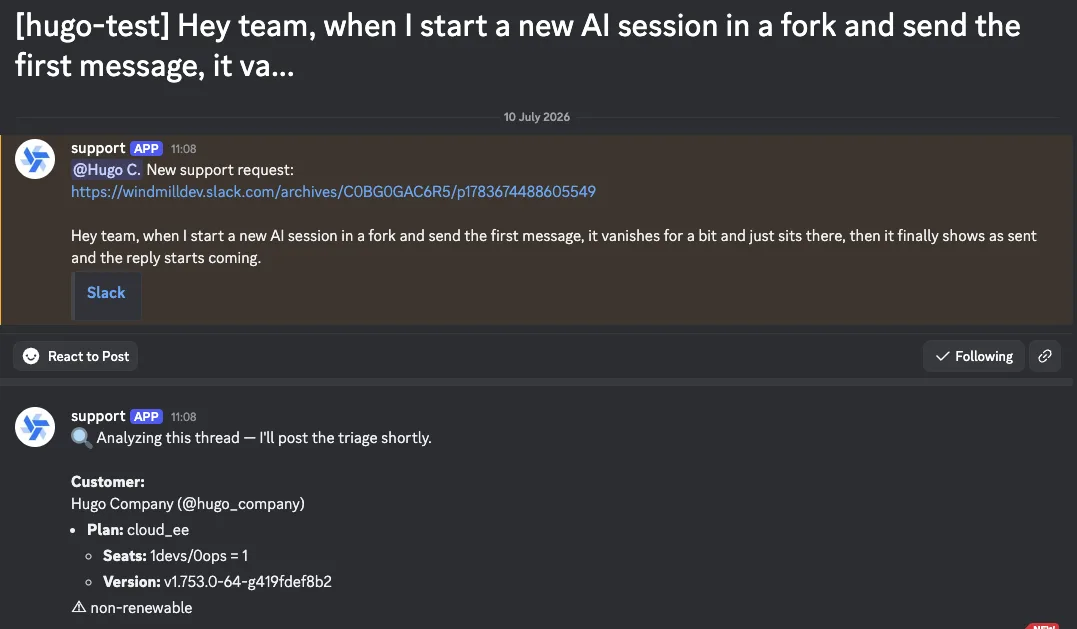
Whatever the channel, the entry flow does the same housekeeping: it drops noise (a thank-you or some off-topic banter never gets past a cheap classification step), stages attachments to object storage, and handles team commands like assign and close.
Then the piece that makes it all work: thread matching. A new message isn't always a new ticket. Someone replies three days after we'd written a thread off, or starts a fresh message about a bug we already have open. The tidy fix would be for everyone to always reply in-thread, but I gave up trying to enforce that... so we do it in code instead: a lightweight model reads each incoming message, compares it against recent conversations, and decides whether it continues an existing thread or starts a new one. A match reattaches and reloads that thread's context; a miss opens a fresh one. The conversation stays one conversation, however much the customer scatters it.
Then it hands the message off.
The entry flow doesn't run the heavy analysis inline: a step enqueues the post-processing flow as a separate job, one runFlowByPath call with the TypeScript client, and returns.
The handler finishes in well under a second, so when ten messages land at once they don't pile up behind a single multi-minute analysis.
The slow thinking happens out of band.
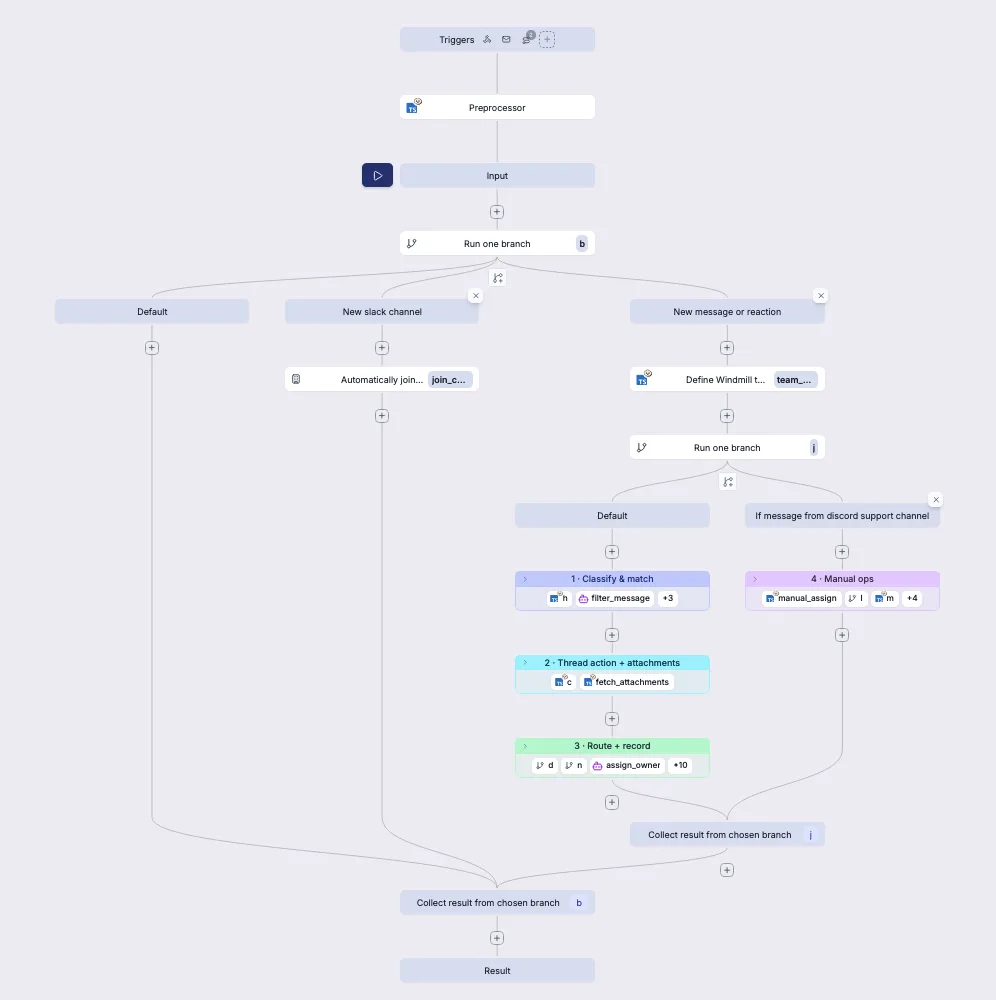
Several of those steps, the noise filter, the thread matcher, the owner routing, are Windmill AI agent steps, the same building block any flow can drop in to let a model make a small decision with tools.
Triage with Claude
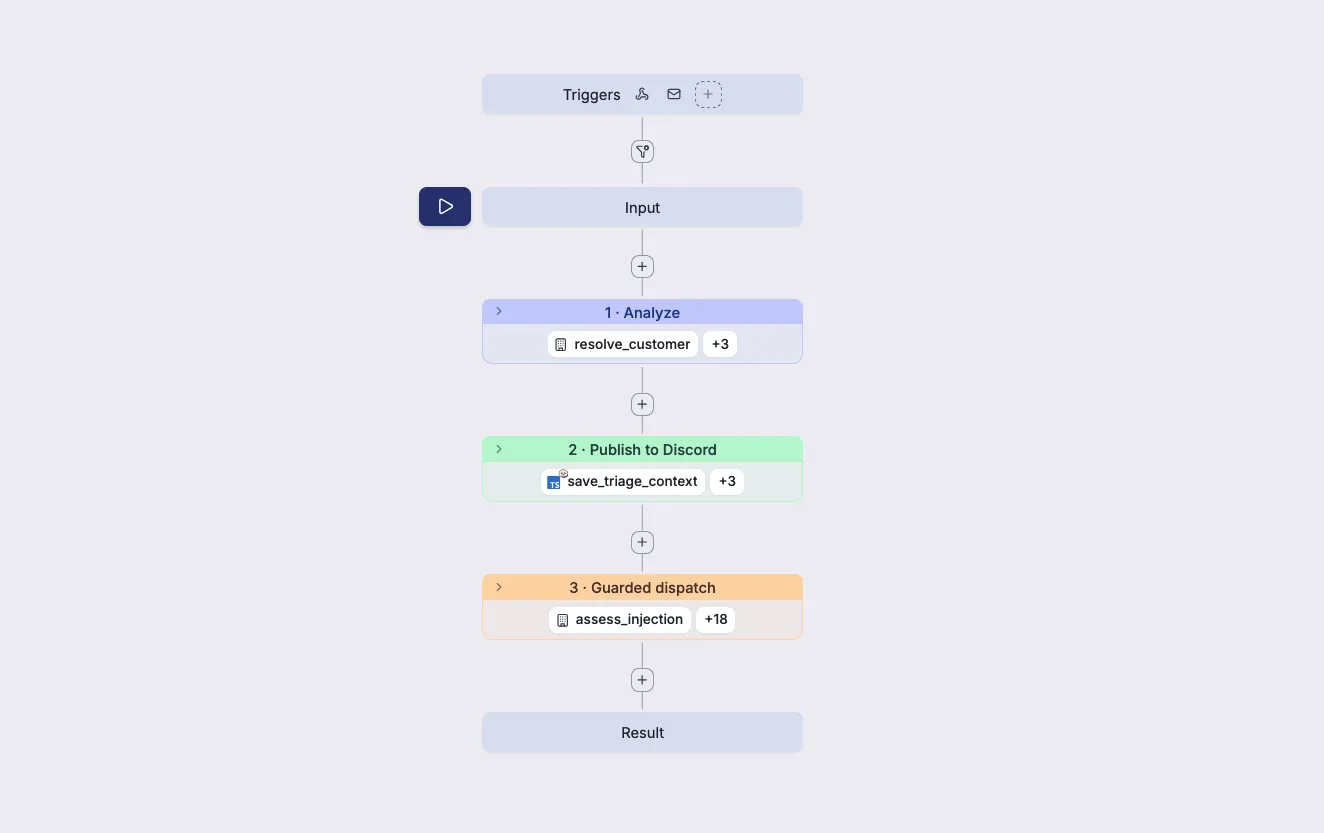
The flow runs in three stages, and the next few sections follow them in order: analyze the ticket, publish the triage and draft into the thread, then a guarded dispatch of the reply and any fix.
The async step runs Claude in a sandboxed Windmill script, with all the context it needs:
- A customer dossier, fetched first: plan, subscription status, recent usage. For a billing or commercial question that's often enough to answer at a glance. We assemble it from our own data, so Claude never touches live credentials.
- Read access to our codebase, docs and GitHub issues, so it can check whether the problem is already a known issue or got fixed in a recent release, and ground its answer in how Windmill actually behaves.
- That customer's own telemetry, scoped to their instances and nothing else; the most useful signal is which version they're on, since the bug they hit may already be fixed in a newer release. The query can't escape that scope, so one ticket can never read another customer's data.
- The attachments from the message, text inlined and images looked at directly.
Out of all that, the analysis returns one small structured object:
{
  summary: string;                  // one or two sentences
  customer_draft?: string;          // a ready-to-send reply
  fix_request?: {                   // only when there's one obvious fix
    title: string;
    problem: string;
    proposed_fix: string;           // file:line and a diff
    files: string[];
  };
}
The summary and the draft get posted straight into the thread. So by the time a human looks, the ticket already reads like someone got started on it. Opus does the heavy analysis; lighter models (Sonnet, Haiku) handle the cheap routing and classification.
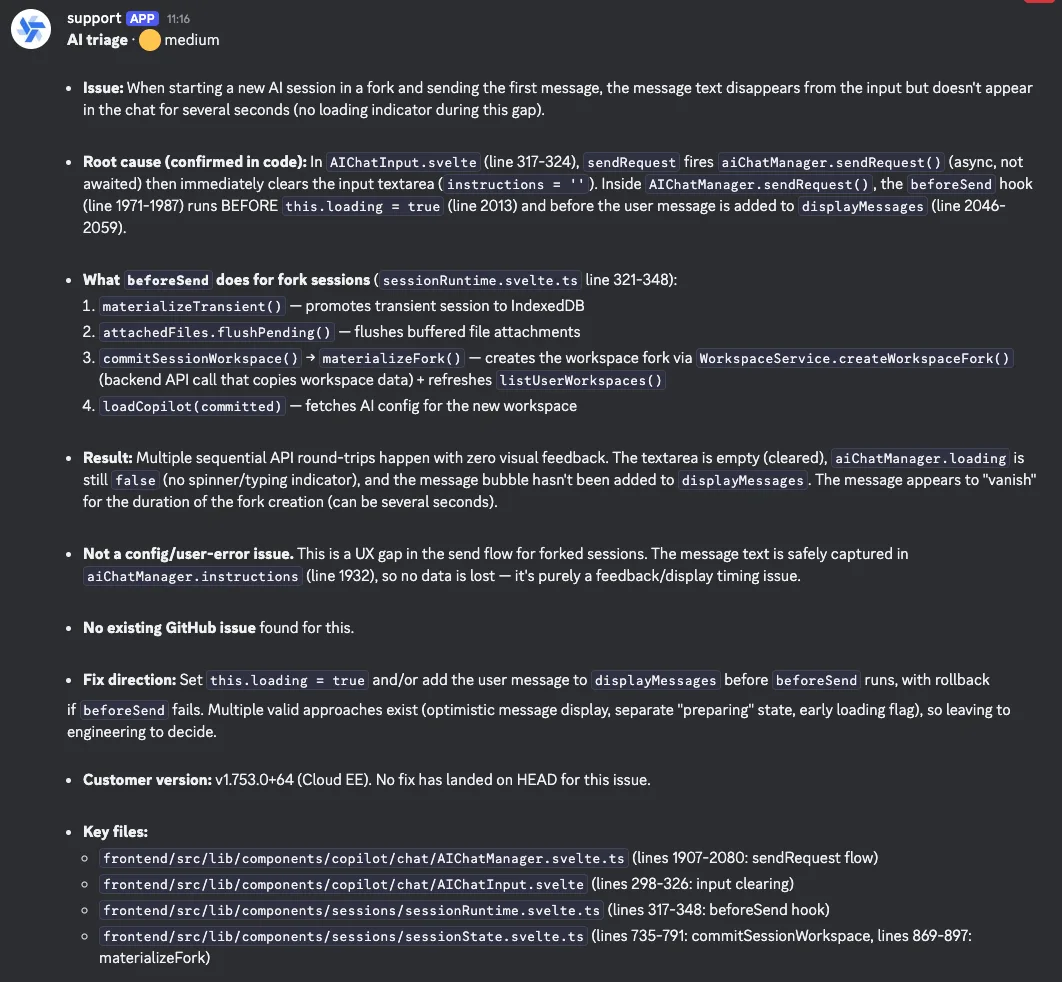
If the customer writes back, the flow reloads the earlier context and runs in follow-up mode, picking the thread back up instead of starting cold. One conversation, one growing record, however long it runs.
A human still presses send
We draft replies automatically. We do not send them automatically, and that line matters to us. The whole system runs on customers trusting the drafts, and that trust is gone the first time a wrong or sloppy AI reply reaches someone; from then on every AI message reads as noise. So every customer-facing reply goes through an approval step first.
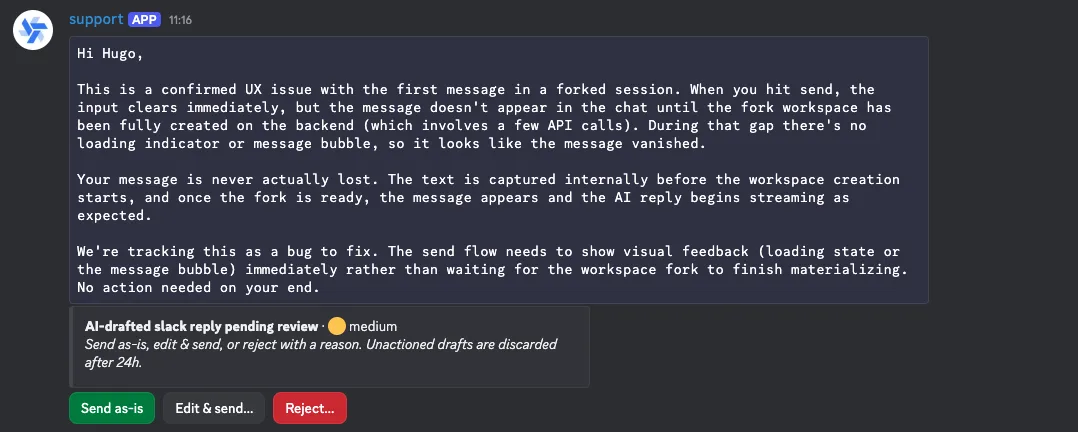
The draft lands in the thread, posted by our own support bot, with buttons to send it as-is or edit it first.
Editing opens a small Discord modal where you can tweak the wording before it goes out, so a quick fix doesn't mean leaving the thread.
Under the hood it's a Windmill suspend, so the flow just waits, holding no worker, until someone acts on it.
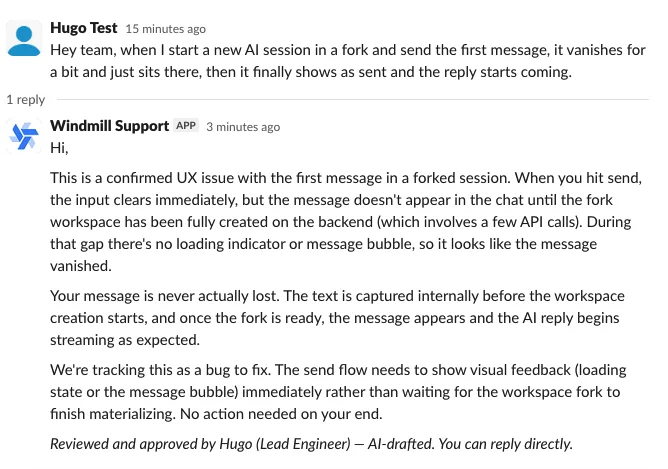
We're also deliberate about how a reply is framed. It goes out from the bot, but the footer names the teammate who reviewed it, says plainly that it was AI-drafted, and tells the customer they can reply directly. So the customer always knows what they're getting: an AI draft that a named human signed off on, not someone typing every word, and not a bot pretending to be human.
Drafting the fix while the reply waits
Those two branches run in parallel: the fix gets drafted while the reply is still sitting in the approval queue.
When the analysis lands on one obvious change, it emits a fix_request and the second branch runs with it.
The request is written around the bug itself, the technical problem and a proposed change, not the customer who hit it, so nothing customer-specific travels with it.
A routing step picks the right owner off the team roster, and the request becomes an assigned Linear issue.
From there webmux, our open-source dashboard for parallel AI coding agents, takes over.
The handoff stays loose: we don't call webmux, we just move the Linear issue to Todo, add a webmux_oneshot label, and assign it to whoever should own the fix.
webmux polls Linear every minute or so, and when it sees that combination it spins up a git worktree on the assignee's own machine and starts an autonomous agent to draft the PR.
So the fix gets drafted on the machine of the engineer who'll review it, not on a shared box.
When the PR's up, its link drops back into the original Discord thread.
The two agents split cleanly.
The triage step runs a dedicated analyzer, but the agent that actually writes the fix runs off the very same CLAUDE.md we use for our own coding sessions, so there's one source of truth for how the AI writes Windmill code, whether a person or a ticket kicked it off.
For tickets we run webmux in "oneshot" mode, which is basically one extra instruction: try to go from the ticket straight to a pull request with no human in the loop.
When oneshot can't close it out, the half-finished attempt is still sitting in our webmux dashboard for someone to take over.
And wherever it got stuck usually points at something thin in our CLAUDE.md, so fixing that makes both the support fixes and our own sessions better.
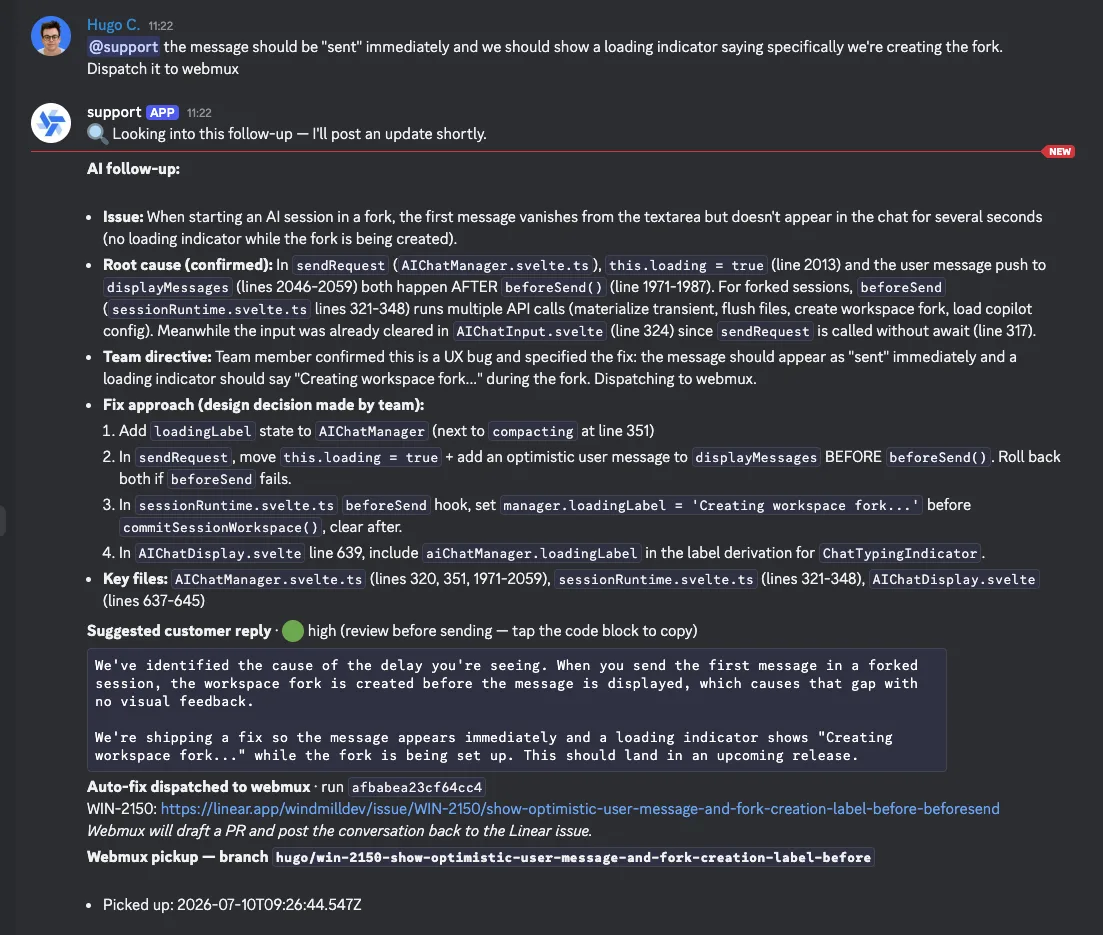
Not every ticket clears that bar, and that's the point of the gate: it dispatches on its own only when there's one obvious change to make, a confirmed bug or a small, self-contained feature. And because the whole pipeline runs on untrusted input, the gate's first check is for prompt injection: a ticket that tries to steer the agent gets flagged instead of followed. Anything that needs a real product or design call, which is most feature requests, it leaves for us. When the AI holds back, a teammate can still nudge it from the thread. Reply with a sharper repro or point it at the right file and it re-runs with that context, or for a feature we've decided to build, just tell it to go ahead and dispatch. You can also pick who owns the fix by @-mentioning them. Either way the thread gets a note back: the Linear issue link when it dispatches, or the reason it held off.
That's the path the example above takes: the AI wasn't sure which of a few reasonable fixes was right, so it held the fix back and only drafted a reply. Once a teammate confirmed the approach and told it to dispatch, it re-ran and handed the PR to webmux.
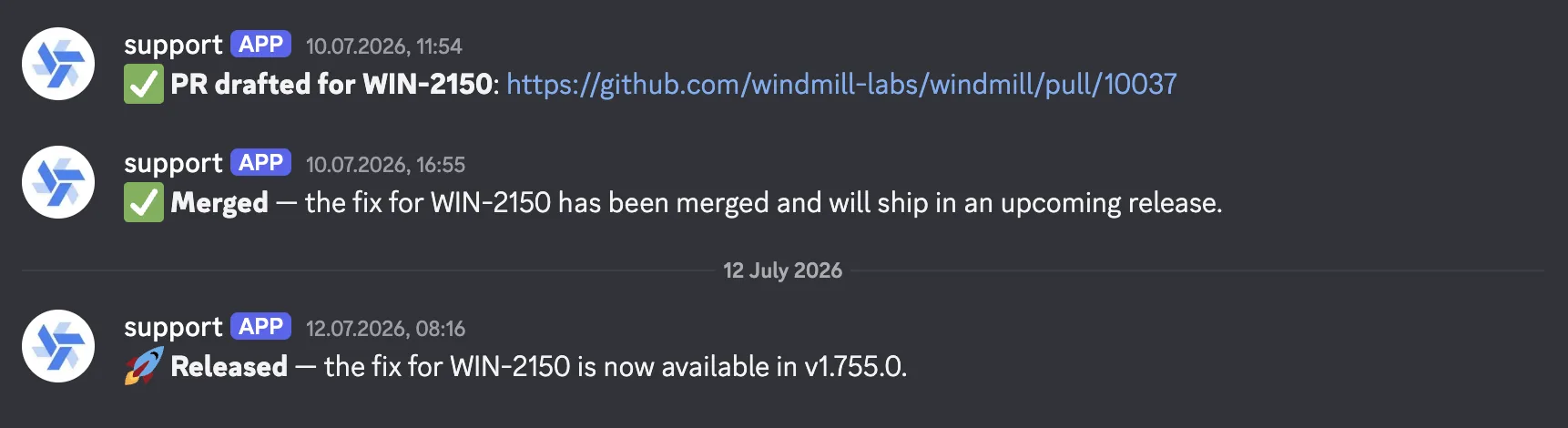
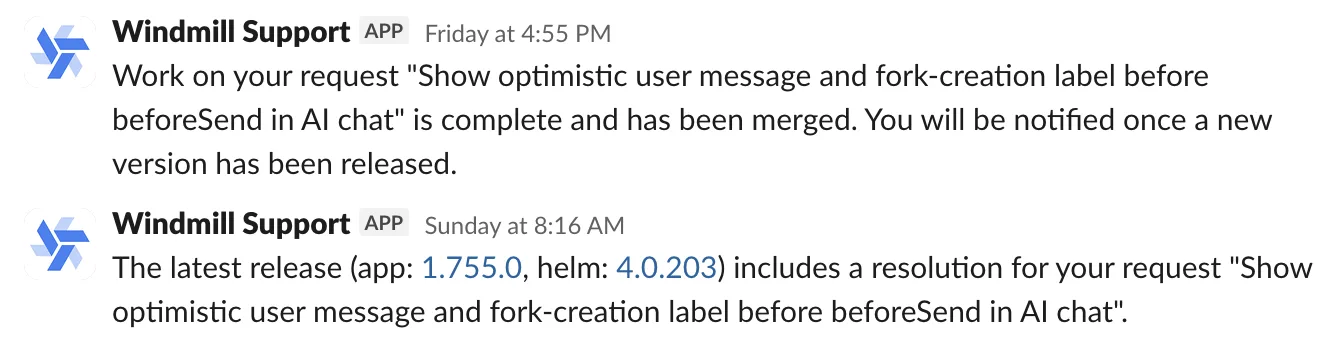
And it doesn't stop at the PR. webmux's progress comments get forwarded into the thread as it works, and when the fix merges we can ping the customer automatically, right where they first reported it, to tell them it shipped. If it ever gets reopened, that comes back too. A single line dropped in a Discord channel can travel all the way to a "fixed in the latest release" reply, with a reviewed code change in between, and nobody had to babysit it across four different tools to get there.
Since the auto-fix path switched on in late May, it has opened 71 pull requests, and 62 of them have merged. The other 9 were closed on review, usually because the fix turned out not to be needed or too big for a one-shot; none are sitting open. One recent example: a UI bug where dialogs rendered behind the new AI chat panel, fixed here.
When a fix starts as code
Everything so far runs from a customer message toward a PR. But plenty of changes go the other way: an engineer fixes something directly, or we start building a feature on our own, and the PR quietly resolves something a customer asked about last week, with no ticket attached. Fixes dispatched through support link themselves automatically. A stray PR has nothing tying it back to the person who was waiting, and we really don't want those shipping in silence.
So a GitHub pull_request webhook feeds another flow.
When a teammate opens a feat or fix PR that isn't already tied to an issue, a model holds it up against the pool of open support requests that still have no fix linked.
It's deliberately paranoid: a PR usually matches zero or one request, and any match it does find waits behind a Discord approval before anything is created.
Approve it, and the PR links to that customer's thread, and from there the same merge-and-release notifications take over.
The customer hears their issue shipped even though nobody manually connected the dots.
Nothing slips through
A scheduled job runs every 15 minutes and pings the relevant team lead about any thread that's gone more than two hours without a reply. And every action the pipeline takes is recorded, so re-runs never double-post and a fix is never dispatched twice for the same thread.
Where it stops, and where it doesn't fit
It's good at the technical tickets and noticeably weaker at the rest. A bug report with a stack trace, a "why is my flow doing this", a config question: those have answers in the code and the docs, which is exactly what the AI is holding. Commercial questions are different. They need context the system doesn't have and decisions that are ours to make, an MSA to negotiate, a pricing exception, a roadmap promise, so those reach a human early, on purpose.
We also didn't set out to build a help desk. We meet customers in their own Discord and Slack channels and only pull a conversation aside when it really needs it. The tracking a help desk would give us is the easy part, and we get it for free by funneling every channel into one place. The hard part, and the whole reason this exists, is the layer on top: triage, drafted replies, and fixes that land as real pull requests against our own code. That last part is the one a help desk structurally can't do, because it lives outside your repo.
How we built it: locally, with Claude
A quick word on how all this got built. None of it was clicked together in a UI. It was written locally with Claude Code, against the workspace files on disk.
That works because everything in Windmill, scripts, flows, triggers, schedules, can live as plain files in a git repo.
The workspace is git-synced: push to main, CI runs wmill sync push, and it's in production.
(Git sync is a Cloud and Enterprise Edition feature, with Community Edition covering workspaces of up to 2 users.)
And wmill init generates an AGENTS.md plus skill files that tell an agent exactly how those files work, so Claude builds valid scripts, flows and triggers without hand-holding.
The loop ends up looking like normal engineering: Claude edits files, we review the diff like any other PR, a merge ships it.
And none of this is a separate product. It's scripts, flows, triggers, and a handful of tables on the same Windmill that runs the rest of what we do. That's the real takeaway for us: because it's all files and building blocks an AI already understands, Windmill turned out to be very easy to build on this way, and the pipeline keeps growing the same way it started.
Run it yourself
A minimal version of this pipeline is on the Windmill Hub as the support automation project: the same two-flow architecture, webhook intake handing off to an async triage with the approval suspend and the parallel fix branch, stripped of everything specific to us. Every step has a demo mode: with no credentials filled in, it logs what it would send and returns canned data, so you can import it and run the whole loop, approval page included, before wiring up Slack, Anthropic or GitHub.
Claude inside the UI
Building locally with Claude works, but it used to mean leaving Windmill to do it. That gap has since closed: AI sessions (beta) bring the same coding-agent power right into the browser. You open a session, chat with Claude on one side and watch a live editor and preview on the other, ask it to build or change a script, flow or app, review the diff, and deploy when you're happy. It's the local-dev workflow minus the local part, scoped to a forked workspace so it never steps on what's already running.
The way we work on this pipeline shaped that product directly: supervising coding agents on our own codebase through webmux is what taught us what AI sessions needed to be. And it's exactly the kind of thing the pipeline above will lean on to get even more hands-off.
If you want to build something like this, Windmill is open source, and we're around on Discord (in a thread, ideally).

You can self-host Windmill using a
docker compose up, or go with the cloud app.